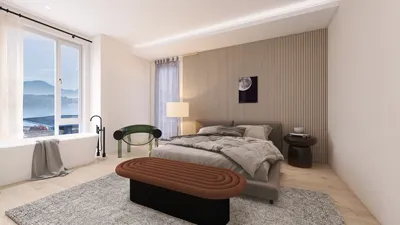
Creating stunning interior renderings becomes much easier when you use SketchUp in conjunction with V-Ray. These powerful tools enable designers to visually articulate their concepts in a lifelike way, effectively animating their spaces. Regardless of your level of experience, mastering the integration of SketchUp and V-Ray can greatly improve your design projects' outcomes.
Getting Started with SketchUp
SketchUp is an intuitive 3D modeling software, designed to help creators build intricate models of their spaces. Here are several tips to help you embark on your design journey:
Take the time to familiarize yourself with the various tools and functionalities that SketchUp offers. A solid understanding of the interface will facilitate a more efficient modeling experience.
Employing layers can help you organize your model efficiently, streamlining the management of different design components within your project.
Cluster similar elements and utilize components for items that repeat, such as furniture. This practice can save you valuable time and enhance your workflow.
Integrating V-Ray for Realistic Renderings
Once your model is completed in SketchUp, it’s time to elevate it using V-Ray. Here's how to get started:
Make sure to install the V-Ray extension for SketchUp and verify it is properly configured to work seamlessly with your model.
Lighting is a vital component for achieving realistic renderings. Utilize V-Ray’s illumination options to mimic both natural and artificial light, making your interior spaces warm and welcoming.
Apply V-Ray materials to your model with careful attention to texture as they greatly influence the appearance of your renders. Test different parameters to reach your desired aesthetic.
Rendering Settings for Optimal Results
Before initiating the rendering process, make sure to optimize your settings:
Choose a rendering quality that strikes a balance between speed and detail, which will vary according to your project requirements. Higher quality settings may require more time but will produce superior outcomes.
Utilizing render elements can provide you with the flexibility to modify specific aspects of your image during post-production, which is especially beneficial for adjusting lighting or reflections later on.
If you discover an effective configuration, save it for future reference to enhance your efficiency in upcoming projects.
Tips for Post-Processing
After rendering, you can take further steps to enhance your images:
Applications like Photoshop can be instrumental in refining your renderings, allowing you to tweak colors, add effects, or boost lighting the way you envision.
Including figures and decorative objects can breathe life into your renderings, making them feel more engaging and realistic.
Conclusion
Gaining proficiency in SketchUp and V-Ray for creating interior renderings requires dedication and experimentation. Equipped with these tools, you can craft captivating visuals that not only engage your audience but also effectively convey your design intentions, especially when using platforms like Homestyler.
FAQ
Q: What advantages does V-Ray offer when paired with SketchUp? A: V-Ray enhances models created in SketchUp by delivering sophisticated rendering capabilities, yielding photorealistic visuals that elevate presentations and may boost client comprehension.
Q: Is V-Ray also capable of producing exterior renderings? A: Absolutely. V-Ray’s versatility extends beyond interiors, making it suitable for both interior and exterior renderings, thus aiding in the visualization of various environments.
Q: How can I deepen my knowledge about V-Ray rendering? A: There are countless online resources, including tutorials and courses that span from beginner to advanced levels in V-Ray rendering techniques.
Welcome to the leading home design software available today!








































