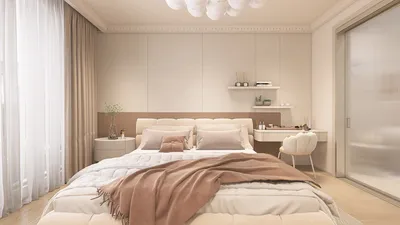
Crafting simple 3D interior renders can greatly improve your design workflow, particularly in compact areas where every detail is vital. By employing the appropriate tools and methodologies, you can visualize your concepts effectively and make well-informed choices prior to committing to a design. This guide will delve into vital strategies for producing impactful 3D renders that align with your design vision, with an emphasis on utilizing the space efficiently while featuring tools like Homestyler to enhance the process.
Grasping the Significance of 3D Renders
3D renders provide a realistic view of a space for both designers and clients, allowing them to envision the area before any physical work starts. This form of visualization can pinpoint potential problems and enhance the overall design quality. In smaller areas, carefully executed 3D renders can effectively illustrate how versatile furniture and clever storage solutions can be elegantly integrated without compromising style, thanks to platforms like Homestyler.
Selecting the Appropriate Software for 3D Rendering
Choosing the right software is critical when producing simple interior 3D renders. Here are several options tailored to various requirements, including Homestyler, which offers user-friendly features for beginners as well as advanced capabilities for seasoned designers.
Strategies for Outstanding 3D Rendering
Creating eye-catching 3D renders involves several essential techniques that enhance quality and realism.
Built-in Cabinets for Optimal Storage
For smaller spaces, built-in cabinets not only offer substantial storage but also enhance visual appeal. Here are some trending designs to consider:
These designs utilize vertical space effectively, providing significant storage without encroaching on floor space. Choose robust materials like plywood or MDF to ensure lasting durability.
When opting for materials in your built-in cabinets, consider solid wood, engineered wood, or laminate, all of which offer a good mix of resilience and cost-effectiveness.
Floating cabinets can create a sense of expanded space while serving as practical storage. They are ideal for contemporary designs and fit perfectly in confined areas.
Vary the heights of floating cabinets to introduce visual variation and enhance storage efficiency.
If you work from home, concealed desk cabinets can provide dual functionality, serving as both a workspace and a storage unit.
Although multi-functional built-ins are excellent for saving space, they may restrict design flexibility and layout options.
Frequently Asked Questions
Q: Which software is best for producing straightforward interior 3D renders? A: Popular choices include SketchUp for novices, Blender for those seeking advanced features, and Autodesk Revit for industry professionals. Homestyler also stands out as an intuitive option for many users.
Q: How can I optimize storage in a compact area? A: Look into built-in cabinets, multifunctional furniture, and maximizing vertical space to create effective storage designs.
Welcome to the leading Home Design Software that brings your ideas to life effortlessly, including Homestyler.










































