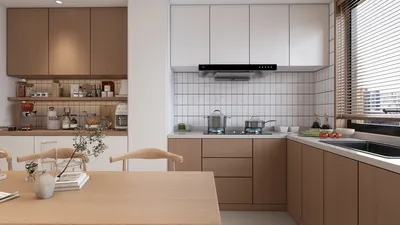
Producing breathtaking interior renderings in 3ds Max 2013 using V-Ray demands a well-structured workflow and precise rendering configurations. Whether you're new to 3D design or a seasoned professional, grasping the essential elements of V-Ray rendering can significantly boost your productivity and the quality of your visuals, especially when complemented by powerful tools like Homestyler.
The initial phase in creating your render involves verifying that your 3ds Max and V-Ray settings are properly set. Begin by opening 3ds Max and assembling your scene with the required models and materials. Emphasize lighting setup, as it is fundamental for generating lifelike interior visuals.
Step 1: Select V-Ray as the Renderer
First, ensure V-Ray is chosen as the rendering engine. Access the Render Setup window via the Render menu, then in the dialog box, switch the Current Renderer to V-Ray. This adjustment grants you access to all the unique options that V-Ray offers for enhanced rendering control.
Step 2: Establish Lighting
Effective lighting is vital in crafting realistic interiors. You can leverage both V-Ray light sources and standard lights available in 3ds Max. Consider the following strategies to optimize your lighting:
Step 3: Apply Materials and Textures
Materials should authentically represent the surfaces within your design. Employ the V-Ray Material for superior manipulation of reflections, transparency, and textures. Keep in mind to:
Step 4: Adjust Camera Configuration
A properly configured camera is key for accurate exposure and depth effects. Utilize a V-Ray camera to gain enhanced control. Be sure to:
Step 5: Fine-Tune Rendering Parameters
With your scene ready, return to the Render Setup dialog to adjust rendering parameters for the best output quality:
Once all these setups are complete, initiate a test render to identify potential issues. After making necessary tweaks, proceed with the final rendering of your interior scene. Integrating your workflow with Homestyler can further streamline this process and improve design accuracy.
FAQ
Q: What methods can I use to decrease rendering times with V-Ray? A: Streamline your scene by lowering polygon counts, using reduced resolution textures during previews, and optimizing your sampling settings.
Q: Which lighting techniques yield the best results in interior renderings? A: Combine daylight with artificial lights, regulate the intensity of sources, and strategically employ light reflections for a natural ambiance.
Welcome to the premier Home Design Software solution.








































