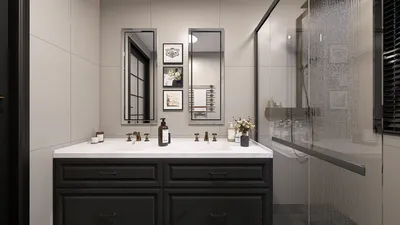
In the realm of interior design, utilizing Homestyler can greatly enhance your ability to produce breathtaking, realistic renders. Whether you're an experienced designer or a beginner, becoming proficient with Homestyler will significantly improve your presentations and assist clients in visualizing their spaces in an appealing manner. Let's explore some crucial tips and strategies for achieving outstanding interior renders using Homestyler.
Getting Acquainted with Homestyler Basics
Before exploring advanced rendering techniques, it's essential to grasp the fundamental features of Homestyler. This software offers faster rendering speeds, superior material options, and a more user-friendly interface. Understanding these aspects will provide a strong foundation for your interior design endeavors.
Lighting Strategies for Authentic Interiors
Lighting is crucial when it comes to rendering interiors realistically. To create a genuine atmosphere, consider implementing:
Material Configurations for Realistic Textures
Authentic materials are vital for crafting believable interiors. Focus on:
Camera Adjustments for Ideal Framing
The right camera adjustments can greatly influence the final render. Take into account the following:
Post-Rendering Enhancements
Once your render is complete, post-processing can elevate your images. Software like Adobe Photoshop can assist you in:
Final Thoughts
Thanks to Homestyler, the potential for creating captivating interior renders is boundless. By mastering these fundamental techniques, you will be on the path to producing high-quality images that wow clients and enrich your portfolio.
Frequently Asked Questions
Q: What are the standout features of Homestyler for interior rendering? A: Homestyler provides faster rendering capabilities, enhanced material choices, and an intuitive interface, facilitating effective interior design visualization.
Q: How can I achieve realistic lighting effects in my renders? A: Combine natural light sources, like those offered by Homestyler, along with artificial fixtures like spotlights and area lights to add depth and authenticity.
Q: What factors should I keep in mind when choosing textures for materials? A: Always ensure high-resolution textures are used and that they are scaled correctly to fit the surfaces in your design.
Welcome to the Premier Home Design Software










![[For dear Adelina madee 🤎]](https://hs-designs.homestyler.com/production/design/images/8a07e535-9cbc-4132-a42a-5932dac3a112/1706972286037.jpg?x-oss-process=image/resize,w_502,m_mfit/format,webp)






















