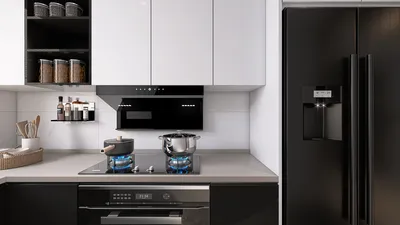
Creating stunning interior renderings necessitates the right combination of tools and techniques. By integrating Homestyler with advanced rendering software, designers can produce photorealistic visuals that engage clients and effectively present their concepts. This guide will provide you with the crucial steps to leverage these powerful tools for your interior design initiatives.
Getting Started with Homestyler and Advanced Rendering Software
To kick off your design journey, make sure you have both Homestyler and your preferred rendering software installed. Homestyler features an intuitive interface for crafting 3D models, while the rendering software enhances these models with professional rendering features. After installation, familiarize yourself with the basic functionalities of each tool to optimize your workflow.
Setting Up Your Interior Model
When working on your interior rendering, start with a well-organized model in Homestyler. Be attentive to the following aspects:
Applying Materials and Textures
After finalizing your model, the next step is to apply materials and textures. The rendering software provides an extensive library of materials that can be tailored to match your design aspirations. Keep these suggestions in mind:
Lighting Your Interior Space
Effective lighting is essential for rendering. The software you choose typically offers a range of lighting options, encompassing both natural and artificial sources. Here are some recommendations:
Rendering Settings for Optimal Results
To obtain the finest outcome, tune your rendering settings within the software. Important factors to consider include:
Post-Processing Techniques
Once rendering is complete, think about utilizing post-processing tools like Photoshop to further refine your images. This stage allows you to adjust color balance, contrast, and other details to make your renderings stand out.
Conclusion
By mastering Homestyler alongside advanced rendering techniques, you can produce exceptional interior renderings that leave a lasting impression on your clients and elevate your design projects. Remember, continual practice is key—experiment with various techniques and settings to develop your distinctive style.
FAQ
Q: What benefits does integrating your rendering software with Homestyler provide? A: Using Homestyler in conjunction with advanced rendering software offers realistic lighting, high-quality materials, and increased rendering speed, making it an optimal choice for interior designers.
Q: Is it feasible to use this rendering software for exterior designs? A: Definitely! The software is versatile and can be effectively applied to both interior and exterior rendering projects.
Q: What are the best resources for learning how to use this rendering software? A: There are a multitude of online tutorials, courses, and community forums focused on the software that can aid you in mastering its features.
Welcome to the Leading Home Design Software








































