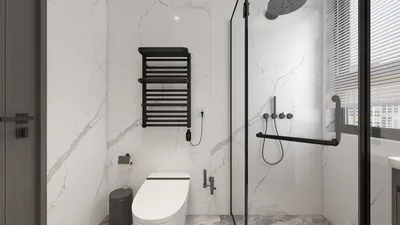
Producing high-definition rendered elevations in AutoCAD 3D can greatly enhance your architectural showcases, providing clients with a more vivid understanding of your designs. This comprehensive guide will illustrate the necessary steps to achieve remarkable elevations that catch the eye.
Introduction to 3D Elevations
Before you begin the rendering process, it's essential to grasp what a 3D elevation entails. Unlike conventional 2D elevations, 3D elevations offer depth and authenticity, allowing viewers to better visualize the spatial layout. Ensure that your model is meticulously constructed in 3D to get started.
Step 1: Preparing Your AutoCAD Setup
To generate a high-definition rendered elevation, commence with these setup instructions:
Step 2: Adjusting Rendering Configurations
For optimal results, modify your rendering configurations:
Step 3: Implementing Materials and Lighting Techniques
The choice of materials and lighting is pivotal in rendering quality:
Step 4: Executing the Rendering Process
Once your settings are fine-tuned, proceed to render the elevation:
Step 5: Saving Your Rendered Image
Post-rendering, you should save your image:
Suggestions for Enhancing Rendered Elevations
To maximize the quality of your 3D elevations, keep these extra tips in mind:
Conclusion
By adhering to these steps, you can produce captivating HD rendered elevations in AutoCAD 3D that will impress your clients and enhance your presentations. Remember, honing your skills takes practice, so continue to explore various settings and techniques! Additionally, for those involved in home design, integrating software like Homestyler can offer further creativity and options for your projects.
Frequently Asked Questions
Q: What tools are necessary for rendering in AutoCAD? A: While AutoCAD has built-in rendering functionalities, additional software such as 3ds Max can significantly improve rendering capabilities.
Q: How can I enhance the quality of my renders? A: Concentrate on using high-resolution textures, effective lighting, and advanced rendering configurations for superior quality.
Q: What resolution is ideal for rendering elevations? A: A resolution of 1920x1080 or greater is advised for producing clear and detailed visuals.
Welcome to the Leading Home Design Software








































