


Are you eager to elevate your design projects with breathtaking 3D models? Accessing and downloading these models to your computer can significantly enhance your creative space. Regardless of whether you're an experienced designer or a newcomer, having the right 3D models at your disposal is essential for the success of your projects. With tools like Homestyler, you can seamlessly integrate amazing 3D assets into your design work.
Here’s a straightforward guide to help you download 3D models that perfectly match your requirements:
Select a Trustworthy Platform:
Begin by choosing websites that provide high-quality 3D models. Renowned platforms such as Sketchfab, TurboSquid, and CGTrader offer an extensive selection of models suited for various design projects, ensuring you have ample options for every type of endeavor, similar to what you’d find on Homestyler.
Verify File Formats:
Make sure that the models you download come in a format compatible with your design software. Commonly used formats include .OBJ, .FBX, and .STL. This compatibility is vital for easy integration into your projects, allowing you to focus on creativity without technical disruptions.
Free or Paid Models:
Consider your need for free versus paid models. While premium models often provide superior quality and detailed textures, free options can be advantageous for beginners or those on a limited budget. Knowing your project's requirements will guide you in making the right selection.
Downloading the Model:
Once you've identified a model you like, simply hit the download button. Most platforms will require you to agree to usage terms—particularly for free models—so make sure to review these guidelines before proceeding. Be mindful of any usage limitations or credits you may need to include in your work.
Importing into Your Design Software:
After downloading, launch your design software and utilize the import function to add the model. This procedure may differ based on the software you are using, but most applications have user-friendly import options. Understanding the specific import process for your design tool can help optimize your workflow, including when using Homestyler.
Frequently Asked Questions
Q: What should I do if the model doesn't load properly?
A: Make sure you have the latest version of your design software and that the file format is compatible with your program. Check for any missing textures or components needed for proper visualization. If issues continue, consider reaching out to online forums or the customer support team of your software provider for assistance.
By adhering to these guidelines, you can effortlessly download and integrate 3D models into your designs, allowing you to produce captivating visuals that leave an impression on your clients and enhance your projects. Continue to innovate and discover new sources of inspiration as you refine your design skills!
Built on technology originally developed at Autodesk, Homestyler empowers anyone to design beautiful, realistic spaces in minutes. Join over 20+ million registered users (platform data, 2026) who have already discovered a smarter way to plan, visualize, and bring their dream homes to life — all from the comfort of a browser.
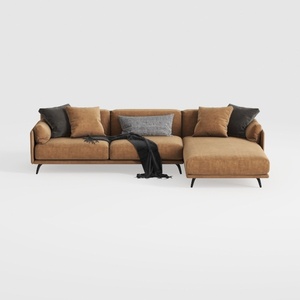

Coaster Home Furnishings - Camacho - Upholstered C

Minimalist Japandi Solid Oak Rattan TV Stand Cabinet 3D Model

Modern Japandi Solid Wood Rattan Coffee Table 3D Model
Homestyler is an exceptional online home design platform that empowers you to create stunning spaces effortlessly. With its intuitive design tool, impressive 3D renderings, a wealth of design projects, and DIY video tutorials, turning your home design dreams into reality has never been easier!
Design Now for FREE