- New
- Popular



Homestyler V6.0 is Newly Launched! Design Faster, Smarter, and More Collaboratively
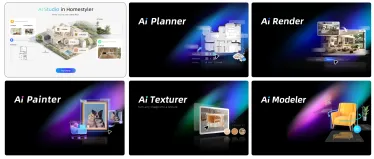
Homestyler V6.0 is a major milestone release. We’ve upgraded the product across three dimensions—core tools, AI capabilities, and team collaboration—so you can move from inspiration to construction drawings in a single, continuous workflow. On the 3D design side, new parametric components make architectural detailing faster and easier to edit. On the intelligent side, the brand‑new AI Studio unifies all AI features into one place, covering everything from mood exploration and floor‑plan generati


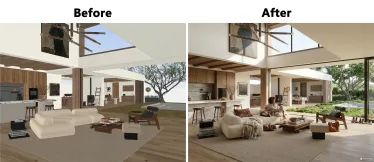
AI Render -- One click rendering of realistic renderings
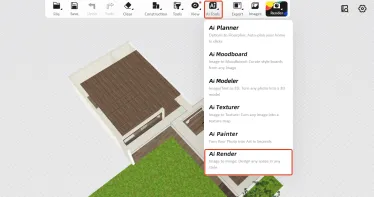
What is AI Render? AI Render uses the camera view combined with tags and prompt input to intelligently generate stunning visualizations within one minute.No professional rendering skills or complex parameter adjustments are needed, eliminating the hassle of complicated rendering entirely! You can freely choose lighting atmospheres, add people, pets, decorations, and more to quickly enrich your scene and significantly improve rendering efficiency. Entrance Find “AI Render” in the top menu under 「


- +2
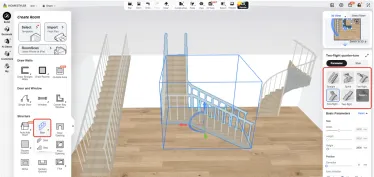
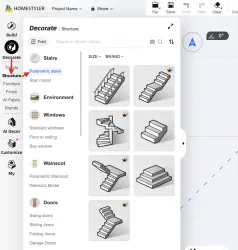
Introducing the new feature of Parametric Stairs in Homestyler!
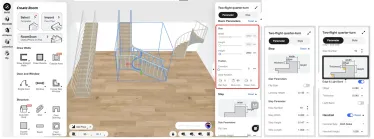
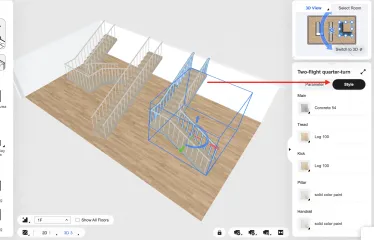
Tired of boring, one-size-fits-all stairs? Now you can easily create custom staircases—straight runs, L-shaped turns, spiral designs around a central pole, and more—all without complex modeling. What Are “Parametric Stairs”? “Parametric” means you control every dimension. Change the width, height, number of steps, or angle—and the entire staircase updates automatically to stay structurally accurate. No manual redrawing needed! Create Your Perfect Staircase in 4 Simple Steps Step 1: Open the Para
- +4

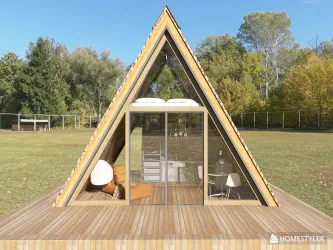
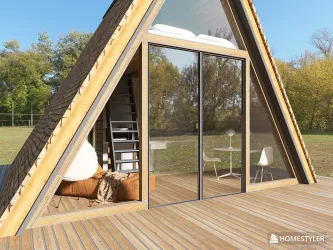
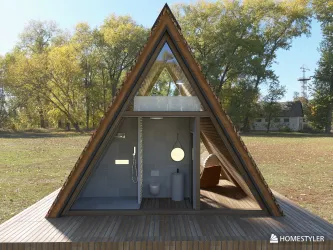
A Frame Tutorial using Interior Modeling
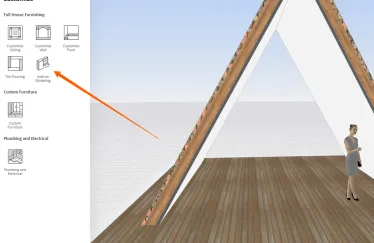
Okay, I have a few beautiful folks ask me how I do an A Frame. It's hard for me explain in writing so I'm posting some videos on how I do it. I would suggest that you have to know at least how Interior Modeling works. It is not so much as you're an expert of this tool, but if you know how to work this tool - it will make your life so much easier because you can create objects and save them as such- and resuse them later on. Your creative life will not be contained in just using the objects that

Lowering shed type roof
I have designed a shop with an accessory dwelling on one side, but the shop is 9' taller than the ADU meaning that the roof for the ADU should sit lower on the wall of the shop. When I make the roof for the ADU, Homestyler puts it at the height of the shop wall so it looks like it is floating,and I can't find a way to lower it. Any help would be appreciated. Thanks



Subscriptions charges
I would like to request a refund for the subscription charges from April 14 and May 16. I forgot to cancel my subscription and only recently realized I was still being billed. I have not been using the service and would greatly appreciate it if you could review my request and consider a refund as a courtesy. Thank you for your understanding.


3 д модели
Здравствуйте. Я оплатила тариф PRO, но программа не позволяет мне загрузить 2 д и 3д модели! Программа дополнительную оплату! Более того, программа не позволяет мне удалить некоторые загруженные ранее модели. Я знаю, как загружать модели и знаю как удалять. Дело в том, что программа не позволяет это сделать!


refund
I noticed a $12 charge for a subscription renewal that I did not intend to use. I am currently busy with my family business and freelance work, so I won't be able to use the platform. I have already turned off the auto-renewal. Since I haven't used any premium features or credits from this new cycle, I kindly request a full refund of the $12 charge and the immediate termination of the remaining 28 days. Thank you for your help

New Feature: Multi-floor Floor Plan Import Is Now Supported
🎉 The long-awaited Multi-floor Floor Plan Import feature is now officially live! You can now import multi-floor floor plans more accurately and efficiently, making it faster to build multi-level layouts and significantly improving your workflow. 🛠️ How to Use: Import a multi-floor floor plan in just a few steps. Step 1: Open the Floor Plan Import Tool Go to Build > Import Floor Plan from the left-side panel to open the upload window. Step 2: Upload Multi-floor Floor Plan Files Depending on your


- +1
【Team License】How to Sync Modified Models to Team Model
Homestyler Team now allows you to sync modified models back to Team Model, making them easier for your team members to use. Step 1: Log in to Homestyler Team Version and enter the 3D tool. -Team Version link: https://team.homestyler.com/ Step 2: Adjust the model as needed -Drag a model from Team Library in the left-side panel into your project scene, then modify its material, size, and other parameters as needed. Step 3: Save the modified model to Favorites -Select the modified model and click A


“I always save my design in the Homestyler app before closing it after finishing my work, but when I open it again, the last saved version doesn’t appear and instead the very initial design opens. Why does this keep happening?”
“I always save my design in the Homestyler app before closing it after finishing my work, but when I open it again, the last saved version doesn’t appear and instead the very initial design opens. Why does this keep happening?”


Anyone here using minimalist rugs in their space
I have been exploring ways to make my home feel more simple and balanced lately. I recently added a minimalist rug to my living room and it made a bigger difference than I expected. The space feels more put together but still calm and open. I am still learning what works best though. Do you prefer plain rugs or ones with very subtle patterns. Also how do you decide on the right size for a room. I want something that looks good but is also practical for everyday use. Would love to hear what other


Custom Furniture: Interface Introduction
Welcome to the official Homestyler tutorial series! In this video, we’ll introduce the interface layout and commonly used features of Custom Furniture, and demonstrate the functions most often used when creating parametric cabinets. Video highlights: This video includes an overview of the Custom Furniture interface and a demonstration of its commonly used features, helping you quickly get familiar with Custom Furniture. Like and comment to get more Homestyler tips!
Cancel my subscription and refund the money
Dear Homestyler Support Team, I hope you are well. I am writing to request a refund for the most recent subscription payment that was charged to my account. The renewal happened only about two hours ago, and it occurred because I forgot to cancel the subscription in time. Since the renewal, I have not used the Pro account at all. Given that the payment is extremely recent and the subscription has not been used, I kindly ask if you could process a refund for this last charge. Thank you in advance


