
To ensure that your models upload successfully and display with the correct dimensions, materials, and behavior in Homestyler, review the following requirements before uploading your files.
This guide applies to 3D Models and 2D texture materials. For detailed upload instructions, see: [How to Upload 3D Models and 2D Materials].
1. 2D Texture Guidelines
1.1 File Requirements
·Supported formats: JPG, JPEG, and PNG;
·Use RGB, 8 bits/channel color mode;
·Do not use CMYK mode, as it may affect the rendered result;
·Maximum file size: 30 MB;
·Maximum image dimension: 15,000 px.
1.2 Texture Requirements
·Wallpaper, paint, and similar materials must use seamlessly tileable textures;
·Textures should be clear, complete, and evenly lit;
·Avoid perspective distortion, lighting effects, highlights, and shadows.
1.3 Texture Size
·Minimum texture resolution: 512 × 512 px;
·Recommended resolution: 1024 × 1024 px or higher;
·Enter the material's actual physical dimensions during upload;
·Supported units include mm, ft, and inches.
1.4 Texture Examples
Use clear, evenly lit textures that can be repeated without visible seams.

2. 3D Model Guidelines
After completing the model, materials, and textures in 3ds Max, we recommend archiving all related files in a RAR or ZIP package. This helps prevent missing textures or incorrect materials after upload.
2.1 File and Software Requirements
·Supported formats: MAX, RAR, ZIP, GLTF, GLB, SKP, FBX, and OBJ;
·Supported 3ds Max versions: 2026 and earlier;
·SketchUp version: No restrictions;
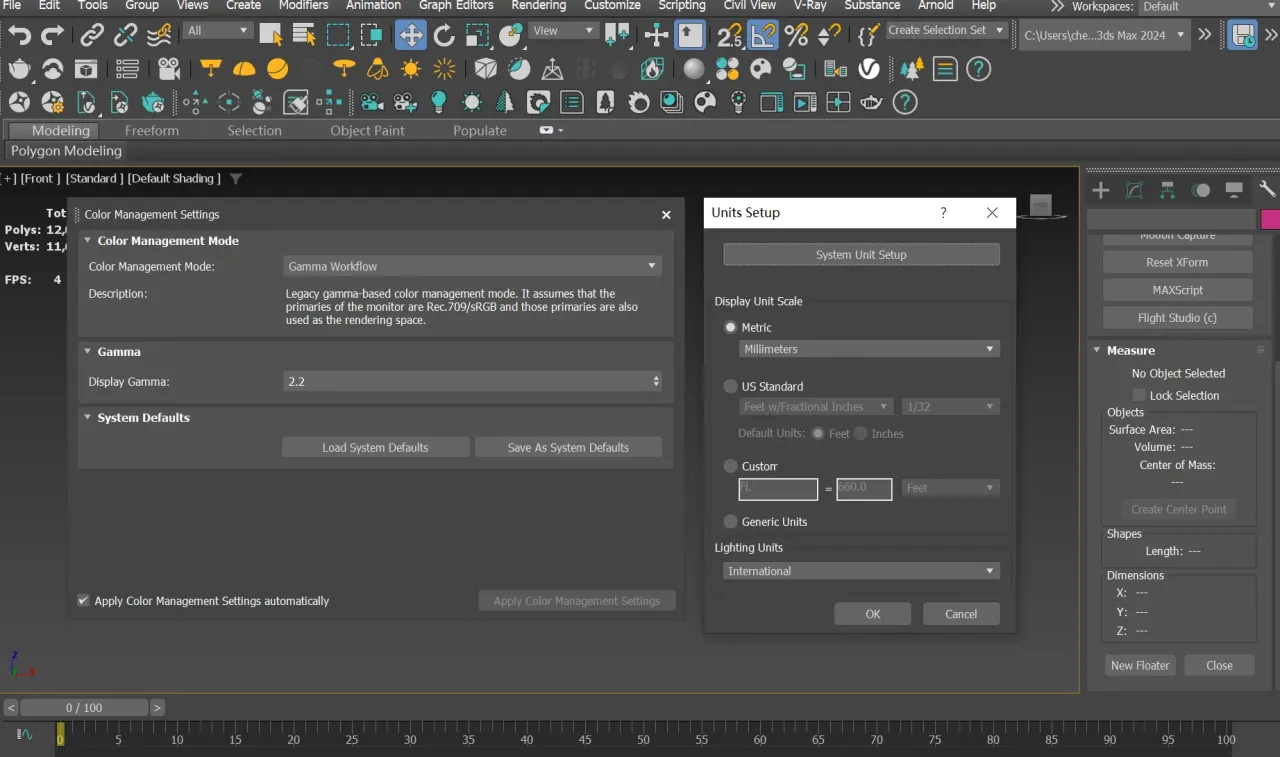
·Set Gamma to 2.2 in 3ds Max;
·We recommend using millimeters (mm) as the modeling unit.
2.2 Model Structure and Dimensions
·Keep only the geometry required for the product itself;
·Remove rooms, lighting, unrelated models, and hidden objects;
·Maximum polygon count: 5 million triangles or 2.5 million quadrilaterals;
·Maximum number of objects: 5000;
·Maximum file size: 200 MB;
·Align the front of the model with the Front View in 3ds Max or SketchUp;
·Create the model according to its actual dimensions;
·The model's length, width, and height must each be no greater than 20 m.

2.3 Materials and Textures
·V-Ray materials are recommended;
·Corona and Standard materials may appear differently after conversion;
·Ensure that all texture file paths are complete and properly linked;
·Complex materials such as hair materials and VRayTriplanarTex are currently unsupported. Supported material types are shown below:

3. Special Model Category Guidelines
3.1 Door Models
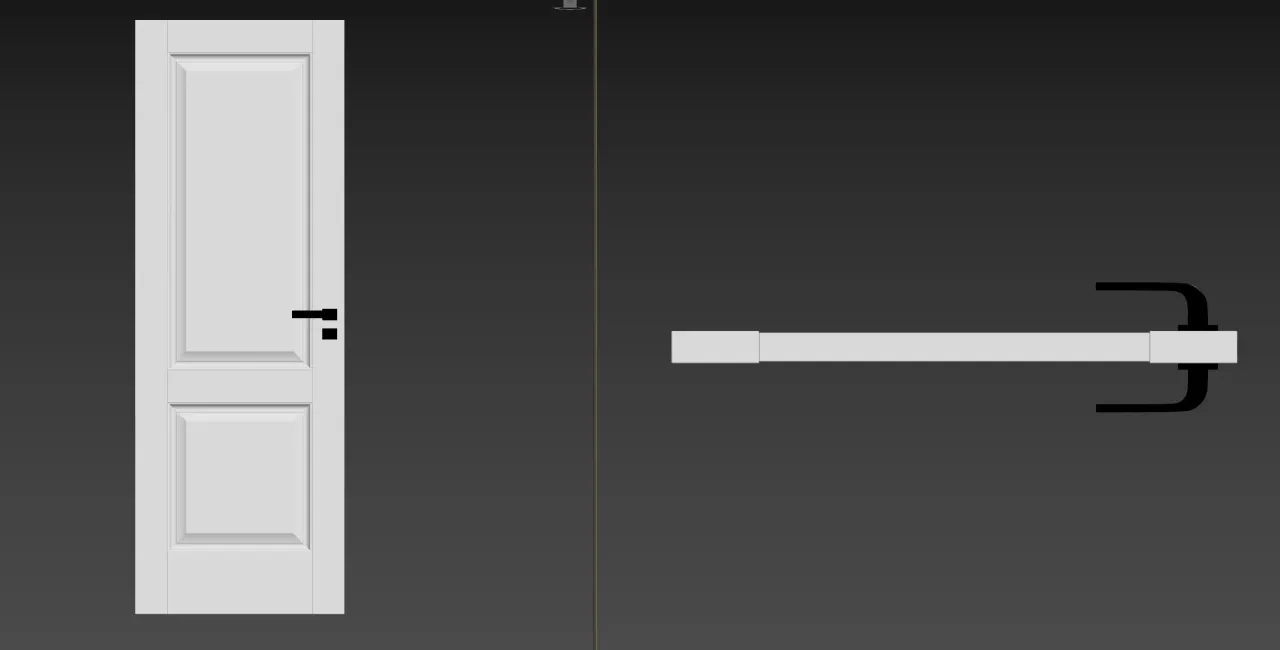
·For a single door, position the handle on the right side;
·Complete the geometry on both sides of the door;
·Remove the door casing before uploading. Homestyler will generate it automatically, allowing the casing style to be changed later;
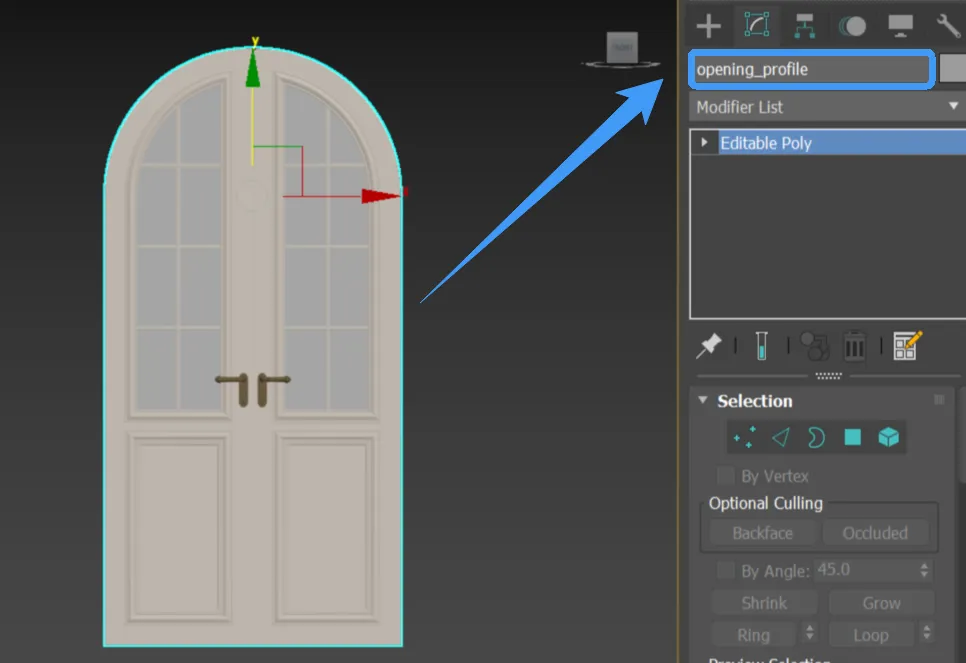
·For arched or irregularly shaped doors, create a corresponding profile plane in 3ds Max;
·Name the profile plane opening_profile and place it in the center of the model.
3.2 Window Models
·Complete the geometry on both sides of the window;
·Remove the window casing and wall geometry before uploading;
·For arched or irregularly shaped windows, create a corresponding profile plane;
·Name the profile plane opening_profile and place it in the center of the model.
3.3 Bay Window Models
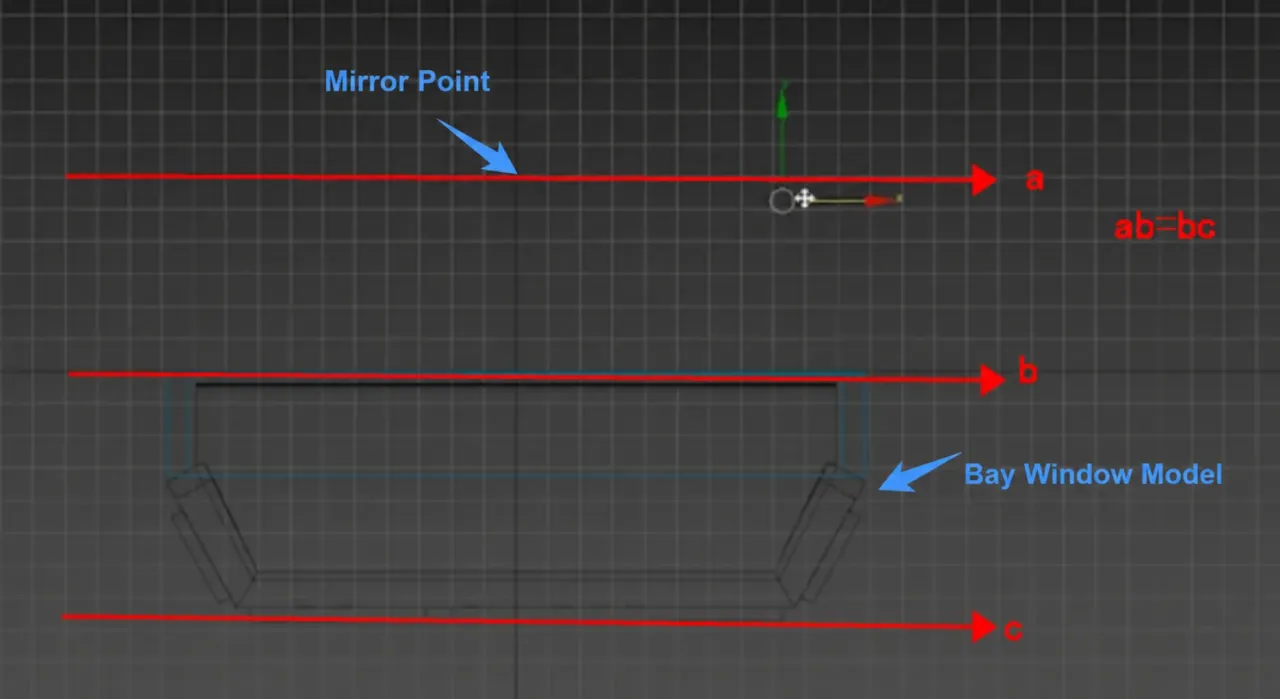
·Create a 10 × 10 mm plane as the Mirror Point;
·Set the Mirror Point to be invisible in rendering;
·Position the Mirror Point according to the depth of the bay window;
·Adjust its position as shown so that ab = bc.
3.4 Lighting Models
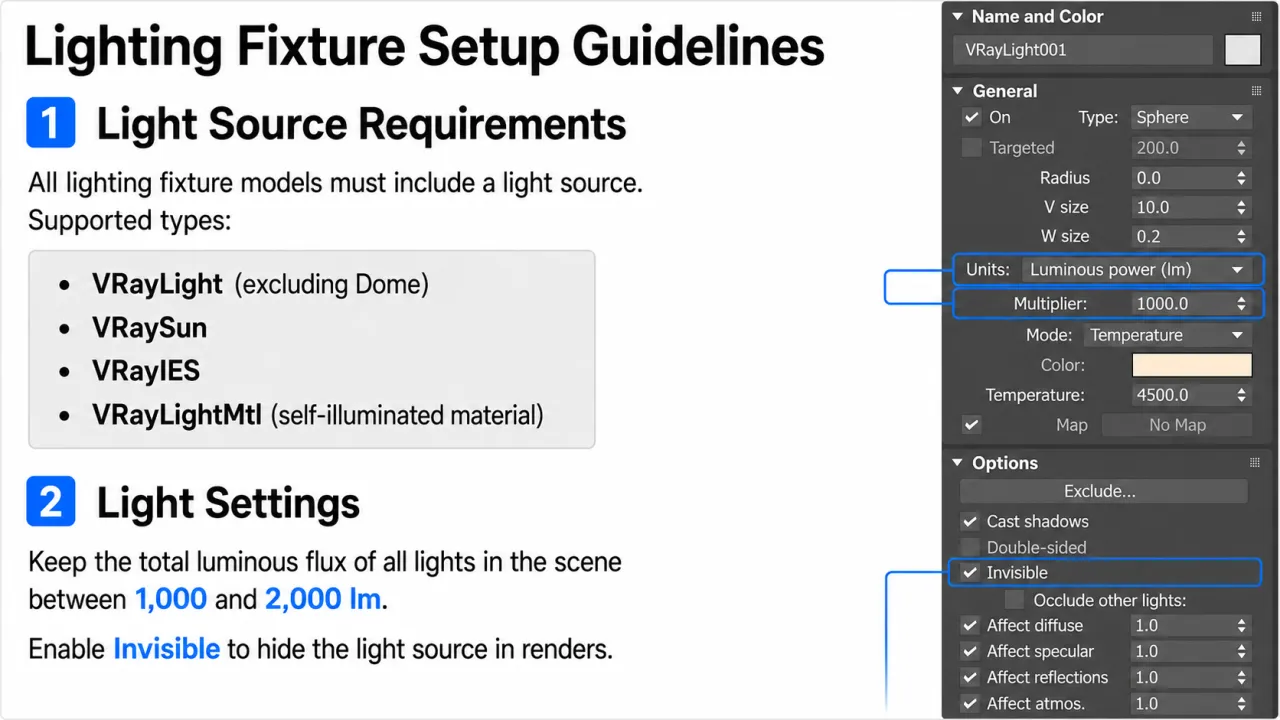
·Add at least one light source or use an emissive material;
·After uploading, the light intensity and color temperature can be adjusted in Homestyler;
·Set the light unit to Luminous power;
·Recommended light intensity: 1,000–2,000 lm;
·Supported light types are shown below:
3.5 Profile Models
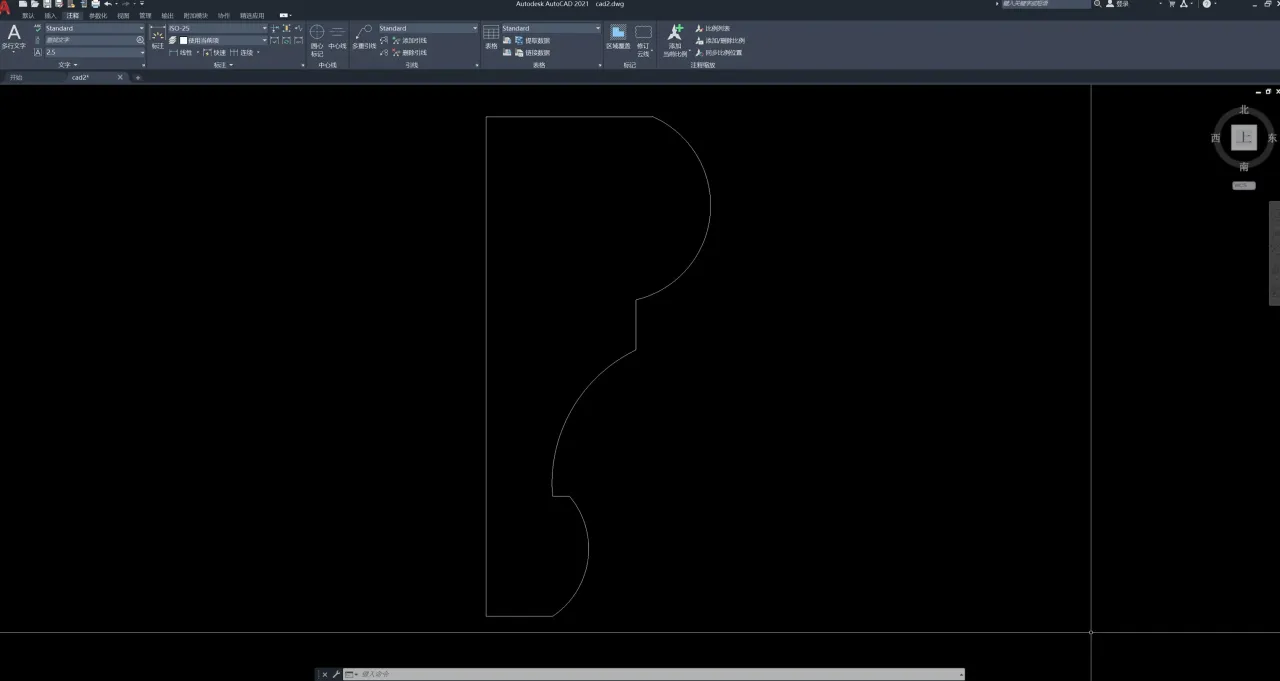
·Keep only the profile cross-section in the CAD file;
·Remove dimensions, drawing frames, and other unrelated content;
·Ensure that the profile is complete, closed, and free of gaps;
·Orient the profile toward the Top View;
·Export the file in DWG or DXF format.
4. Pre-upload Checklist
Before uploading, confirm that:
·The file format and software version meet the requirements;
·Gamma is set to 2.2 in 3ds Max;
·The model does not exceed the size, polygon, object-count, or file-size limits;
·The model is facing the correct direction;
·The file contains no unrelated or hidden objects;
·All materials and texture paths are complete;
·Unsupported complex materials have been removed;
·Special-category models meet their corresponding requirements;
·Furniture sets have been separated into individual models when needed;
·The RAR or ZIP package contains all required model and texture files.
