Homestyler V6.0 is a major milestone release. We’ve upgraded the product across three dimensions—core tools, AI capabilities, and team collaboration—so you can move from inspiration to construction drawings in a single, continuous workflow.
On the 3D design side, new parametric components make architectural detailing faster and easier to edit.
On the intelligent side, the brand‑new AI Studio unifies all AI features into one place, covering everything from mood exploration and floor‑plan generation to 3D modeling and high‑quality visualization.
For teams, enhanced asset management, permissions, and title block settings help you standardize outputs and scale your design process.
Below is an overview of what’s new in V6.0 and how it can upgrade your daily workflow.

Build with Precision: New Parametric Tools
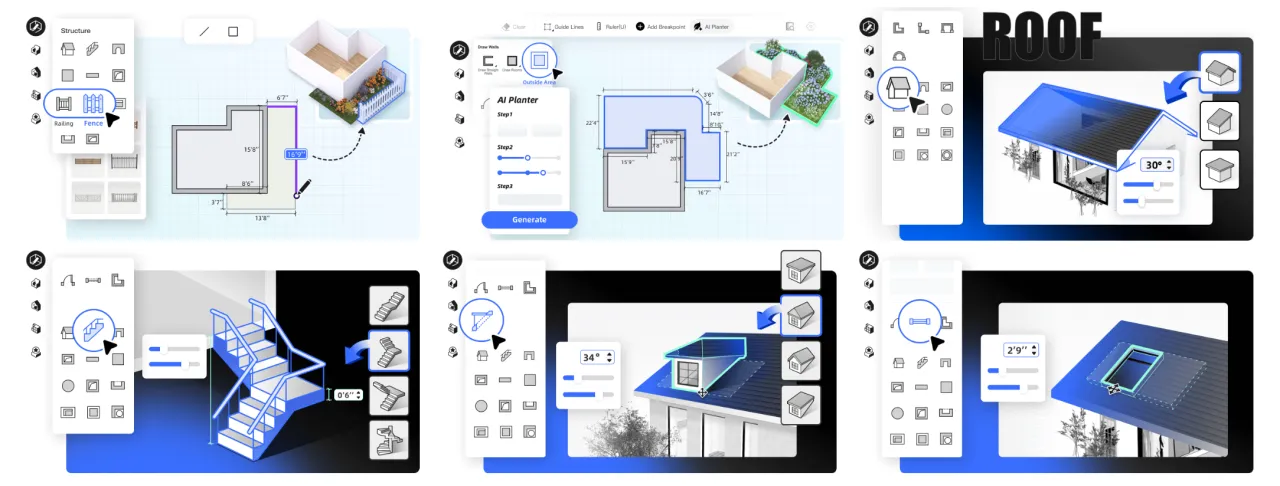
We’ve added powerful parameterized controls for key building components:
1. Parametric Stairs – Adjust width, rise/run, landings, and handrails with parameters instead of redrawing from scratch.
2. Parametric Roof – Quickly build and edit complex roof forms by adjusting slopes, overhangs, layers, and intersections with precise parameters.
3. Fences & Railings – Generate continuous, editable fences and railings that adapt quickly to layout changes.
4. Dormer (Tiger) Windows – Create complex dormer windows in a few clicks, perfectly integrated with roofs.
5. Outside Area Editor - We've also upgrade the Outside Area Editor, allowing a more flexible planning on the garden, along with AI planter and paramtric fence, making garden design so easy.
These tools make structural modeling faster, more accurate, and much easier to revise.
Design with AI: Standalone AI Tools Upgraded
Alongside the newly launched Homestyler AI Studio, our AI tools have been individually enhanced to support different stages of your work:
1. AI Planner – Generate tailored floor plans in 3 simple steps.
2. AI Stager – Instantly stage interiors and explore multiple styles with one click.
3. AI Planter – “Grow” outdoor plants and greenery in seconds to enrich landscape design.
4. AI Render – Produce realistic, lighting‑aware renderings with a single click.
5. AI Painter – Turn photos into design‑ready artwork and style references in an instant.
6. AI Moodboard - Curate style moodboard from any image
The AI tools now fully cover the workflow from concept inspiration and floor‑plan drafting to interior styling, 3D modeling, and final visualization.

Team Version Updates: Smarter Asset & Permission Management
Alongside V6.0, we’ve also upgraded the Homestyler Team experience to support more streamlined collaboration and asset management.
My Space – Folder Management
Create folders in My Space and batch‑organize projects into them, so your team’s work stays clean and easy to navigate.
Model Library – Clear Separation of “Team Model” & “My Model”
Manage shared and personal assets more precisely with new filters (including Source) and support for batch syncing personal models to the team library. Synced team models become independent versions, so later personal edits won’t affect team assets.
Edited models (materials, sizes, or structures) can now be favorited for quick reuse.
AI Tools Entry in the Left Panel
The Team version now has a dedicated AI Tools section, gathering six major AI design capabilities (AI Planner, AI Stager, AI Moodboard, etc.) in one place.
Permission Control – Team admins can flexibly assign AI feature permissions in the Admin Console to ensure standardized use across the team.
Title Block Settings
A new Title Block Settings entry on the left makes it easy to create, manage, and reuse unified title block templates across projects and team members, ensuring consistent documentation.
These enhancements give teams more control over assets, clearer permissions, and a more efficient, standardized workflow.
Feature Highlights & Tutorials
Click the titles below to view step‑by‑step tutorials for each new feature:
3D Design Tool upgrades & tutorials:
V 6.0 - Shed, Gable, Hip or Saltbox - add Parametric Roof in no time!
V6.0 - Introducing the new feature of Parametric Stairs in Homestyler!
V6.0 - Homestyler New Feature: Parametric Fence and Railing
V6.0 - Homestyler NEW Feature: Dormer Window makes a strong debut!
V6.0 - Add windows directly to the roof!
AI Tools upgrades & tutorials:
V6.0 - AI Render - Generate realistic rendering images with one click
V6.0 - AI Planner – 3-Step Operation to Generate Your Exclusive Floor Plan
V6.0 - AI Stager – Design Magic, Get Interior Design Inspiration with One Click!
V6.0 - AI Planter - New outdoor feature for quickly spreading plants
V6.0 - AI Painter—Photos to masterpieces in a flash, What You See Is What You Get!
V6.0 - AI Moodboard - Curate style moodboard from any image
Team Version upgrades & tutorials:
V6.0 - Customize Title block with Homestyler Team version
V6.0 - Team version upgrade with enhanced asset management, AI suites and permissions management