Homestyler logo
    • Untuk Desainer Interior

    • Untuk Merek & Penjual

    • Untuk Real Estat

    • Untuk Sekolah

    • Solusi pemilik

    Fitur

    Design

    • Perencana Lantai
    • Custom Furniture
    • Kolaborasi
    • Aplikasi Mobile
    • Aset pasar

    Visualization

    • Render Video
    • Studio Virtual
    • Teknologi VR & AR
    • Pemirsa 3D

    Service

    • Model 3D
    • 3D Content Creation
    • Belanja
    • Perancang keselamatan
    Produk
  • Pricing SALE
    • Komunitas

      Temukan inspirasi desain tak terbatas

    • Tantangan

      Ikuti tantangan dan pertunjukan bakat Anda

    • Aset pasar

      Jelajahi jutaan model dan bahan 3D

    • AIDA Awards

      Ikuti dalam kompetisi untuk memenangkan anugerah

    Komunitas
    • Tutorial

      Step-by-step instructions & helpful tips

    • Pusat Bantuan

      Temukan dokumentasi dan dukungan terperinci

    • Forum

      Discuss and share ideas about design

    • Kemah latihan Rookie

      Bangun rumah pertama Anda dan dapatkan sertifikat + hadiah!

    • Bootcamp ruangan

      Master 5 desain kamar, dapatkan 3,000 koin + sertifikat!

    Apa yang Baru Lihat Semua
    • Fungsi pengeditan dan ekspor gambar konstruksi baru ditambahkan.
    • Jendela dan pintu parametrik baru memungkinkan parameter kustom.
    • Mendukung impor file DWG multi-lantai dan penyesuaian lantai.
    • Model Struktur mendukung rotasi, lantai ubin, dan fungsi lainnya.
    • Menambahkan gambar dinding lengkung, penyesuaian dinding, dll di denah.
    • Menambahkan fungsi penggantian model yang sama dengan cepat, dan lainnya
    • 4
    • 6
    • 5
    Belajar
  • Bisnis
    • Bisnis
    • Newsroom
    • descMdsKeyValue NEW

      Opsi Denah Lantai: Buat denah rumah dalam beberapa klik

    • descMdsKeyValue

      Gambar untuk gambar: merancang ruang apa pun dalam gaya apa pun

    • descMdsKeyValue

      Gambar ke Moodboard: Buat moodboard dari foto

    • descMdsKeyValue

      Gambar/Teks ke 3D: Ubah foto apa saja menjadi model 3D

    • descMdsKeyValue

      Gambar ke tekstur: Ubah gambar menjadi peta tekstur

    • descMdsKeyValue NEW

      Ubah Foto Anda menjadi Karya Seni dalam Hitungan Detik

    • Lebih banyak yang akan datang.

    AI
  • Layanan Desain NEW
  • Masuk
  • Gabung Sekarang
    Hadiah selamat datang gratis untuk Anda!
  • ID
    • English
    • Italiano
    • РУССКИЙ
    • العربية
    • Français
    • Polska
    • ESPAÑOL
    • PORTUGUÊS
    • Deutsch
    • 繁體中文
    • Indonesian
    • 日本语
    • 한국
    • 简体中文
MULAI MENDESAIN

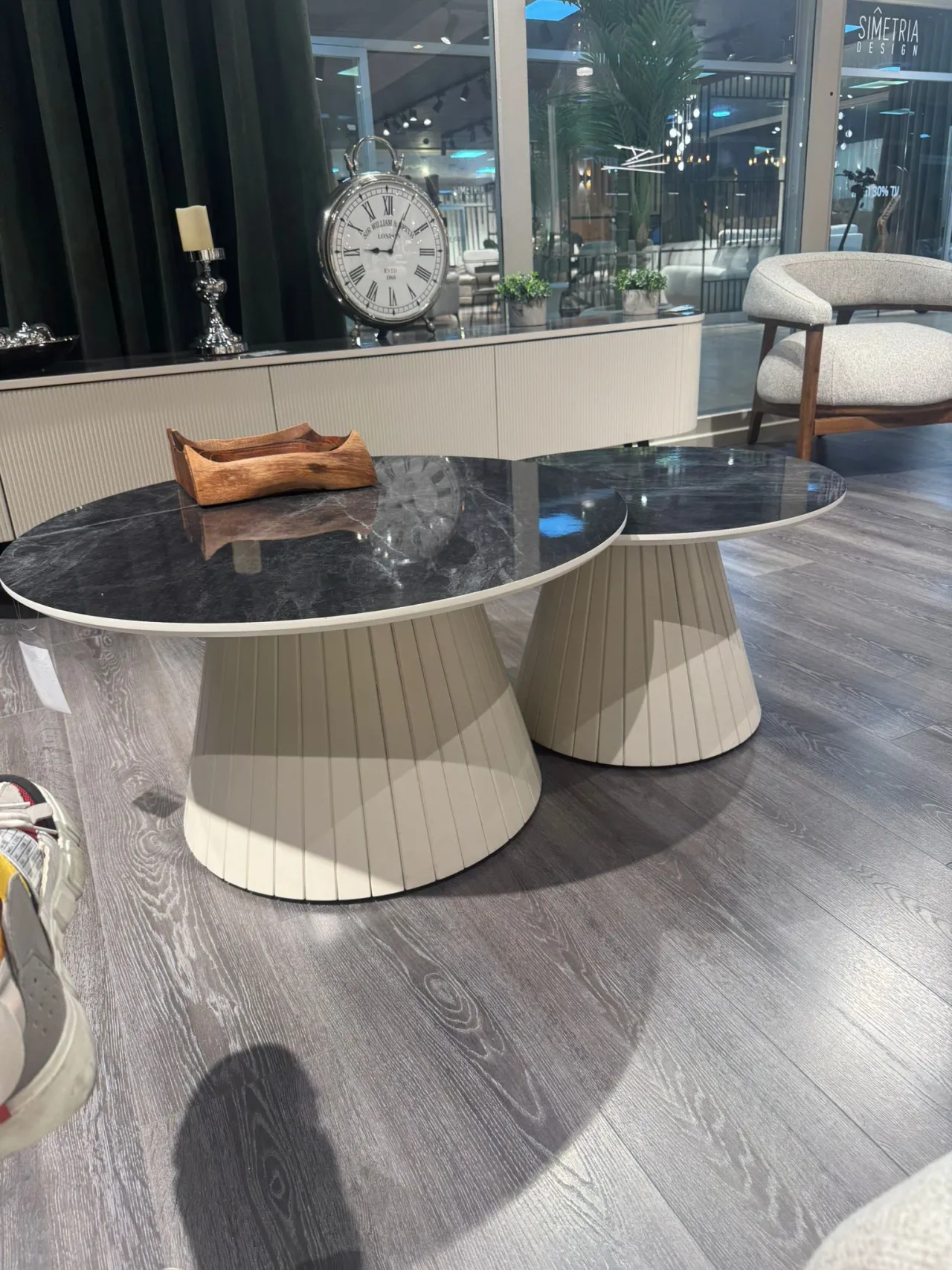
how to draw base of these tables/ I can make only sphere, but i can't make lines to be pushed a bit. inwards. PLease explain how would you do those legs

alja.kisik 11 Januari

Pusat Desain
188 5

Komentar(5)

head-img
Pelajari Lebih Lanjut
head

0 Desain

0 Suka

Homestyler support 16 Januari
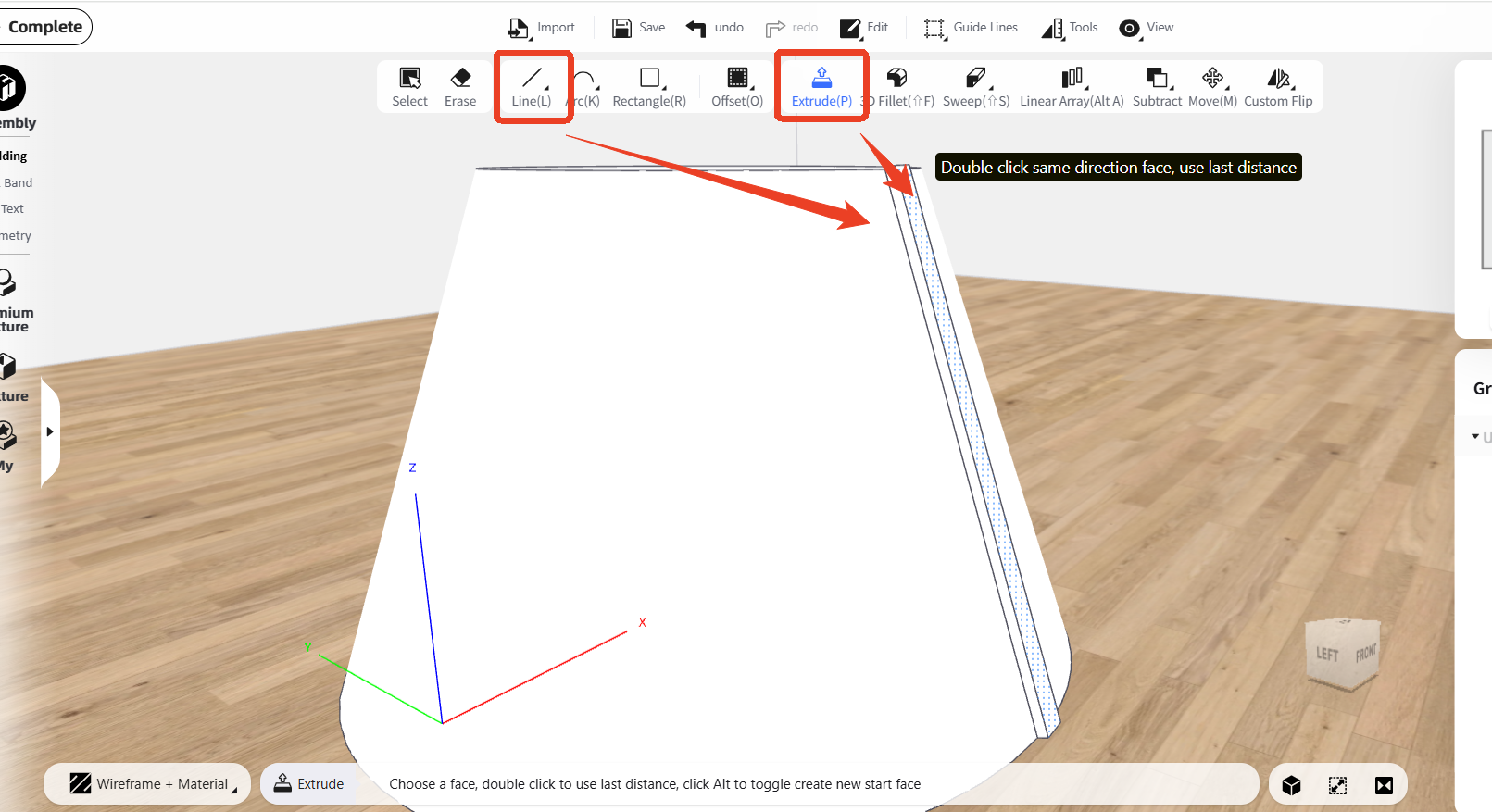
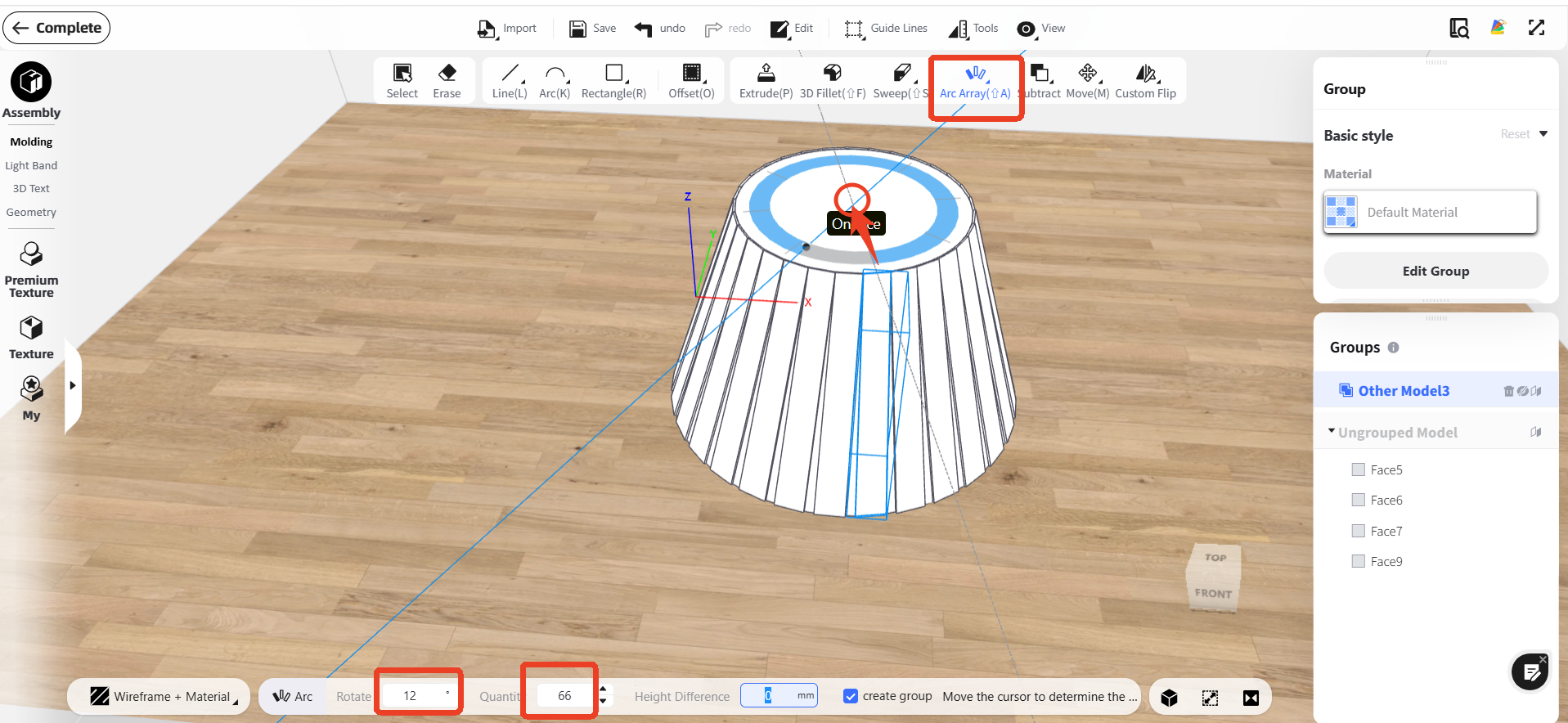
Finally, use ‘Arc Array’ to generate sticks around the base: click the base center, then set the rotation angle and stick count.:
attachment
Balas
head-img
Pelajari Lebih Lanjut
head

0 Desain

0 Suka

Homestyler support 16 Januari
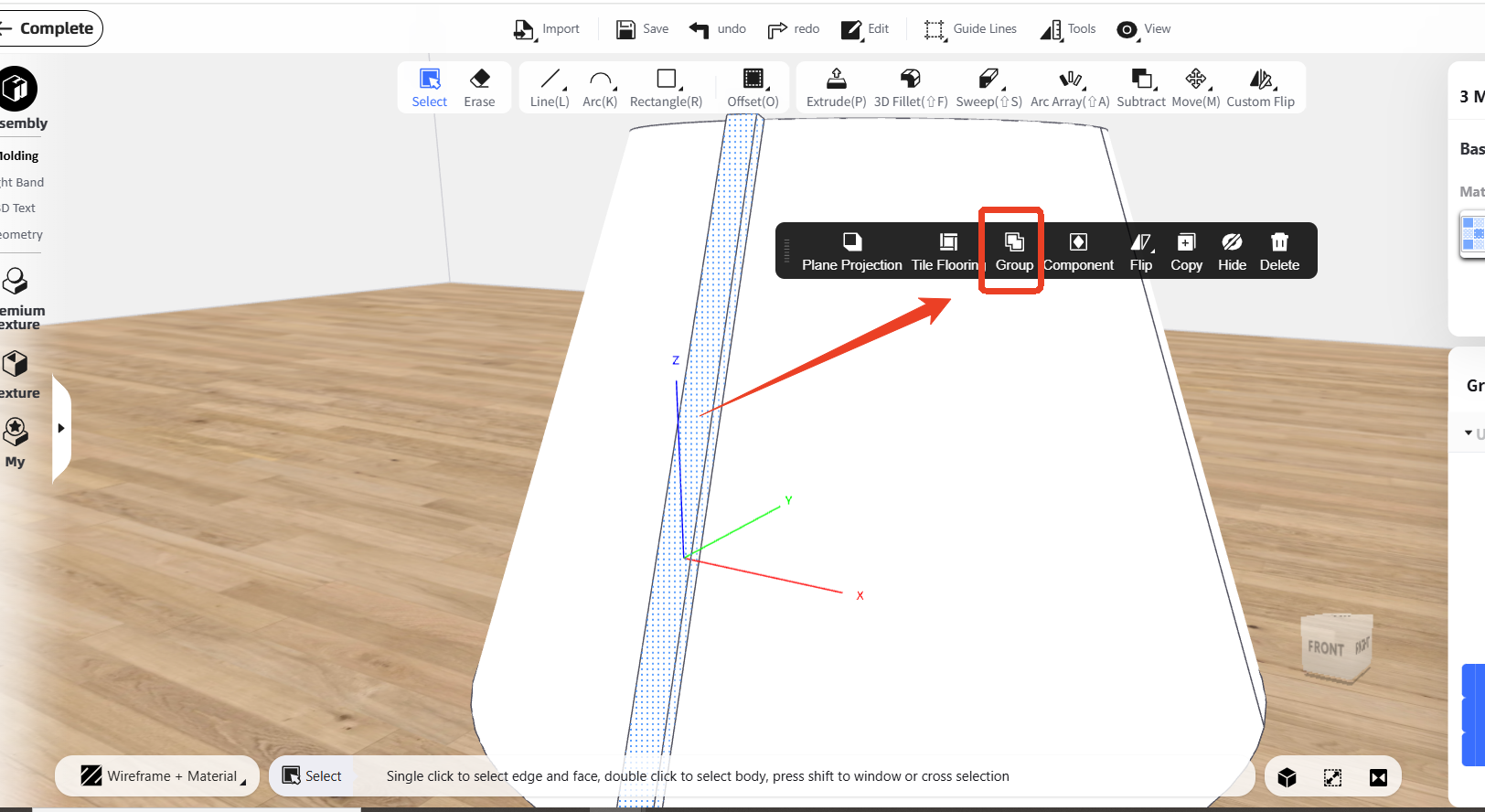
Then 'Group' the stick into one unit:
attachment
Balas
head-img
Pelajari Lebih Lanjut
head

0 Desain

0 Suka

Homestyler support 16 Januari
Sure, you can firstly draw one stick on the base by using 'Line' function and 'Extrude' function, using the 'Line' function to draw the shape, and using 'Extrude' function to add thickness: @ alja.kisik
attachment
Thank you, but I already know how to model a cylindrical base. However, I am struggling to create the vertical slats on the cylinder — specifically the type that are not straight flat slats, but slightly convex / rounded outward, like on the attached reference image. My main difficulties are: • How to correctly draw evenly spaced slats around a cylindrical surface • How to give each slat a convex profile instead of a flat rectangular shape • How to make sure the spacing and curvature stay consistent around the whole cylinder • Which tools (Extrude, Spineline, Follow Path, etc.) are best
Balas
head-img
Pelajari Lebih Lanjut
head

0 Desain

0 Suka

alja.kisik 16 Januari
Thank you, but I already know how to model a cylindrical base. However, I am struggling to create the vertical slats on the cylinder — specifically the type that are not straight flat slats, but slightly convex / rounded outward, like on the attached reference image. My main difficulties are: • How to correctly draw evenly spaced slats around a cylindrical surface • How to give each slat a convex profile instead of a flat rectangular shape • How to make sure the spacing and curvature stay consistent around the whole cylinder • Which tools (Extrude, Spineline, Follow Path, etc.) are best @ Homestyler support
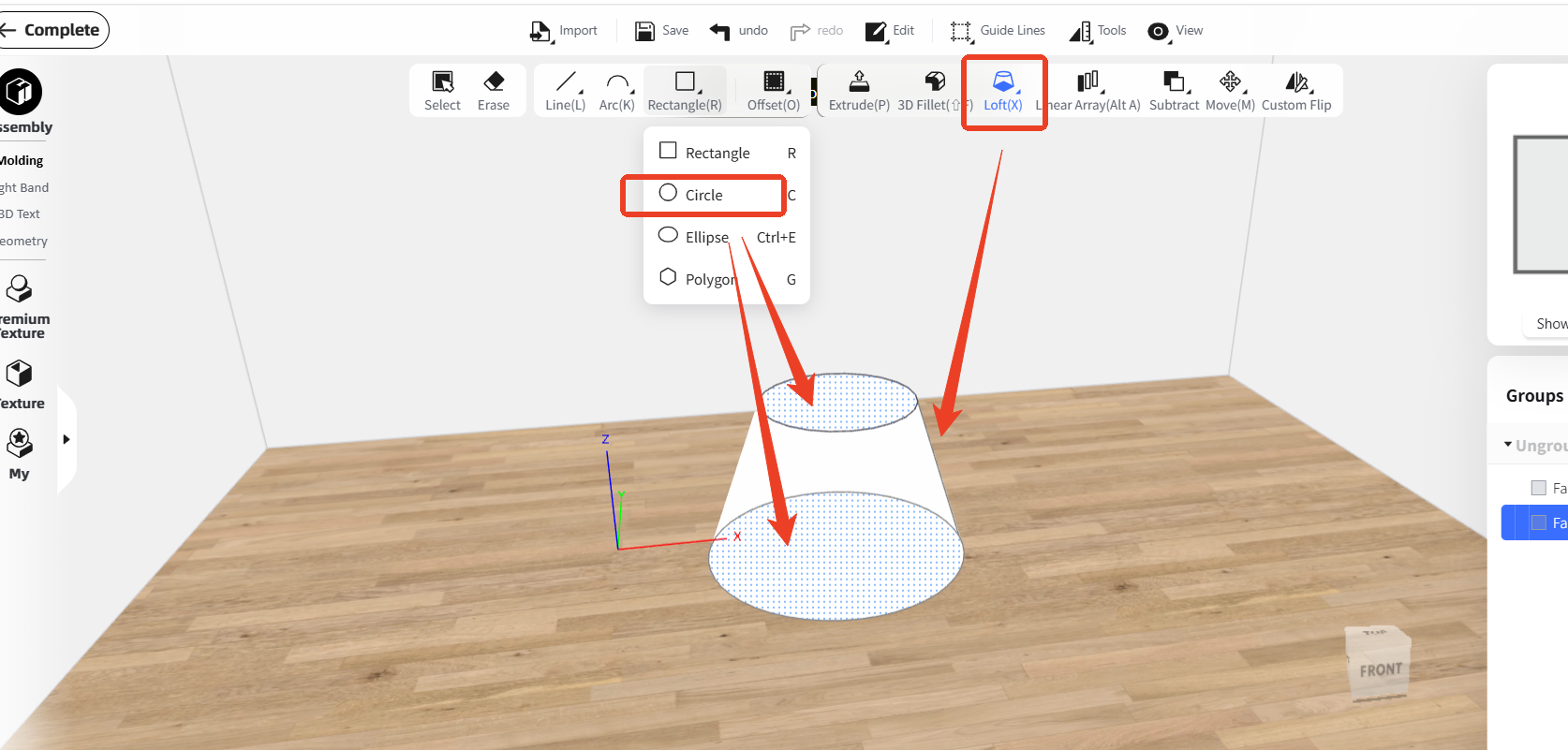
Hello, please enter the 'Interior Modeling' first, and you can use 'Circle' function to draw two circles, then use ' Loft' function to connect them:
attachment
Balas
head-img
Pelajari Lebih Lanjut
head

0 Desain

0 Suka

Homestyler support 12 Januari
Hello, please enter the 'Interior Modeling' first, and you can use 'Circle' function to draw two circles, then use ' Loft' function to connect them:
attachment
Balas

Tentang Kami

Kisah Kami

Berita

Blog

Privasi

Perjanjian Pengguna

Pembaruan

Hubungi Kami

ISO/IEC 27001:2022

Produk & Layanan

Perencana Lantai 3D

Ide Desain

Perpustakaan Model

Studio Virtual

Harga & Paket

Bisnis

Rendering Video

Kolaborasi

Layanan Pemodelan 3D

Solusi

Untuk Desainer Interior

Untuk Brand & Retailer

Untuk Real Estat

Untuk Sekolah & Universitas

Solusi pemilik

Mengapa Homestyler

Homestyler vs 3Ds Max

Homestyler vs Floorplanner

Homestyler vs SketchUp

Komunitas

Galeri

Belajar & Bantuan

Forum

Tutorial Video

Program Afiliasi

Unduhan

Aplikasi Desain Rumah

Aplikasi untuk iOS

Aplikasi untuk Android

Versi Desktop

Copyright © 2009 - 2026 居然设计家(上海)科技有限公司. All Rights Reserved

Ikuti survei singkat dan bantu kami memperbaiki layanan

Ceritakan tentang diri Anda dan kemudian kunjungi pusat koin untuk Claim 20 Coins!

Tugas selesai! Anda mendapatkan koin!
Klaim
Posting Cerita
Bagikan dilema & penemuan desain Anda
Desain Posting
Bagikan proyek desain Anda