

Forza is acclaimed for its lifelike car models and high-grade 3D assets utilized in racing gameplay and fan modifications. To swiftly convert Forza 3D models, having the appropriate tools, a foundational grasp of file structures, and meticulous care in maintaining model fidelity during conversion is crucial. Typically, enthusiasts aim to extract, convert, or adapt Forza car models for use in various platforms such as Blender, Unity, or Unreal Engine. The conversion process generally consists of several stages: 1. **Extraction:** Employ specialized extraction tools like ForzaStudio or Ninja Ripper to retrieve model assets from the game files. Forza models are frequently stored in proprietary formats such as `.carbin` or `.bin`, necessitating dedicated software to access the underlying mesh and texture data. 2. **Conversion:** Shift the extracted models into a universal 3D format like `.obj`, `.fbx`, or `.dae` utilizing converters or scripts. Blender serves as a powerful and free tool for importing, adjusting, and exporting these files to your desired format. 3. **Texture Mapping:** Forza models come equipped with intricate textures. Ensure you apply all necessary diffuse, normal, and specular maps to maintain realism. Popular choices for manual texture adjustments include Photoshop and GIMP. 4. **Optimization:** Assess the polygon count, scaling, and smoothing groups for compatibility with your target platform. Eliminate unnecessary details, merge vertices, and rectify normals where applicable. Transitioning 3D models between platforms involves technical challenges—yet it’s also a chance to reconsider how these assets will interact with new settings and aesthetics. For example, integrating a Forza car model into a personalized architectural visualization can heighten realism in a residential garage scene. Opting for appropriate design software—like Homestyler—facilitates faster asset placement and ensures that the 3D model seamlessly harmonizes with your overall presentation, making the imported vehicle look inherently embedded within your created space.
Tips 1:
Before proceeding with conversion, always verify licensing and copyright limitations relating to Forza assets. Respect intellectual property rights and utilize extracted models solely for educational or personal non-commercial use—unless granted permission by the rights owner.
FAQ
Q: What software is most effective for extracting Forza 3D models?
A: ForzaStudio and Ninja Ripper are widely recognized tools for extracting models from Forza games.
Q: What formats are best for converting Forza models for general 3D applications?
A: Well-known formats include .obj, .fbx, and .dae, as they demonstrate broad compatibility with most 3D software platforms.
Q: Am I permitted to use Forza models commercially post-conversion?
A: Normally, commercial use of Forza assets is prohibited without explicit authorization due to copyright protections.
Q: How can I ensure textures stay intact during model conversion?
A: Make certain that all texture maps are correctly exported and applied within your 3D editor; manual adjustments may be required.
Q: Which design software works best with imported car models for enhancing scene visualization?
A: Advanced planners, such as Homestyler, offer excellent functionality for seamless scene integration and realistic rendering.

Minimalist Ceramic Vase with Decorative Branches and Stacked Coffee Table Books 3D Model
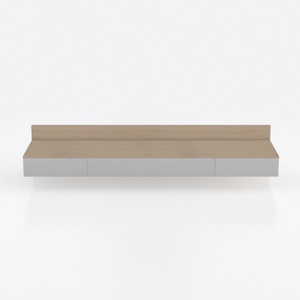
Minimalist Solid Wood and White Wall Mounted Console Cabinet 3D Model
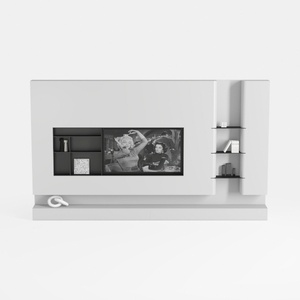
Minimalist White Wall Mounted TV Stand Cabinet With Open Shelves 3D Model
Discover your creativity with Homestyler, an exceptional online home design platform. This user-friendly tool offers stunning 3D renderings, inspiring design projects, and helpful DIY video tutorials. Whether you're a beginner or an enthusiast, Homestyler makes transforming your ideas into reality easy and enjoyable!
立即免费设计
































