


The evolving "state of play" in technology has transformed how we interact with our living spaces, blending digital innovation seamlessly into home environments. As gadgets become central to daily routines, thoughtful spatial design now emphasizes integrating smart devices with comfortable furniture, creating versatile zones for work, relaxation, and entertainment within the home. Utilizing tools like Homestyler can further enhance this integration by allowing users to visualize and design these multifunctional spaces with ease.
Direct Answer
Objects can be scanned into 2D or 3D models through various technologies such as photogrammetry applications, LiDAR scanners, or specialized 3D scanning hardware. This typically involves capturing multiple images or depth maps from different perspectives and converting them into a digital model using reconstruction software. Remarkably, even modern smartphones are capable of producing highly accurate scans with the appropriate techniques.
Quick Takeaways
Introduction
Over recent years, 3D scanning has evolved from a specialized industrial process into a common tool for designers, makers, and homeowners alike. Personally, I have scanned furniture, decorative items, and whole rooms to create digital assets for interior design projects. When aiming to create 2D or 3D representations of objects, the primary challenge lies not in technology itself, but selecting a method suited to your specific needs.
Certain tools excel in speed, others prioritize precision, while some surprisingly accessible applications offer results comparable to professional scanners. This guide outlines effective real-world methods, common pitfalls to avoid, and how to select the ideal scanning workflow for your projects, including how Homestyler can assist in visualizing scanned assets within home environments.
save pin
What tools can scan objects into 2D or 3D models?
Key Insight: The best scanning tool depends less on cost and more on factors such as object size, surface texture, and required accuracy.
Having tested scanners on furniture, decorative elements, and architectural features, I’ve found that most needs fall into three main categories of tools.
Typical Tool Comparison
In my workflow, photogrammetry accounts for roughly 80% of scans due to its versatility and impressive detail capture.
How does photogrammetry convert photos into a 3D model?
Key Insight: Photogrammetry reconstructs spatial positions by detecting common visual points across multiple images.
While it may seem complicated, the process is actually quite straightforward.
Basic Photogrammetry Workflow
Most contemporary applications automate reconstruction; for instance, RealityScan utilizes cloud processing, whereas Polycam performs scans directly on mobile devices.
save pin
What mistakes ruin 3D scans?
Key Insight: Inadequate lighting and reflective surfaces cause more scan failures than poor camera quality.
Through numerous furniture and decor scans, recurring errors have become apparent.
Common Scanning Mistakes
Quick Fixes That Work
Small adjustments to lighting and environment often greatly improve scan quality.
save pin
Can a smartphone really produce usable 3D models?
Key Insight: Modern smartphones can indeed generate detailed 3D models, though precision depends on careful scanning technique.
I have used smartphone-derived scans to recreate furniture pieces within 3D interior layouts, finding the accuracy sufficient for visualization and planning.
Typical Smartphone Scanning Capabilities
However, engineering-level precision for manufacturing purposes still requires dedicated scanning devices.
save pin
How do you convert scans into clean design models?
Key Insight: Raw scans almost always require cleaning to become practical design assets.
Scan data often contains extraneous geometry, noise, or irregular topology; post-processing improves usability and performance.
Typical Cleanup Workflow
This step is especially important when preparing models for game engines, augmented reality, or interior design visualization tools like Homestyler.
When should you choose 2D scanning instead of 3D?
Key Insight: When outlines, textures, or documentation are the focus, 2D scanning is quicker and more efficient.
In design workflows, capturing flat patterns or textures is often preferred over full geometry.
Situations Where 2D Works Better
Devices such as flatbed scanners, DSLR cameras, and certain smartphone apps perform well for these tasks.
Answer Box
The simplest approach to scan objects into 2D or 3D models involves photogrammetry apps that reconstruct geometry from photographs. LiDAR scanners enable faster spatial captures, while professional scanners provide superior precision. Regardless of method, good lighting and thorough photo coverage are vital for successful results.
Final Summary
FAQ
1. What is the easiest way to scan objects into 3D models?
Photogrammetry apps like Polycam or RealityScan are generally the easiest solutions, utilizing a smartphone camera and multiple images taken around the subject.
2. Do I need a special scanner to create 3D models?
Not necessarily. Many accurate 3D models can be generated with smartphone photogrammetry software.
3. How many photos are needed for photogrammetry?
Typically, 40 to 120 photos are sufficient to reconstruct most objects reliably.
4. Can you scan a room into a 3D model?
Yes. LiDAR devices and room-scanning applications can produce spatial models ideal for interior planning and visualization.
5. What file formats are used for scanned 3D models?
OBJ, STL, FBX, and GLB are common file formats employed for 3D scans.
6. Why do some scans look messy or distorted?
Scan errors often come from reflective surfaces, uneven lighting, or incomplete photo coverage.
7. Is photogrammetry accurate enough for design projects?
For purposes like visualization and layout planning, photogrammetry generally offers adequate accuracy.
8. What software cleans scanned meshes?
Applications such as Blender, MeshLab, and ZBrush are widely used for cleaning and optimizing scanned 3D models.

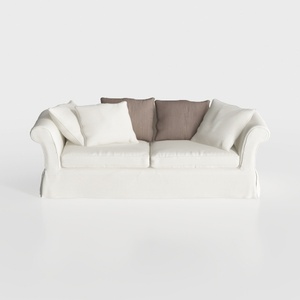
Minimalist White Fabric Sofa with Throw Pillows 3D Model

Minimalist Off White Fabric Large Sofa 3D Model
Homestyler is a user-friendly online platform offering powerful home design tools, realistic 3D renderings, inspiring design projects, and helpful DIY video tutorials—perfect for anyone looking to create and visualize their dream space with ease.
Zaprojektuj teraz za darmo
































