


The evolving state of play in technology has transformed how we interact with our living spaces, blending digital innovation seamlessly into home environments. As gadgets become central to daily routines, thoughtful spatial design now emphasizes integrating smart devices with comfortable furniture, creating versatile zones for work, relaxation, and entertainment within the home. Utilizing tools like Homestyler enables homeowners and designers to visualize and plan these dynamic spaces with accuracy and creativity.
Direct Answer
To create 3D models in Blender with precise measurements, begin by setting the scene's units to match real-world standards. Enabling measurement tools and using exact numeric inputs for dimensions, scaling, and positioning ensures that each object corresponds to accurate sizes such as meters, centimeters, or millimeters. This approach guarantees models that are functional and realistic.
Professionals often combine Blender’s unit configurations, snapping features, and dimension overlays to maintain precision throughout their modeling workflows.
Quick Takeaways
Introduction
A frequent challenge encountered when starting modeling in Blender is overlooking scale. Models might appear visually correct but when applied to architecture, product design, or 3D printing, their proportions are inaccurate and problematic.
From experience in numerous interior visualization projects, I have found that precise measurements are essential. For example, if a cabinet needs to be exactly 900 mm wide or a countertop stands 36 inches tall, the 3D model must reflect those dimensions precisely. Otherwise, lighting, furniture arrangement, and overall layout decisions will suffer down the line.
This guide walks you through a practical methodology used by experts to 3D model in Blender with accurate measurements. You will learn to set correct units, input exact sizes, and avoid hidden scaling issues that commonly affect beginners.
Why Accurate Measurements Matter in Blender Modeling
Key Insight: Maintaining correct scale forms the basis of any usable 3D model, particularly in architectural visualization, product development, or manufacturing.
When models lack real-world measurement accuracy, issues arise during later workflows. Light sources can behave unexpectedly, imported assets may appear disproportionately large or small, and scenes become harder to reuse or adapt.
Even minor scale inaccuracies, like a sofa modeled 10% larger than intended, can necessitate redesigning entire room layouts — a problem frequently encountered in interior design projects.
Adhering to official Blender documentation and architectural visualization best practices, keeping units consistent ensures compatibility with CAD imports, BIM software, and rendering engines.
How Do You Set Units and Measurement Scale in Blender?
Key Insight: Establishing Blender’s unit system before modeling is a crucial first step for precision design work.
Blender’s default generic unit scale suits artistic modeling but falls short for precise measurements. Switching to a real-world unit system ensures predictability and accuracy throughout the process.
Steps to configure measurement units include accessing the Scene Properties panel and selecting the preferred unit system (Metric or Imperial) and desired unit subdivisions.
For architectural and interior design projects, I recommend using the Metric system with length units set to centimeters. This setup aligns efficiently with most CAD exports and asset libraries.
How to Model Objects Using Exact Dimensions
Key Insight: Precision in Blender modeling hinges on numeric inputs rather than approximate manual scaling.
While beginners might resize objects by dragging, professionals input dimensions directly during transformations to ensure exact sizing.
Common workflows include setting dimensions via the Properties panel and using snapping tools to align objects precisely.
For example, when creating a cabinet base, entering width, depth, and height numerical values guarantees the model matches the intended real-world measurements.
What Tools Help Maintain Measurement Accuracy?
Key Insight: Blender provides several native tools that facilitate exact measurement and alignment, reducing reliance on estimation.
After extensive experience working with 3D layouts, I depend on features like the Measure Tool, snapping options, and dimension overlays to improve accuracy.
These measurement tools are especially valuable when recreating floor plans or matching product dimensions.
For instance, aligning vertices to grid lines when replicating a kitchen layout ensures consistent cabinet spacing across the room.
Common Measurement Mistakes Beginners Make
Key Insight: Early-stage scaling errors compound over time and can severely disrupt models as they evolve.
Reviewing many beginner Blender projects reveals recurring problems such as inconsistent units and improper scaling.
A stealthy issue arises when importing models from external libraries created in different unit systems, turning a chair into a towering 10-meter object or something minuscule.
To avoid such pitfalls, it’s best to lock in your unit system at the project’s start and refrain from altering it midway.
Answer Box
The most dependable approach to modeling with measurements in Blender involves setting real-world units upfront, inputting precise numeric values, and validating distances with built-in measurement tools. Neglecting these steps is the primary cause of incorrect scales in beginner models.
Final Summary
FAQ
How do I add measurements in Blender?
The Measure Tool found in the toolbar allows you to check distances directly within the viewport between any points.
Can Blender use real world units?
Yes, Blender supports both metric and imperial units, making it possible to create models that correspond exactly to real-world sizes.
How do I set dimensions of an object in Blender?
Open the Item panel by pressing N, and enter exact measurements into the Dimensions fields for X, Y, and Z axes.
Is Blender good for architectural measurements?
Absolutely. When properly configured, Blender is effective for architectural visualization and space planning.
Why is my Blender model the wrong size?
Incorrect unit settings or scaling objects manually without numeric inputs are common reasons behind size discrepancies.
How do professionals 3D model with measurements in Blender?
They first define the unit system, model using precise numeric inputs, and confirm spacing accuracy through snapping and measurement tools.
Can I convert Blender units to centimeters?
Yes. In the Scene Properties tab, set the unit system to Metric and select centimeters as the unit length.
Does scale matter for rendering?
Definitely. Correct scale enhances lighting realism, physics simulations, and compatibility with asset libraries and plugins.

Natural Live Edge Solid Walnut Coffee Table Top 3D Model
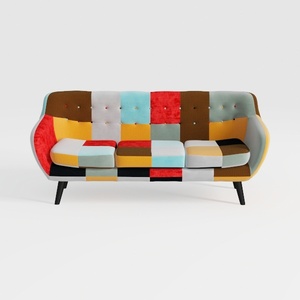

Colorful Patchwork Fabric Tufted Modern Sofa 3D Model

Minimalist Linen Fabric Slipcover Three Seater Sofa 3D Model
Homestyler is an easy-to-use online home design platform offering powerful 3D rendering, a vast collection of design projects, and helpful DIY video tutorials. It’s perfect for creating and visualizing your dream interior effortlessly.
Design Now for FREE
































