


The evolving "state of play" in technology has transformed how we interact with our living spaces, blending digital innovation seamlessly into home environments. As gadgets become central to daily routines, thoughtful spatial design now emphasizes integrating smart devices with comfortable furniture, creating versatile zones for work, relaxation, and entertainment within the home. Leveraging tools like Homestyler can greatly aid in visualizing and planning these multifunctional areas to maximize both utility and comfort.
Direct Answer
To create 3D models using Blender, it's best to begin by familiarizing yourself with the interface, then proceed to crafting simple geometric forms such as cubes or cylinders. Utilize editing tools like extrude, scale, and loop cuts to modify these shapes. Rather than starting with complex designs, most beginner projects succeed by progressively refining basic primitives.
With steady practice, newcomers can produce effective 3D models in Blender within a few days by following a streamlined process: starting from primitive shapes, entering edit mode, applying modifiers, and finally adding materials.
Quick Takeaways
Introduction
When beginners seek guidance on using Blender for 3D modeling, they often anticipate a complicated and technical workflow. However, professional modeling pipelines commonly commence with very simple geometry.
In my experience with interior design rather than purely game development, we frequently develop quick concept models for layouts, furniture ideas, and lighting studies. Blender proves to be one of the most adaptable tools for these tasks. Novices are often amazed at how much can be created from just a cube, a handful of editing operations, and sound modeling techniques.
This guide outlines a beginner-friendly workflow that I recommend to design students and new users keen on learning Blender efficiently without becoming overwhelmed by the software's full complexity.
What Is the Basic Blender Workflow for Creating 3D Models?
Key Insight: Almost all Blender models follow the same fundamental sequence: start with primitive geometry, modify the shape, enhance with modifiers, and then apply materials.
Beginners tend to rush into advanced sculpting tools, but the cleanest models typically result from careful edits to simple shapes. This method helps keep the mesh organized and easier to adjust later.
A standard workflow for beginners would be as follows:
According to official Blender documentation, production modeling heavily depends on non-destructive modifiers, which permit designers to alter shapes without permanently changing the mesh structure.
How Do You Create Your First Simple 3D Object in Blender?
Key Insight: Your initial Blender project should remain extremely simple—complexity at the start often hinders rather than helps learning.
An excellent first exercise is modeling a basic chair or table. These objects introduce the core tools without overwhelming the user.
Steps to build a beginner chair model:
Based on my mentoring experience, this single project teaches more essential Blender concepts than many extended tutorial series.
Why Do Most Beginners Struggle With Blender Modeling?
Key Insight: One frequent pitfall is focusing on memorizing tool commands instead of grasping the underlying logic of modeling.
Many tutorials emphasize shortcuts and menus, but skilled modelers think primarily about shape structure rather than software interfaces.
Common beginner missteps include:
Professional workflows prioritize large forms before working on mid-level and finally small details, a method widely adopted in game development and visualization studios.
Which Blender Tools Should Beginners Learn First?
Key Insight: Approximately eight fundamental tools cover most beginner modeling needs in Blender.
New users might find Blender’s interface daunting, yet most modeling jobs rely on a surprisingly concise set of essential tools.
Important Blender modeling tools include:
In architecture visualization and interior concept design, the Mirror modifier can almost halve modeling time when replicating symmetrical objects.
Can Blender Create Professional Quality 3D Models?
Key Insight: Blender is fully capable of generating high-quality models suitable for games, films, and product visualization.
Once seen as merely a hobbyist program, Blender has been used in numerous open movie projects and is increasingly integrated into professional production pipelines.
Industries actively incorporating Blender include:
While large studios often combine Blender with software like Maya or Houdini, the core modeling principles remain universally applicable.
How Can Beginners Improve Blender Modeling Skills Faster?
Key Insight: Looking beyond tutorials and engaging in brief, hands-on modeling projects accelerates skill development.
A common issue is "tutorial paralysis," where users watch many lessons but seldom practice modeling themselves.
A more effective method involves repeatedly completing small-scale projects.
Recommended beginner practice models include:
Each model teaches proportions, extrusion, and using modifiers without overwhelming new learners.
Answer Box
The fastest way to master creating 3D models in Blender is by starting with simple primitives and progressively refining them with editing tools such as extrude, loop cuts, and modifiers. Prioritizing simplicity, consistency, and clean topology ensures the best results for beginners.
Final Summary
FAQ
Is Blender suitable for 3D modeling beginners?
Certainly. Blender is free, well-supported, and offers thousands of tutorials, making it among the most accessible 3D modeling tools for newcomers.
How long does it take to learn Blender modeling?
Most beginners acquire basic Blender modeling skills within a week of dedicated practice; advanced mastery might require several months.
What is the easiest object to model in Blender?
Simple items like cups, chairs, and tables are excellent starter projects since they rely on primitive geometry and straightforward editing tools.
Do I need a high-end computer to use Blender effectively?
Basic modeling runs well on most modern hardware; high-performance GPUs primarily speed up rendering rather than the modeling process itself.
Is Blender used in professional settings?
Yes. It is employed in animation, game development, architectural visualization, and product rendering pipelines.
Can beginners create game-ready 3D models with Blender?
Absolutely. Many indie developers rely on Blender to design optimized 3D assets for game engines such as Unity and Unreal.
What is the optimal way for beginners to practice Blender modeling?
Selecting small, real-world objects to replicate enhances spatial reasoning and speeds up modeling proficiency through repeated practice.
Is Blender more difficult than other 3D software?
Though Blender has a learning curve, users often find it more efficient than traditional 3D programs once familiar with its interface.
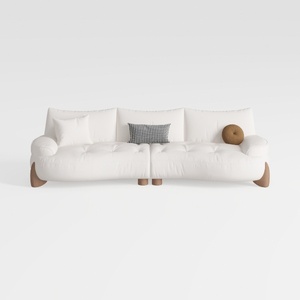
Minimalist White Fabric Curved Sofa With Decorative Throw Pillows 3D Model
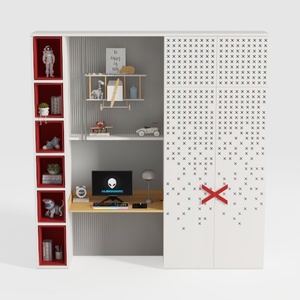

Modern Minimalist Multi functional Kids Study Wardrobe Cabinet 3D Model
Homestyler offers an easy-to-use online home design tool with stunning 3D renderings, inspiring design projects, and helpful DIY video tutorials. It’s perfect for anyone looking to create and visualize beautiful interior spaces effortlessly.
Diseño ahora GRATIS
































