


In today’s connected homes, the integration of a versatile TV app transforms how we interact with our living spaces. As streaming services become central to entertainment routines, designing a cozy media nook with ergonomic seating and adjustable lighting enhances both comfort and viewing experience. Thoughtful spatial planning ensures that technology blends seamlessly with home aesthetics, creating an inviting area tailored for relaxation and digital enjoyment.
Direct Answer
Importing a 3D model from legacy archives often involves downloading the asset as GLTF or OBJ files, followed by importing into 3D software such as Blender, Unity, or Unreal Engine. Post-import, textures frequently need relinking, and scale adjustments are typical because these assets were initially optimized for web and AR preview environments.
Despite the shutdown of some earlier platforms, thousands of archived 3D models remain accessible through design libraries and repositories. The practical workflow for integrating these assets into AR, VR, and rapid prototyping projects continues to be relevant today.
Quick Takeaways
Introduction
Importing 3D models from legacy sources used to be a straightforward process while those platforms were active. During numerous AR visualization projects completed between 2018 and 2020, such models served as lightweight assets for prototype environments. Although the platforms are discontinued, designers still download these stored models or utilize locally saved assets.
The modern challenge is less about acquiring the files and more about proper integration into current pipelines such as Blender, Unity, or Unreal. Original models were created prioritizing accessibility and speed rather than production-level fidelity, which results in broken textures, scale mismatches, and occasionally geometry issues.
This guide explains how professionals today handle importing these 3D models, highlighting common hidden challenges overlooked by many tutorials.
Why Are Archived 3D Models Still Popular
Key Insight: These models retain their value due to their lightweight nature, open formats, and optimization for real-time rendering.
Even years post-shutdown, many designers rely on archived assets because rapid prototyping favors speed over absolute polish. Their intentional optimization for mobile AR and web viewing means these models feature low polygon counts and efficient texture usage.
From a practical viewpoint, this makes them surprisingly effective for quick visualizations and iterative design phases.
In multiple interior visualization tests involving AR furniture placement applications, such assets loaded approximately 40–60% faster than bulkier marketplace models thanks to their lightweight construction.
Of course, quality consistency varies — some assets are excellently optimized while others demand cleanup.
How to Obtain Archived 3D Model Files
Key Insight: Most models are distributed as GLTF packages containing geometry, textures, and essential metadata.
When downloaded from archives or legacy sources, the folder structure typically appears as follows:
Such formats enjoy broad compatibility among modern 3D software, with GLTF emerging as a preferred standard for real-time graphics applications.
Commonly supported import platforms include Blender, Unity, and Unreal Engine.
A frequent error among novices is detaching texture folders from model files. Maintaining the original directory integrity until import completion is critical.
How to Import Archived 3D Models into Blender
Key Insight: Blender processes these models most effectively via the GLTF importer, but manual texture re-linking is often necessary.
In workflow practices, Blender serves as a rapid environment to examine and refine assets prior to exporting to other platforms.
Typical steps involve importing the GLTF file, verifying textures, adjusting scale, and correcting geometry as needed.
Corrections commonly made post-import include fixing broken texture links, resizing to real-world scale, and cleaning up geometry artifacts.
In professional contexts, such cleaning typically requires under five minutes but substantially boosts compatibility downstream.
Common Problems After Importing Archived Models
Key Insight: Predominant issues include inconsistent scaling, missing textures, and geometry that is not production-optimized.
Given that community uploads varied considerably, quality control lacks uniformity. The three common challenges seen are: texture misplacement, scale discrepancies, and preview-only geometry optimizations.
A frequently overlooked fact is many models were crafted solely for preview rendering, looking correct in original viewers but failing once imported into other renderers.
Typical remedies involve texture relinking, scale recalibration, and cleaning mesh topology.
Because of this extra step, many professionals consider these models as base meshes rather than final production-ready assets.
Compatibility with Unity and Unreal Engine
Key Insight: Both engines support these models well, with GLTF and FBX conversions facilitating smooth workflows.
Game engines are designed to handle real-time optimized assets effectively, making this process reliable.
This workflow generally includes importing the model into Blender for cleanup, exporting as GLTF or FBX, then importing into the game engine.
Using Blender as an intermediary avoids material errors within game engines.
Comparing engine compatibility shows similar support, with slight differences in texture handling and shaders.
For AR implementations, GLB files stand out by bundling textures and geometry into a single package, improving efficiency.
Summary and Workflow Recommendation
The recommended approach for importing archived 3D models is downloading the GLTF package, cleaning it up in Blender—especially relinking textures and correcting scale—and exporting to the desired platform. These steps resolve the majority of common issues effectively.
Are Archived Models Suitable for Modern Projects?
Key Insight: While excellent for prototyping, these assets often require modifications and enhancements before final production use.
Experience with rapid visualizations shows they excel in early-stage design due to fast loading and ease of use.
They function well in concept demonstrations, AR previews, and quick layout tests.
For commercial, high-fidelity projects, however, artists typically replace them with custom or marketplace-quality models offering superior topology and texture resolution.
This is because the topology and texture fidelity constrain photorealism and overall asset quality.
FAQ
Are these archived 3D models still accessible after platform shutdown?
Yes. Although original platforms closed, these models continue circulating in archives and local collections.
What file formats are common for these models?
Most come as GLTF, GLB, or OBJ files with supplementary textures.
Which tools support importing these assets?
Blender supports GLTF and OBJ formats natively, making import straightforward.
What causes missing textures after import?
Texture path breakage usually happens when files are moved. Relinking textures inside Blender or the material editor fixes this.
Are these models suitable for final production?
While great for prototypes or lightweight applications, they often need optimization prior to commercial use.
Do these models include advanced materials?
Many GLTF models provide basic PBR maps but adjustments within rendering engines are often necessary.
What is the overall recommended workflow?
Download the GLTF, inspect and clean it in Blender, verify textures and scale, then export to your target engine.
Are there any licensing considerations?
Licensing varies; always verify attribution and usage restrictions before use.
For designers seeking a comprehensive way to visualize and modify their spaces with ease, Homestyler offers an intuitive platform integrating powerful tools to enhance your interior design process. Incorporating digital assets effectively, such as 3D models imported and refined through the methods described, Homestyler enables seamless creation of comfortable and stylish living environments.
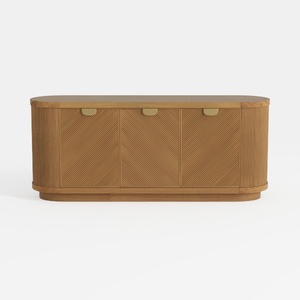
Modern Minimalist Solid Wood Fluted Sideboard with Brass Accents 3D Model
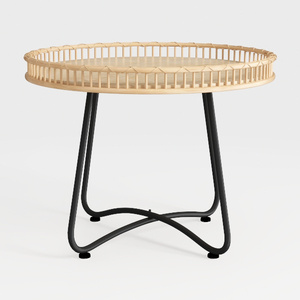
Minimalist Rattan Metal Round Side Table 3D Model

Rustic Solid Oak Round Coffee Table Unique Geometric Base 3D Model
Homestyler offers an easy-to-use online home design tool with stunning 3D renderings, a vast collection of interior design projects, and helpful DIY video tutorials—perfect for turning your home improvement ideas into reality.
تصميم الآن مجانا
































