


As new Xbox Game Pass games continue to expand the horizons of digital entertainment, many gamers are seeking comfortable and functional spaces that enhance their immersive experience. Creating a dedicated gaming nook with ergonomic seating and smart lighting can transform any room, blending technology seamlessly with home design to support extended play and relaxation.
Direct Answer
You can display 3D models on your website by integrating a WebGL-based viewer, such as a model viewer component, a Three.js scene, or a hosted service. Most modern solutions enable uploading 3D files like GLB, GLTF, or USDZ and embedding them easily via scripts or iframes. This results in an interactive model allowing visitors to rotate, zoom, and explore directly within the browser.
Quick Takeaways
Introduction
Over recent years, I've collaborated with various design studios and product brands aiming to showcase 3D models on their websites instead of relying on static images. This interactivity immediately boosts user engagement, as visitors can manipulate products to understand materials and proportions better, fostering trust and prolonging site visits.
Many teams mistakenly think displaying 3D content requires complex game-engine-level programming. However, advancements in browser technology have simplified the process considerably. The true challenge lies in embedding models that load quickly, are mobile-friendly, and genuinely aid user understanding of the product.
This article will explore effective ways professionals present 3D models on websites today, the most efficient tools available, and common pitfalls that often cause 3D experiences to fail.
Why are 3D models becoming prevalent on modern websites?
Key Insight: Interactive 3D content significantly enhances product comprehension compared to traditional static images.
In categories such as furniture, consumer electronics, architecture, and industrial equipment, users want to grasp scale, construction, and materials before purchasing or making inquiries.
Conventional product photos usually capture only limited angles, failing to convey full detail. By contrast, 3D models empower visitors to freely examine items, overcoming these limitations.
Based on my experience with visualization teams, major advantages include:
Leading brands like Apple, IKEA, and Nike extensively leverage interactive 3D visualization to let customers inspect products prior to buying, and smaller companies increasingly adopt these methods thanks to efficient web technologies.
How to embed a 3D model on your website?
Key Insight: Utilizing a browser-based viewer component is the simplest approach to display 3D models on websites.
Most contemporary websites depend on WebGL-driven viewers, rendering 3D graphics directly in browsers without plugins.
Common implementation methods encompass:
A typical workflow involves preparing the model, uploading it to the viewer, and embedding the generated code. Setting this up can often be completed within an hour if the model is ready.
Which file formats best suit web 3D models?
Key Insight: GLB and GLTF are the most dependable file types for web-based 3D models.
Although numerous 3D formats exist, only a few are efficiently supported by browsers today.
The most prevalent formats are:
In practical projects I've encountered, GLB is typically the preferred format due to simplified deployment and fewer texture issues.
Common mistakes when adding 3D models to websites
Key Insight: The biggest cause of poor web 3D experiences is inadequate optimization, not the 3D technology itself.
Teams often worry interactive models will degrade site speed, but oversized assets are usually the culprit.
Typical issues include:
For example, in a furniture project I advised on, an original 3D file exceeded 120MB. After using polygon reduction and texture compression techniques, the size was cut to 6MB without sacrificing visual quality.
This drastically improved page loading times.
Should you build a custom 3D viewer or opt for a platform?
Key Insight: Prebuilt or hosted viewers mostly offer better balance of convenience and maintenance than custom 3D engines.
While custom solutions provide maximum flexibility, they typically involve greater costs and upkeep challenges.
Generally, teams select between:
Hosted viewer platforms are ideal for small businesses or portfolios, providing ease of use with good performance.
Answer Box
The most straightforward way to display 3D models on websites is using a WebGL-based viewer supporting GLB or GLTF files. Proper optimization ensures fast loading while enabling interactive rotation and inspection.
How can you optimize 3D models to enhance website performance?
Key Insight: Combining efficient geometry with compressed textures enables practical interactive 3D on most sites.
Performance gains often stem from:
Tools like Blender, glTF-Transform, and mesh decimation utilities effectively shrink file sizes greatly while maintaining visual fidelity.
Final Summary
FAQ
How do I embed 3D models on a website without coding?
One option is uploading models to a platform and embedding them via iframe, requiring little technical skill. Homestyler can assist in designing your website layout to accommodate such 3D features smoothly.
What is the best file format for website 3D models?
GLB is generally regarded as optimal because it bundles geometry, materials, and textures in one compact file.
Do 3D models slow down website loading?
If not optimized, they can, but compressed models typically load quickly, often within a few megabytes.
Are mobile browsers capable of displaying 3D models?
Yes, most modern mobile browsers support WebGL and can render interactive 3D content smoothly.
Is Three.js required for showing 3D models?
No, while powerful, simpler viewer components can suffice for most purposes.
Can augmented reality be added to website 3D models?
Absolutely. Many viewers support AR using formats like USDZ or WebXR.
What is a recommended file size for web 3D models?
Ideally under 10MB for fast loading, though more complex items might be slightly larger.
Do interactive 3D models improve product pages?
Yes, by allowing users to explore shape, scale, and materials directly, enhancing understanding and engagement.
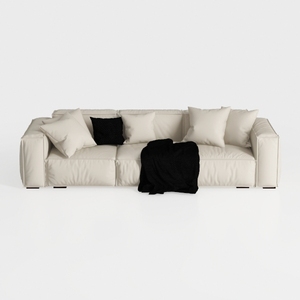
Minimalist Modern Leather Wide Sofa With Throw Pillows and Blanket 3D Model
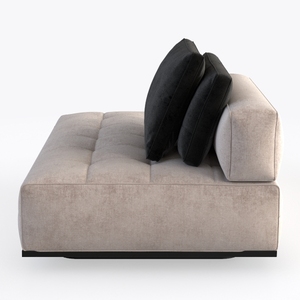
Minimalist Fabric Tufted Chaise Lounge Sofa 3D Model

Modern Black Leather Curved Sectional Sofa with Throw Pillows 3D Model
Homestyler is an easy-to-use online home design platform offering powerful 3D rendering tools, a vast collection of interior design projects, and helpful DIY video tutorials—perfect for creating and visualizing your dream space effortlessly.
Concevez maintenant gratuitement
































