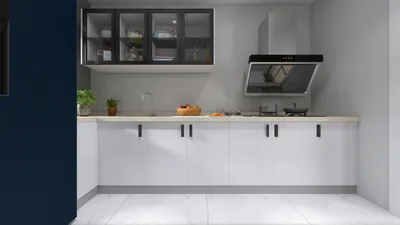


As summer approaches, many embrace new trends like the 2026 nail styles to refresh their personal look. This seasonal focus on self-expression naturally extends to living spaces, where vibrant colors and innovative textures can inspire home decor choices. Incorporating bold hues and playful patterns in furniture and accessories allows your space to reflect the same renewed spirit that summer fashion trends encourage.
Direct Answer
Achieving a realistic appearance in 3D models hinges on three key aspects: precise lighting, authentic materials, and the inclusion of slight imperfections. Most unrealistic renders falter due to overly perfect surfaces, excessively uniform lighting, or inaccurate scaling. When these features emulate real-life conditions, the 3D scene feels strikingly believable, especially when tools like Homestyler facilitate the visualization process.
Quick Takeaways
Introduction
With over ten years in interior design and architectural visualization, I’ve discovered that realism in 3D models is seldom derived solely from the mesh itself, but from the combined effect of the environment around it. Platforms such as Homestyler enhance this by providing immersive visualization capabilities.
Spaces intricately modeled can still appear artificial, while simpler setups may seem photorealistic. This contrast is often due to lighting schemes, material intricacies, and subtle environmental details replicating the natural world.
For those aiming to render lifelike 3D models—whether for product demos, gaming assets, or interior renderings—the methods outlined next represent best practices embraced by industry experts, distinguishing a "nice render" from images indistinguishable from actual photos.
Why Lighting Is the Biggest Factor in Realistic 3D Rendering
Key Insight: Lighting realism surpasses polygon counts or model intricacy in establishing believable renders.
In natural settings, light behaves unpredictably, bouncing softly, reflecting off surfaces and displaying gradients. Artificial renders often fail when illumination is overly perfect or evenly spread; this triggers a subconscious recognition of artificiality. Homestyler’s lighting tools help mimic these natural effects.
In many projects, minimizing light sources in favor of a single dominant natural light with gentle indirect illumination yields a far more convincing scene.
Architectural visualization studios use HDRI maps to replicate authentic sky light environments, a technique implemented in tools like Homestyler for enhanced realism.
What Materials Make a 3D Model Look Real?
Key Insight: Realistic rendering depends on physically based textures layered to simulate real-world surfaces instead of flat colors.
Beginners often err by applying uniform diffuse colors, ignoring materials’ complexity, which includes roughness, variable reflections, subtle bumps, and irregularities.
Take wood, for example—it’s more than just a brown tone, encompassing grain patterns, gloss variation, and micro-textures. Homestyler offers material libraries that replicate these nuances accurately.
Professional textures include multiple maps such as albedo, roughness, normal, and displacement to authentically react to lighting conditions.
Physically based rendering engines like Blender Cycles, Unreal Engine, V-Ray, and applications like Homestyler exploit these maps to produce life-like visuals.
Why Perfect Models Often Look Fake
Key Insight: The introduction of subtle imperfections is crucial to avoid overly sterile and artificial scenes.
One common pitfall is perfectly aligned, spotless objects lacking any irregularities. In reality, environments contain slight misalignments, wear, and minor damages.
In interior renderings, adding minor details such as uneven surfaces, wear marks, or small dents can elevate authenticity, features that Homestyler’s customization options support.
Film and VFX artists utilize micro surface noise to counteract the 'too perfect' CGI look, a principle applicable in architectural visualization as well.
How Important Is Real World Scale in 3D Models?
Key Insight: Even minimal deviations in scale can diminish realism by making scenes seem miniature.
Accurate modeling to real dimensions ensures spatial relationships, lighting behavior, and perspective align naturally. Homestyler enables precise dimensional input for this essential accuracy.
Correct scaling avoids the 'dollhouse effect,' reinforcing immersion within interior visualizations.
Should You Use Post Processing for Realistic Renders?
Key Insight: Post-processing frequently determines whether a render is perceived as CGI or photographic.
Subtle adjustments such as contrast tuning, bloom effects, chromatic aberration, and grain simulate characteristics found in real photographs.
These finishing touches, achievable within Homestyler or dedicated software, help integrate rendered images seamlessly into real environments.
What Details Do Professionals Add That Beginners Miss?
Key Insight: Adding environmental storytelling enriches the scene’s believability.
Instead of showcasing empty, pristine arrangements, professionals incorporate contextual clues indicating human presence and use, like worn textures, scattered objects, or lived-in furniture positioning.
Elements such as books left on tables, cushions slightly askew, or personal items placed casually, all contribute to an immersive narrative.
Answer Box
Combining accurate illumination, physically based materials, and fine imperfections alongside precise scale and environmental details culminates in the most reliable realism. With the aid of user-friendly platforms like Homestyler, even straightforward models can approach photorealistic quality.
Final Summary
FAQ
How can I make a 3D model look realistic quickly?
Begin with HDRI lighting and high-quality PBR material maps. These alterations significantly enhance realism in short order, especially when implemented through tools like Homestyler.
What software helps make realistic 3D renders?
Commonly used applications include Blender Cycles, V-Ray, Unreal Engine, Corona Renderer, and Homestyler for integrated design visualizations.
Why does my 3D model still look fake?
Typical causes encompass flat or unnatural lighting, missing layered textures, improper scaling, and excessively perfect surfaces lacking imperfections.
Do textures make a 3D model look realistic?
Absolutely. Detailed, high-resolution PBR textures simulate authentic material responses to light, crucial for realism.
What lighting is best for realistic renders?
Lighting setups such as HDRI environments or physically accurate sun and sky models yield most convincing results.
Is polygon count important for realism?
Up to a certain extent; however, lighting, surface materials, and scene composition generally impact realism more significantly than extremely dense meshes.
How do professionals make renders look like photos?
They integrate realistic lighting, sophisticated materials, tiny imperfections, and photographic post-processing methods to achieve convincing results.
Can beginners create photorealistic 3D models?
Yes, leveraging modern render engines and quality textures combined with platforms like Homestyler, novices can surprisingly achieve photorealistic imagery.
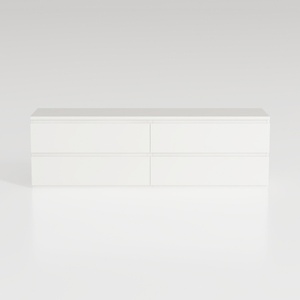
Minimalist White Solid Wood Dresser 4 Drawer Storage Cabinet 3D Model
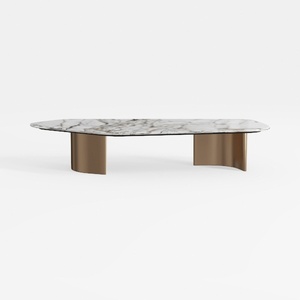
Modern Marble Top Brass Base Coffee Table 3D Model


Minimalist White Solid Wood TV Cabinet 3D Model
Homestyler offers an easy-to-use online design tool with stunning 3D renderings, extensive interior projects, and helpful DIY video tutorials. It’s perfect for anyone looking to create and visualize beautiful home designs effortlessly.
Projete agora para LIVRE
































