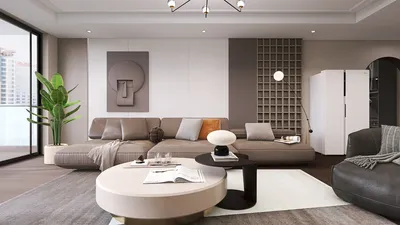


With the excitement around events like Google I/O driving innovation in technology, many people are looking to integrate smart solutions into their daily lives. This trend encourages the creation of home spaces equipped with multifunctional furniture that seamlessly supports tech gadgets. Designing interiors with smart desks or adjustable seating can enhance productivity while creating an environment that complements cutting-edge devices and fosters a balanced lifestyle.
Executive Summary
The advent of free AI-powered home design applications has revolutionized how individuals conceptualize and organize their living environments. What previously necessitated costly licenses or professional consultation can now be accessed immediately via a mobile app or web browser at no charge. These platforms utilize computer vision combined with generative AI to interpret room images, decipher spatial layouts, and generate photorealistic designs in numerous styles within seconds. This article explores the leading free AI home design options available in 2025, delves into their underlying technologies, compares free features with premium upgrades, and offers practical advice on deciding when free tools suffice or when enhanced capabilities are beneficial.
Understanding the Mechanics of AI Home Design
Grasping the process occurring behind the scenes after uploading a room photo and initiating the design generation provides valuable insight before evaluating various platforms.
Phase 1 — Computer Vision Processing. The AI system analyzes your image to detect architectural components such as walls, floors, ceilings, windows, doors, and installed furnishings. This procedure, known as semantic segmentation, enables the AI to comprehend the spatial organization.
Phase 2 — Style Interpretation. The model references a vast database of interior décor images learned during training. It differentiates styles like "Scandinavian"—characterized by light woods, neutral tones, and simplicity—from "Industrial" featuring exposed brick and metallic elements, or "Japandi," which fuses Japanese minimalism with Scandinavian coziness.
Phase 3 — Generation of Renderings. Leveraging diffusion mechanisms or generative adversarial networks (GANs), the AI synthesizes a new depiction preserving the room’s original dimensions and layout, substituting textures, colors, furniture, and décor to align with the chosen style.
Phase 4 — Maintaining Realistic Perspective. Quality AI tools retain accurate depth and scale so that newly rendered furniture appears naturally integrated, avoiding distortions or unnatural placements. This fidelity differentiates practical design solutions from simple visual effects.
This complete transformation generally occurs within 5 to 30 seconds, influenced by server workload and image resolution requirements.
Comparing Premier Free AI Home Design Platforms
The marketplace has significantly advanced, with platforms like Homestyler offering freemium access models that compete effectively with specialized design software. The following are notable services providing valuable free features:
*Some options may require technical configuration for self-hosting.
DecorAI is renowned for its free tier, featuring AI trained specifically on interior spaces, yielding realistic rather than abstract designs. Users can generate multiple designs daily at standard definition, choosing from over 20 style presets. The primary limitation is watermarking, which rarely impedes personal projects.
Planner 5D approaches design through AI-augmented 2D and 3D floor planning tools, as opposed to purely photo-based AI transformations. It allows full use of 2D editors and basic furniture libraries in its free variant, ideal for those needing precise spatial planning, albeit requiring more hands-on input than instant AI renderers.
Homestyler offers a freemium structure with access to a comprehensive 3D planning interface, extensive furniture resources, and an AI assistant named "Home Copilot." This platform excels in multi-room layouts, appealing to whole-house redesign projects. While free AI usage is credit-limited, manual design capabilities remain fully accessible.
VisualGPT simplifies the experience with no login or downloads. Users upload photos, select style themes, and receive multiple design alternatives simultaneously for easy comparison. However, it features fewer style presets, serving best for early conceptual experimentation.
Free Versus Premium: What Features Do You Gain?
Recognizing distinctions between no-cost and paid plans sets pragmatic expectations:
Free tiers are sufficient for style exploration, conceptual validation, and communicating ideas to collaborators. Restrictions mostly impact professionals who require bulk outputs, commercial rights, or high-resolution visuals suitable for presentations.
Effective Tips to Optimize Free AI Design Tools
Photo quality critically affects output accuracy. Avoid blurry, dim, or cluttered images as they tend to confuse the AI. Prior to generation:
Avoid wasting limited daily credits on haphazard tests. Spend time researching specific interior styles through platforms like Pinterest or Instagram, identify a few styles of interest, and generate designs purposefully.
Each free tier caps daily usage but nothing stops use across multiple platforms. For instance, combine DecorAI for photorealistic renders, Planner 5D for floor planning, and VisualGPT for quick style comparisons—effectively multiplying your total free capacity.
Even if exporting high-res images isn't an option, saving screenshots can preserve your results. Organize them by room to facilitate side-by-side mood-boarding at no extra cost.
If tools reset usage limits daily, plan your design sessions accordingly. Distribute generation efforts across various rooms instead of focusing all attempts on one space.
Remain on free plans throughout initial exploration. Upgrade to a subscription briefly when final high-quality exports are necessary for contractors or purchasing decisions.
When Are Free Tools Sufficient and When Are They Not?
A combined strategy is optimal: employ free AI tools to gain design insights and preferences, then consult a professional designer for extensive projects. Advanced platforms offering full 3D modeling bridge rapid visualization and production-ready outputs, reducing time and cost for consultations.
FAQ
Many platforms like VisualGPT offer core AI design capabilities without requiring account creation or downloads. Others including DecorAI, Planner 5D, and Homestyler provide fully functional free tiers with limitations such as daily generation caps or watermarking — though AI rendering remains genuinely accessible at no cost.
Free AI design applications excel at visualizing color schemes, styles, and overall aesthetics, but they are not reliable for precise measurements or generating construction documents. Their strength lies in answering what a room would look like styled differently.
Free tiers generally exclude commercial usage rights. Users intending to employ renders professionally, such as interior decorators or real estate agents, should consider paid options that include licensing.
Kitchen and bathroom visualizations are especially popular with AI tools, enabling cost-effective previews of cabinetry, fixtures, countertops, and tile layouts that save considerable renovation expenses.
Generation limits vary: for example, DecorAI permits several daily; VisualGPT supports multiple per session without sign-in; Homestyler provides AI credits replenished periodically. Terms are subject to change as companies update pricing.
AI tools focus on visualization and ideation and cannot replace the full scope of services offered by professional designers, such as structural expertise, project coordination, and personalized sourcing. The best workflow combines AI for early exploration and human designers for execution.
Trustworthy platforms process uploaded photos transiently without persistent storage. Users should always download software from official sources, review privacy statements carefully, and avoid sharing sensitive personal images online.
Final Thoughts
Free AI-driven home design software has advanced to deliver significant, practical capabilities beyond mere novelty. These tools enable anyone to create photorealistic digital renderings that assist meaningful design decisions at zero financial cost.
Matching the tool to your needs is key: DecorAI excels for instant room makeovers, Planner 5D suits detailed floor layouts, Homestyler is ideal for full-home projects, and VisualGPT facilitates effortless experimentation.
Maximize free plans wisely by planning your design attempts and combining platforms. When transitioning from concept to reality, you’ll have a clear vision crafted through cost-free exploration.

Minimalist White Metal Solid Wood Double Office Desk 3D Model
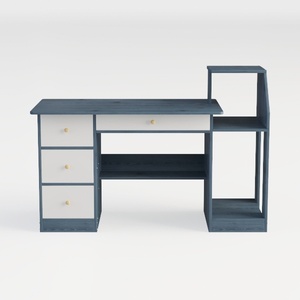
Modern Minimalist Blue Solid Wood Multi drawer Storage Desk 3D Model


Homestyler offers an easy-to-use online design tool packed with 3D rendering, inspiring interior projects, and helpful video tutorials. It’s perfect for bringing your home design ideas to life, whether you’re a beginner or a seasoned decorator. Try it and transform your space today!
Design Now for FREE
































