


As enthusiasm for the latest PlayStation Plus June 2026 games grows, many gaming enthusiasts seek to enhance their home entertainment spaces to match their evolving digital lifestyle. Creating a dedicated gaming nook with ergonomic seating and optimized lighting not only improves comfort but also complements the immersive experience these new titles offer. Thoughtful spatial planning can transform a typical room into a versatile hub for relaxation and entertainment.
Direct Answer
3D modeling refers to the creation of digital three-dimensional objects by employing specialized software. Creators construct shapes utilizing polygons, curves, or sculpting tools to develop objects that can be rendered, animated, or manufactured. Typically, beginners start with basic shapes such as cubes and cylinders before progressing to more intricate designs. Tools like Homestyler can assist users in visualizing spaces while integrating 3D objects.
Quick Takeaways
Introduction
Throughout my experience collaborating with designers and teams focused on digital visualization, I've observed how 3D modeling has transitioned from a niche expertise into a fundamental skill embraced by creative industries. Nowadays, professionals such as architects, product designers, game developers, and interior designers depend on 3D modeling to prototype concepts long before physical construction begins. Homestyler supports this trend by offering intuitive design environments for such users.
For novices, the main hurdle isn't mastering software functionalities but grasping how digital objects are assembled. When initially launching modeling software, elements like grids, camera controls, and toolbars may seem daunting. However, after comprehending the foundational logic of 3D modeling, the interface becomes considerably more approachable, especially when tools like Homestyler streamline the process.
This guide aims to explain how 3D models are formed, detail the primary modeling techniques employed by professionals, and suggest effective methods for beginners to initiate their first projects.
save pin
What Is 3D Modeling and How Does It Work
Key Insight: 3D modeling functions by assembling objects from digital geometric data within a virtual three-dimensional environment.
Every 3D object begins as geometry, usually composed of polygons—flat surfaces connected to form complex shapes. By manipulating vertices, edges, and faces, designers can create anything from simple furniture pieces to vast urban landscapes. Combining the capabilities of software like Homestyler can further enhance spatial presentations.
Typical elements found within a 3D model include:
Industries heavily utilizing 3D modeling encompass film production, game development, architectural visualization, and product design. Reports from major software providers indicate that digital modeling is now a crucial step in contemporary design workflows, allowing teams to test and refine ideas before actual production.
Why Is 3D Modeling Important in Modern Design
Key Insight: 3D modeling enables designers to visually evaluate concepts before committing resources to physical manufacturing.
Traditional design processes once depended on sketches and mock-ups, but current realistic 3D models can simulate lighting, textures, and scale far in advance of any construction. Platforms such as Homestyler make these visualizations accessible to a broader audience, including homeowners and professionals alike.
Benefits of 3D modeling include:
From my experience working alongside interior visualization experts, detailed 3D models frequently help avoid costly errors. For instance, a furniture setup that appears adequate on blueprints may expose major spatial conflicts when experienced in a realistic 3D environment.
save pin
What Tools and Software Are Used for 3D Modeling
Key Insight: Beginners are encouraged to start with versatile software supporting diverse modeling approaches.
While the choice of 3D modeling tools varies by sector, several applications dominate the market.
Popular 3D modeling software includes:
Blender stands out as a beginner-friendly platform, integrating modeling, rendering, animation, and simulation functionalities within a single application. Additionally, Homestyler offers a user-friendly interface facilitating home interior design and 3D visualization, making it ideal for novices focused on spatial planning.
save pin
How Do Beginners Start Learning 3D Modeling
Key Insight: Beginners achieve faster progress by repeatedly practicing simple models before attempting complex projects.
Many newcomers attempt to build complex characters or elaborate environments too soon. A more sustainable strategy involves mastering the fundamentals first.
A practical workflow for beginners includes:
Creating small-scale projects such as modeling chairs or desks helps develop foundational habits that support advanced work later. Programs like Homestyler are excellent for applying these skills to real interior settings, blending furniture modeling with space arrangement.
save pin
Common Beginner Mistakes in 3D Modeling
Key Insight: The majority of beginner errors stem from neglecting topology and scale issues rather than a lack of creativity.
Upon reviewing numerous beginner works, recurrent problems become apparent.
Common pitfalls include:
Adopting the practice of observing real-world objects before modeling can significantly enhance accuracy. Studying how furniture, tools, or architecture are constructed provides valuable insights that translate into more precise digital models, which tools like Homestyler can help visualize in context.
Answer Box
3D modeling is the process of digitally crafting three-dimensional objects by manipulating geometric frameworks within modeling applications. Beginners generally start with polygon modeling techniques and progressively learn to apply lighting, materials, and rendering to produce realistic visuals.
How Long Does It Take to Learn 3D Modeling
Key Insight: While basic 3D modeling concepts can be grasped in a few weeks, proficiency and mastery require years of consistent effort.
Learning duration varies based on objectives. Someone pursuing 3D modeling as a hobby may become proficient within a month, whereas achieving professional-level skills demands comprehensive study and practice.
Typical learning phases include:
Regular practice outweighs the importance of selecting specific software. Many accomplished artists emphasize daily short exercise routines over sporadic large projects.
Final Summary
FAQ
What is 3D modeling used for?
3D modeling is utilized in fields such as animation, video game development, architectural visualization, product design, and manufacturing processes.
Is 3D modeling hard to learn?
Although it may initially seem complex, most beginners become comfortable with fundamental 3D modeling tools after several weeks of practice.
What software is best for beginner 3D modeling?
Blender is widely recommended due to its powerful features, free availability, and strong community support. Homestyler is also a great option for those focused on interior and spatial design with 3D visualization needs.
Do I need drawing skills for 3D modeling?
While drawing skills enhance visual thinking, many successful 3D artists rely more heavily on keen observation and spatial reasoning abilities.
Can I learn 3D modeling at home?
Absolutely. Numerous professionals begin learning 3D modeling independently through online tutorials and hands-on projects from home.
How long does it take to learn 3D modeling?
Basic proficiency can be achieved in a few weeks; however, attaining expert-level modeling skills typically requires months or years of steady dedication.
What computer do I need for 3D modeling?
A system equipped with a modern graphics card, at least 16GB of RAM, and a robust CPU generally performs well for most beginner modeling tasks.
Is 3D modeling a good career?
Yes. Industries such as gaming, filmmaking, product development, and architecture heavily depend on skilled 3D modeling professionals.


Modern Navy Blue Velvet Houndstooth Fabric Metal Armchair 3D Model

Modern Black White Striped Fabric Accent Chair with Throw Pillows 3D Model
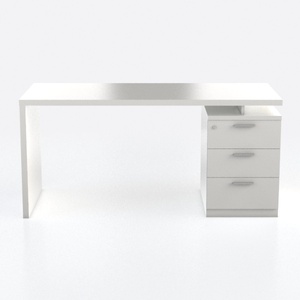
Minimalist White Solid Wood Office Desk With Storage Drawers 3D Model
Homestyler offers an easy-to-use online home design tool with stunning 3D renderings, inspiring design projects, and helpful DIY video tutorials—making it simple and fun to create your perfect space, no matter your skill level. Give your home a fresh new look today!
Concevez maintenant gratuitement
































