

Transforming a 3D model into a virtual reality (VR) format opens up thrilling opportunities for designers, immersing users into their imaginative worlds. With technology evolving rapidly, creating an engaging VR experience is now more attainable than ever. So, what steps are involved in bringing your 3D model to life within a VR setting? Let’s explore!
Grasping the Fundamentals of VR Development
Before delving into the process, it's crucial to comprehend what VR truly means. Virtual reality provides a simulated experience that can either mimic the real world or diverge dramatically from it. To successfully convert your 3D model into VR, familiarize yourself with several fundamental technologies: game engines, VR headsets, and interactive functionalities.
Do you have a favorite game engine in mind? Unity and Unreal Engine stand out as the most favored alternatives for VR developers. These platforms not only allow the importation of your 3D models but also enable the application of textures and development of interactive components. Mastering these tools can significantly enhance your overall design workflow.
Steps to Transform Your 3D Model into VR
1. **Select Your Game Engine:** Begin with choosing a game engine that accommodates VR development. Unity is highly recommended for newcomers, thanks to its user-friendly interface and comprehensive resources available for learners.
2. **Import Your 3D Model:** After creating or sourcing your 3D model—whether it’s a character, setting, or object—import it into your chosen game engine. Ensure that the model’s file format is compatible, such as .FBX or .OBJ.
3. **Establish VR Device Compatibility:** Set up your game engine to recognize the specific VR hardware you aim to target. Unity and Unreal Engine both possess built-in support for popular VR headsets like Oculus Rift and HTC Vive.
Enhancing Your Content for VR
Developing VR experiences demands a focus on optimization. While high-quality graphics are imperative, they shouldn’t compromise the performance. Lowering the polygon count and reducing texture sizes can improve rendering and promote smooth real-time interactions.
Have you thought about how users will navigate through your VR environment? Consider incorporating teleportation or smooth movement features to ensure a fluid experience for users in your virtual space.
Evaluation and Adaptation
The concluding step emphasizes comprehensive testing. It's vital to test your VR experience with actual users, collect insightful feedback, and implement necessary modifications. Testing is essential for understanding user interactions and enhancing your application’s performance.
What do you think is the most challenging part of developing for VR? Engaging with the community can offer valuable perspectives and assistance as you confront these hurdles!
Frequently Asked Questions
Q: Which game engine is best for beginners? A: While both Unity and Unreal Engine are excellent options, many beginners find Unity more accessible, thanks to the abundance of learning resources readily available online.
Q: Can I use my custom models for VR? A: Certainly! As long as your models are in a compatible format and optimized for VR use, they can be seamlessly integrated into your project, especially with tools like Homestyler to help streamline the process.
Q: Are programming skills necessary for VR content creation? A: Basic programming knowledge can be advantageous, but numerous resources, templates, and drag-and-drop tools are available to assist you in crafting captivating VR experiences without heavy coding requirements.
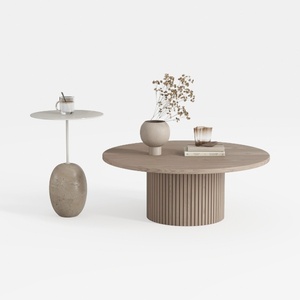

Minimalist Solid Wood Round Coffee Table and Stone Side Table Set 3D Model

Minimalist Black Solid Wood Irregular Coffee Table 3D Model

Natural Green Vine Wall Panel Decorative 3D Model
Homestyler is an outstanding online home design platform that empowers you to create stunning spaces effortlessly. With its user-friendly design tool, impressive 3D rendering, and a wealth of inspiring design projects and video tutorials, you can easily transform your home ideas into reality!
Design Now for FREE
































