

Creating a 3D character model from a 2D image is an exciting blend of artistic vision and technical proficiency. This approach allows creators to transform flat visuals into dynamic, three-dimensional representations, crucial for animation, gaming, and product visualization. Here is a comprehensive guide to navigating this process effectively:
1. Analyze Your 2D Inspiration
Examine your 2D reference from various angles. Take note of the character's proportions, key postures, color schemes, and unique traits. If feasible, gather multiple views (front, side, and back) to enhance spatial comprehension.
2. Develop a Framework
Before diving into modeling, construct a thorough framework by using your 2D image as a baseline in your 3D software. Import front and side views to act as visual references, ensuring that your 3D character matches the intended design.
3. Create Basic Forms
Utilize basic geometric shapes (spheres, cubes, cylinders) to outline the fundamental structure of your character. Concentrate on achieving the correct proportions initially, as this step is vital for maintaining balance and symmetry in your design.
4. Enhance the Outline
Slowly sculpt and shape the base mesh to conform to the curves and lines of your 2D character. Focus on anatomical accuracy and defining edges to preserve the spirit of the original art.
5. Incorporate Features and Details
Once the primary form is established, introduce intricate details like facial features, fingers, clothing, and accessories. Employ sculpting tools for organic forms or use subdivision modeling for cleaner, mechanical structures.
6. Apply Textures and Colors
Unwrap your 3D model's UVs and craft texture maps that align with the character's artistic style. This might involve hand-painted textures for a cartoonish look or more realistic materials to add depth and authenticity.
7. Rigging and Positioning
To prepare for animation or interactive scenarios, implement a rig within your model, facilitating realistic movement and positioning.
In my experience as an interior designer, the methodology for 3D character modeling bears a remarkable resemblance to crafting spatial designs: grasping structural concepts, layering details, and consistently referring back to the original idea. These fundamental principles are equally relevant when visualizing spatial environments or room designs. Tools like Homestyler allow us to animate 2D room sketches, mirroring the evolution from 2D character illustrations to sophisticated 3D models.
Tip 1:
Always make incremental saves of your project. 3D modeling is an iterative journey—should you make a mistake or wish to revisit a previous design, having a version history can be invaluable.
FAQ
Q: Which software is ideal for transforming 2D images into 3D character models?
A: Widely used options encompass Blender (free), Autodesk Maya, and ZBrush. Each allows for image plane references and advanced sculpting functionalities.
Q: How can I ensure my 3D model reflects the proportions of the 2D reference?
A: Utilize image planes as templates within your 3D workspace to provide accurate references during modeling.
Q: What if I only possess a single 2D view of the character?
A: Analyze the style and research similar characters, or use your creativity and knowledge of anatomy to construct the side and back views.
Q: Is there a way to automate any aspects of the 2D-to-3D transition?
A: Some AI-assisted tools and plugins can facilitate base mesh creation; however, manual adjustments are still essential to achieve unique, tailored characters.
Q: How can 3D character models be utilized in interior design projects?
A: 3D character models can enhance virtual environments by providing realistic scale, appearing in architectural visualizations, or contributing to storytelling in interior design presentations.

Modern Black Oak Arched Glass Display Cabinet 3D Model
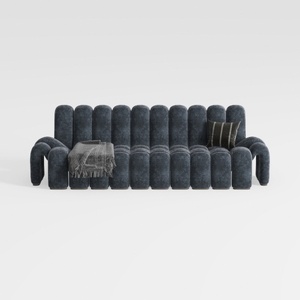

Modern Dark Blue Fabric Channel Tufted Oversized Sofa 3D Model
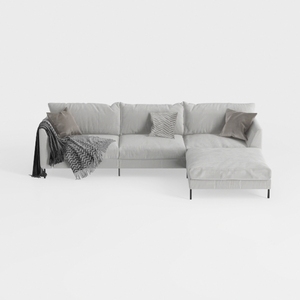
Minimalist Light Gray Fabric L Shape Sectional Sofa 3D Model
Homestyler is your go-to online home design platform, perfect for turning your dreams into reality! With its user-friendly design tool, stunning 3D renderings, and a wealth of inspiring design projects and DIY video tutorials, creating your ideal space has never been easier. Start designing today!
立即免费设计
































