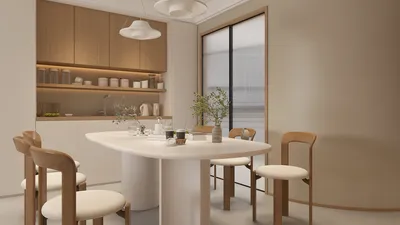


Transforming photos into 3D renderings can significantly enhance your design projects, providing a captivating way to present spaces. Whether you're an interior designer or a digital creator, developing this skill can enrich your portfolio and impress clients. Here's a detailed guide on effectively converting photos into eye-catching 3D renderings, utilizing tools like Homestyler.
Step 1: Select the Right Software
To start, it's essential to choose software that specializes in 3D modeling and rendering. Some popular tools include:
Pick software that suits your experience level and project needs.
Step 2: Import Your Photo
Once you have chosen your software, import the photo you want to use as a reference. This image will assist you in your modeling process. Make sure the photo is of high clarity and quality to achieve the best results.
Step 3: Set Up the Scene
Next, establish your scene by creating a 3D environment that corresponds with the perspective of your photo. Adjust the camera angle to match your image, which is crucial for producing a realistic rendering.
Step 4: Model the Elements
Begin modeling the items depicted in your selected photo. Use the relevant tools in your software to create shapes, furniture, and architectural details, paying close attention to proportions and minute details for accuracy.
Step 5: Apply Textures and Materials
For a more realistic rendering, apply textures and materials to your models. You can utilize pre-existing materials or create custom ones by importing images that correspond to the surfaces shown in your reference photo.
Step 6: Lighting and Shadows
Lighting is vital in 3D rendering. Experiment with various light sources to mimic the natural light from your photo. Adjust the light's intensity, color, and angle to create realistic shadows.
Step 7: Render the Scene
Once your setup meets your satisfaction, it's time to render the scene. Depending on the complexity of your model and the software used, this process may take some time.
Step 8: Post-Processing
After rendering, utilize image editing software like Photoshop to further enhance your 3D render. You can tweak colors, contrast, and incorporate effects to make your visuals stand out.
Step 9: Review and Revise
Finally, take a moment to review your work. Gather feedback from peers or clients and make any necessary adjustments to refine your renderings.
Conclusion
Converting photos into 3D renderings is not only fulfilling but also a creative journey. By adhering to these steps and leveraging effective tools like Homestyler, you can create impressive visuals that highlight your design expertise.
FAQ
Q: What software is ideal for beginners? A: Options like Blender and SketchUp are excellent for beginners, thanks to their intuitive interfaces.
Q: How long does it take to create a 3D rendering? A: The duration varies based on complexity, typically ranging from a few hours to several days.
Q: Is special training required to create 3D renderings? A: While training can be helpful, numerous online resources are available for self-education.
Welcome to the leading Home Design Software.
立即免费设计
































