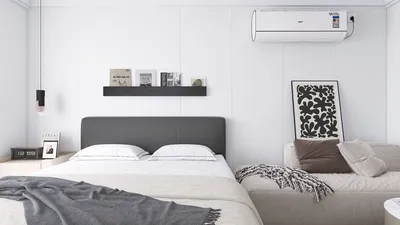


Creating a floor plan is often the initial phase of any interior design project, but have you considered taking that 2D layout and transforming it into a breathtaking 3D visualization? Thanks to contemporary design software, this transformation is more accessible than ever. Whether you are a DIY enthusiast or an aspiring interior designer, mastering the art of converting your floor plan into 3D can greatly enhance your design experience and bring your creative ideas to life. First, let’s delve into the significance of 3D floor plans. Unlike standard 2D drawings, 3D models offer a more precise depiction of space, allowing you to see how various elements interact within an environment. This not only aids in improved planning but also assists in making informed choices regarding color schemes, furniture layout, and overall aesthetics. So, how do you begin this journey? The first step involves selecting the right software. Numerous options are available, including Homestyler, Planner 5D, and Homebyme. These platforms feature user-friendly interfaces and extensive libraries of furniture and decor items that you can effortlessly drag and drop into your design. After choosing your software, you can start creating your 2D floor plan. Most design applications enable you to start from scratch or upload an existing layout. Ensure to input precise measurements for walls, doors, and windows to produce an accurate blueprint. Once your 2D layout is finalized, the exciting part begins: converting it into a 3D model. Most software includes a function that allows you to switch between 2D and 3D views. You can add walls, roofs, and even adjust the heights of spaces. At this stage, you can also start incorporating furniture from the software’s extensive library, allowing for a clear visualization of how everything will fit within the space. Don't overlook lighting! Introducing realistic lighting can significantly alter the ambiance of your design. Play around with different light sources and intensities to achieve the perfect atmosphere for your area. After you are satisfied with your design, it’s time to render your 3D floor plan. Rendering creates a high-quality image of your layout, and while this process may take some time depending on the complexity and your selected quality settings, the final result is worth the wait as it delivers a photorealistic view of your concept. In conclusion, converting your floor plan to 3D is not merely a trend; it’s an essential aspect of modern interior design that enables you to visualize and refine your ideas effectively. With tools like Homestyler, you can bring your visions to life with just a few clicks. Begin your design journey today and witness your creative dreams come to fruition!
Tips 1:
Always remember to save your progress regularly to prevent any loss of work. Consider exporting your designs in various formats to share with others or gather feedback.
FAQ
Q: Do I need any specialized skills to create a 3D floor plan? A: No, most modern design software is tailored to be user-friendly, even for beginners.
Q: Can I design 3D floor plans using my phone or tablet? A: Yes, several software options offer mobile applications that permit you to create designs on the go.
welcome to Homestyler

Minimalist Concrete Planter Pot with Indoor Greenery 3D Model

Minimalist Pink Fabric L Shaped Sectional Sofa 3D Model
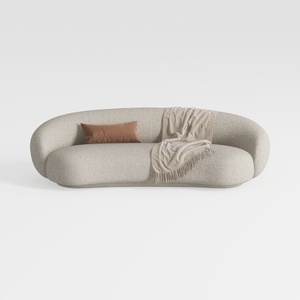

Minimalist Boucle Fabric Curved Sofa With Throw Pillow And Blanket 3D Model
Looking to transform your home? Try Homestyler! This easy-to-use online design tool allows you to create stunning 3D renderings of your space. With a wealth of design projects and DIY video tutorials, Homestyler makes home decorating fun and inspiring, no matter your experience level!
Progetta ora GRATIS
































