


Transforming underutilized basements into cozy media rooms requires a thoughtful approach to lighting, sound, seating, and space flow. By focusing on these elements, you can create an environment that is both serene and functional. Compact spaces can indeed thrive when every detail, including light and surfaces, is deliberately curated, which is where design tools like Homestyler can come in handy.
Two important factors guide my initial designs. Firstly, according to the Illuminating Engineering Society, typical lightning levels for low-activity zones range between 10–30 footcandles (100–300 lux), suggesting additional lighting for snack areas and accessible navigation that can be dimmed during film playback. Secondly, acoustic comfort plays a crucial role; research by Steelcase reveals that excessive noise can lead to increased fatigue and lower cognitive performance. To mitigate this in smaller spaces, early zoning for acoustics can help prevent that undesirable ‘boomy’ effect. These principles are foundational in my planning process, prior to even selecting colors or furniture.
The choice of colors significantly influences mood and energy levels. Insights from Verywell Mind indicate that deep blues and subdued greens promote relaxation and focus, making them ideal for media rooms, while bright reds can heighten alertness and heart rate. Thus, I prefer to reserve vibrant reds for accents rather than painting them on the primary walls close to the screen.
Establish an Appropriate Layout First
In smaller basements, mapping the viewing triangle takes precedence. Start by considering the size of your screen and the distance from it: for 4K televisions, I recommend a viewing distance of about 1.2–1.5 times the diagonal size to maintain clarity without enlarging imperfections. For instance, with a 77-inch screen, aim for about 7.5–9.5 feet of distance. Ensure there's at least a 30–36 inch passage behind or beside the seating to facilitate movement. Utilizing a room layout tool, like Homestyler, can help visualize seat arrangements, side tables, and door swings with precise measurements.
Manage Ceiling Height, Echo, and Sightlines
Basements often feature low ceilings with mechanical elements to accommodate. To cleverly tackle these, I suggest a lightweight soffit around the edges to house LED lights, speaker wiring, and acoustic materials without impacting the center of the room. It's important to maintain a minimum clearance of 78 inches for walking. For sound quality, 40–60% of the ceiling’s surface should consist of sound-absorbing materials, such as fabric-wrapped panels or mineral fiber tiles, which help control echo while keeping the room lively. Balance in placement is critical to avoid acoustic bias.
Wall and Front-Stage Planning
The wall behind your screen should be finished in a low-reflectivity material. A matte deep neutral tone with a Light Reflectance Value (LRV) below 20 will counteract glare around the display. Additionally, installing a minimal sound-absorbing layer behind acoustically transparent fabric can enhance dialogue clarity and decrease sound distortions. If you plan to use a projector, choose a low-gain screen to prevent excessive brightness in cramped spaces.
Layered Lighting for Optimum Viewing
I implement three distinct layers of lighting: (1) indirect lighting around the perimeter at 2700–3000K for a warm feel; (2) wall washers that illuminate art or acoustic panels; and (3) guidance lights on the floor near steps, each using about 1–2 watts. These should be adjustable for different activities: Arrival (100%), Pre-Show (30–40%), Movie (5–10%), and Intermission (15–20%). Ensure that lighting fixtures do not create reflections directly over the screen or the first row to maintain visual comfort.
Essential Measurements for Seating Comfort
In small rooms, seating must be well-considered. A single row should consist of a sofa with a depth between 38–42 inches, ensuring it is supportive with a seat height of 16–18 inches for comfortable foot placement. Aim for 6–8 inches in arm width to allow for side tables; in very tight areas, a narrow sectional can work wonders in defining space without overwhelming it. Allow for at least 24 inches of shoulder width per person, with luxury seating extending to 26–28 inches. If a second row is necessary, a low-back bench positioned on a 6–8 inch riser with supportive foam can be effective. Edges of the riser should be softly illuminated to prevent glare.
Functional Wall Treatments
On the side walls, a blend of diffusion and absorption is crucial. An alternating pattern of 14 to 18 inch-wide diffusive elements with thin absorbers can maintain a lively atmosphere while reducing unwanted echoes. Utilizing bookshelves with varying depths can also enhance diffusion. Ideal materials include fabric panels, ribbed wood, cork, or textured plaster finishes to create micro-diffusion. Keep the surface sheen low near the screen to minimize glare.
Soundproofing for Tranquility Above
If there are bedrooms above the media room, addressing sound isolation early is critical. Use resilient channels or sound isolation clips alongside 5/8 inch Type X gypsum board and acoustic caulk around the edges. Adding mass-loaded vinyl behind the drywall can enhance soundproofing subtly yet effectively. Ensure all penetrations are sealed, including electrical outlets and in-wall speakers, and opt for solid-core doors fitted with seals to reduce noise transmission.
Clever Storage Solutions
Media rooms benefit from concealed storage options. Consider shallow equipment racks built into the wall behind the screen, slim drawers beneath benches, or a full-length credenza with ventilation for electronic components. Use push latches or pocket pulls to keep surfaces sleek, and ensure equipment is ventilated with quiet fans operating below 25 dBA to avoid disrupting quiet moments.
Cozy Color Choices and Textures
For calming environments, opt for deep, desaturated hues. Shades like muted blue-green, warm charcoal, or earthy colors create a peaceful atmosphere. I typically choose ceiling colors that are 1–2 shades darker than the walls, which can create a sense of coziness in lower spaces. Accents such as oxblood throws, brass hardware, and walnut details add depth without creating visual clutter.
Acoustic-Friendly Flooring Choices
High-density carpet tiles that absorb sound serve to reduce noise from foot traffic while offering comfortable underfoot support. If you prefer hard surfaces, be sure to include a high IIC-rated acoustic underlayment under your engineered wood flooring, complemented by a thick rug in the seating area to enhance sound quality. Avoid high-gloss finishes that may reflect light towards the screen.
Creating Micro-Zones in Limited Space
Even in restricted basements, you can carve out distinct areas: a main viewing section, a side corner dedicated to gaming or reading, and a back console bar for additional seating. The console bar can be designed compactly at 12–16 inches deep, neatly tucking stools underneath, which allows for accommodating extra guests while keeping pathways clear. Install focused sconces to light specific areas without illuminating the screen.
Addressing Ventilation and Comfort
Long movie sessions require proper air circulation. In a sealed room, consider installing a dedicated return duct to maintain airflow. Using linear slot diffusers located near the front will direct air flow along the ceiling, away from movie watchers. To minimize noise, keep air velocities low and use lined ductwork near diffusers with larger tubing to tame the airflow.
Technology Integration That Enhances, Not Overpowers
Plan for electrical outlets and conduits from the start. Position the display with a recessed power/data box, and run flexible conduits to the equipment area for future enhancements. In confined areas, a 5.1.2 or 5.1.4 Atmos setup will suffice; just ensure ceiling speakers are placed at 65–100 degrees relative to the front for effective three-dimensional sound without localization.
Choosing Sustainable, Low-Maintenance Materials
Selecting low-VOC paints and Greenguard-compliant upholstery helps maintain excellent air quality. Using dim-to-warm LEDs conserves energy and enhances longevity while echoing the comforting light spectrum of traditional halogen bulbs. Opt for durable fabrics like performance velvet and tight weaves that can withstand regular use during movie nights, along with eco-friendly hardwood and acoustic panels whenever feasible.
Initial Planning Checklist
- Set viewing distances as 1.2–1.5 times the diagonal size of your 4K display while ensuring a circulation space of 30–36 inches.
- Paint the wall behind the screen in a matte dark neutral tone (LRV < 20) and include hidden sound absorption behind fabric.
- Establish layered lighting with adjustable settings, avoiding overhead fixtures above the screen or first seating row.
- Combine diffusion and absorption on side walls, and tune the ceiling with 40–60% of absorptive elements.
- Implement compact, ergonomic seating solutions; a slim banquette may be necessary for additional seating capacity in tighter areas.
- Prioritize isolation techniques such as resilient channels, sealed doors, and lined ducts to maintain a peaceful environment above.
- Prepare pathways for cables and storage for equipment; ensure quiet ventilation and straightforward upkeep.
Recommended Reference and Standards
For a deeper exploration of ergonomic comfort and health-oriented benchmarks, consider reviewing WELL v2 guidelines related to lighting, acoustics, and air quality that overlap with ideal media room environments. Likewise, for valuable workplace insights on sound and concentration, Steelcase's research library serves as an outstanding resource applicable to home media settings.
Frequently Asked Questions
Determine sizing based on viewing distance. For a 4K setup, 1.2–1.5x the diagonal measurement is highly effective. Typically, an 8-foot distance supports a 65–77 inch screen for immersive viewing without discomfort.
For ambient and task lighting, choose the 2700–3000K range. Ensure compatibility with high color rendering index (90+) lights to maintain natural skin tones during movie scenes, adapting to low dim levels for comfort.
Achieving balance is essential. Complement ceiling absorption (40–60% coverage) with sidewall diffusion and a thin absorbent front wall. Including soft furnishings and a plush rug will enhance sound control.
Indeed, smaller rooms can exaggerate sound reflections regardless of speaker configurations. Even minimal treatments—like rugs, curtains, and selective panels—can enhance dialogue clarity while reducing listener fatigue.
A compact sofa with a depth of 38–42 inches or a narrow sectional will keep pathways clear. If additional seating is necessary, a low-back banquette on a modest riser can provide extra seats without taking up excess space.
Utilize resilient channels or isolation clips on the ceiling, seal all penetrations, select solid-core doors with appropriate seals, and maintain low airflow speeds in the HVAC to prevent noise leakage.
Definitely so, especially near the screen. A matte dark neutral finish (LRV < 20) minimizes glare while enhancing the perceived contrast of images. Ensure consistency in the color palette—darker ceilings aid in calming lower spaces.
While possible, it's essential to rethink the layout. A front sofa alongside a rear console bar or a slender banquette on a riser can establish tiers of seating without cluttering the area.
Yes, with appropriate planning: opt for short-throw or ultra-short throw projectors to avoid issues with head shadows; ensure matte surfaces, control extraneous light, and consider a low-gain screen to reduce hotspotting.
Install dedicated returns, utilize lined ducts and slow-velocity diffusers, ensuring effective and quiet ventilation through equipment cabinetry.
Employ an interior layout planner to experiment with seating arrangements, riser depth, and angles before making purchases. Visualization tools such as Homestyler help to streamline the design process.


Minimalist Black Solid Wood Irregular Coffee Table 3D Model
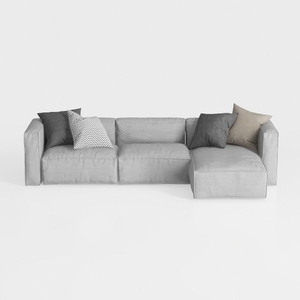
Minimalist Light Gray Fabric L Shaped Sectional Sofa 3D Model
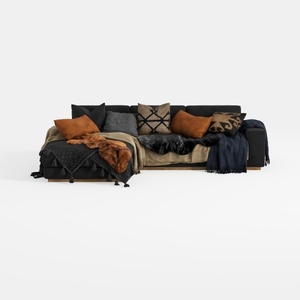
Modern Black Fabric Sectional Sofa with Decorative Throw Pillows and Blankets 3D Model
Looking to bring your home design dreams to life? Homestyler is your go-to platform! With its easy-to-use online design tool, stunning 3D renderings, extensive design projects, and helpful DIY video tutorials, you can create beautiful interiors effortlessly. Start designing today!
立即免费设计
































