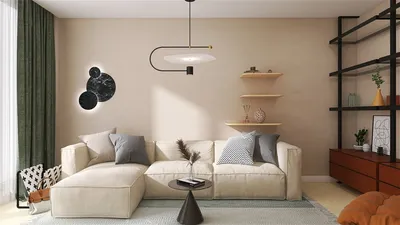


I once mounted a large television above a fireplace to achieve a ‘grand’ aesthetic for a client, and we both ended up with sore necks — a valuable lesson learned. Now, I always initiate the design process with a quick layout assessment to analyze sightlines and seating arrangements before purchasing any equipment like cable ties.
1. The Centered Sofa and TV Wall
I enjoy starting with a timeless arrangement: a sofa centered in front of a low media console and television on a designated feature wall. This setup provides a sense of balance, creating a clear focal point that guides guests on where to sit and how to engage with the screen. However, the challenge lies in scale — a TV that's too large can dominate the space, while one that's too small will seem insignificant. Therefore, it's crucial to measure accurately and choose proportions wisely.
save pin
2. Corner Television for Intimate Layouts
For narrow or elongated rooms, I frequently mount the TV in a corner on a swivel bracket, allowing it to be visible from various angles. This approach conserves wall space and promotes a seating arrangement conducive to conversation, avoiding the typical straight-ahead stare. The main consideration is the routing of cables and ensuring the bracket can support the TV's weight.
save pin
3. Custom Media Wall with Storage Solutions
When clients seek a refined appearance, I often design a custom media wall featuring closed storage and display shelves around the television. This setup not only conceals equipment clutter but also adds an aesthetic touch to the living space. However, this approach tends to be more expensive than simple shelving and requires meticulous planning for ventilation and remote access. For complex layouts, I utilize a 3D floor plan modeling tool like Homestyler to visualize proportions and flow before finalizing any built-in structures.
save pin
4. Swivel Television with Multi-Functional Seating
In open concept homes, I sometimes incorporate a swivel arm or a television on a movable cabinet to accommodate multiple zones—living, dining, and occasionally the kitchen bar. This flexibility is ideal for smaller households that rely on one screen for diverse activities. It’s essential, however, to manage cable lengths and develop a tidy cord management plan when the TV is mobile.
save pin
5. Transforming the TV into Art: Frames, Mirrors, and Concealed Screens
When the television is turned off, integrating it seamlessly into the decor or making it appear as art can transform the entire room. I've installed recessed mounts, framed screens, and even mirrored panels that conceal the TV—these options are stunning but may require higher budgets and advanced installation processes. If you desire the drama without the renovation, a thoughtfully selected media console paired with artwork can harmonize the television with the overall decor.
For every design choice, I advise clients on the same two principles: prioritize seating before technology, and always test a mock-up at a human scale. A practical method to pre-visualize the final design is through a photo-realistic render using Homestyler, enabling confirmation of lighting, finishes, and the visual placement of the TV.
save pin
FAQ
Q1: What height should I mount the TV?
I suggest positioning the center of the screen at approximately eye level when seated, which is about 42 inches (106 cm) from the floor for most sofas. This arrangement minimizes neck strain and ensures comfort during viewing sessions.
Q2: What is the optimal distance from the TV?
A general rule of thumb is to sit about 1.5 to 2.5 times the diagonal screen length of the TV; this balance helps achieve both detail and immersive viewing. (Source: Consumer Technology Association, CTA)
Q3: Should the TV be mounted or placed on a console?
Mounting the TV can save floor space and provides a streamlined appearance, but a console offers additional storage and easier access to devices. Your decision should depend on cable management needs, storage preferences, and how permanent you want the configuration to be.
Q4: How can I minimize glare on my TV?
To reduce glare, avoid direct lighting on the screen, utilize window treatments such as blinds or sheer curtains, and position lamps strategically to the sides. Additionally, matte screen protectors and anti-reflective finishes can significantly help in bright environments.
Q5: What are some tips for optimizing small living rooms?
Opt for a compact sofa, consider a corner or swivel-mounted TV, and use vertical features for storage to keep the space feeling open. Floating consoles and sleek mounts can contribute to a sense of spaciousness while retaining functionality.
Q6: How much should I expect to spend on built-in media walls?
Costs can vary greatly—from do-it-yourself shelving solutions to custom millwork that may reach several thousand dollars. I always recommend obtaining multiple estimates and identifying which features (such as doors, wiring channels, and lighting) are essential.
Q7: What is the best way to conceal cables?
For a clean appearance, consider using in-wall rated cable kits or running cables through cord channels that match your wall color. For tenants, cable raceways that can be painted to match the wall work effectively with no permanent alterations.
Q8: How can a TV be part of my decor?
Definitely — through framing, coordinated cabinetry, or stylish positioning, the TV can seamlessly blend with the room’s decor and even enhance it. Minor adjustments in screen placement can lead to significant improvements in the harmony of the space.
save pin
Discover the ease of home design with Homestyler! This user-friendly platform offers a powerful online design tool, stunning 3D renderings, and a wealth of DIY video tutorials. Transform your space effortlessly and explore endless design possibilities—all from the comfort of your home!
Design Now for FREE
































