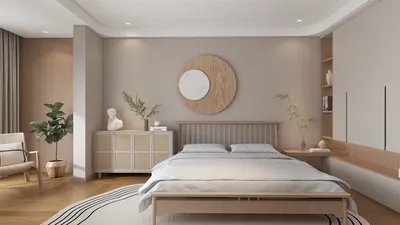


In the realm of interior design, utilizing an advanced 3D rendering system can significantly enhance how you articulate your ideas and visualize your concepts. A dependable rendering engine empowers you to produce eye-catching visuals that not only impress clients but also aid in effectively conveying your design objectives. This article delves into the leading 3D rendering systems tailored for interior designers, ensuring you possess optimal tools for your projects.
1. V-Ray
V-Ray remains a top choice among design professionals. Renowned for its ability to generate high-quality photorealistic images, V-Ray integrates flawlessly with a range of design platforms such as SketchUp, Rhino, and 3ds Max. With a comprehensive array of features—ranging from advanced lighting options to meticulous material and texture management—this engine enables you to create truly lifelike representations of your interior designs.
2. Lumion
Lumion distinguishingly features an intuitive interface along with real-time rendering capabilities. It’s especially advantageous for interior designers who wish to visualize their projects promptly, even without extensive technical expertise. Boasting an extensive library containing a plethora of objects, materials, and visual effects, Lumion allows you to craft engaging presentations that can genuinely captivate your clients.
3. Enscape
Enscape serves as another remarkable choice for interior designers in search of a straightforward rendering solution. This real-time rendering software is compatible with platforms like Revit, SketchUp, and Rhino, permitting instant visualization of your designs. With a user-friendly interface and rapid rendering capabilities, Enscape is favored by professionals who need to deliver presentations efficiently without sacrificing quality.
Conclusion
Selecting the ideal 3D rendering system is contingent upon your individual requirements and workflow preferences. V-Ray, Lumion, and Enscape all offer exceptional functionalities that can enhance your design presentations and facilitate clearer communication of your vision. It might be beneficial to explore a few options to determine which one best complements your design aesthetics and project goals.
FAQ
Q: What features should I prioritize when choosing a 3D rendering system? A: Focus on compatibility with your design software, rendering speed, user-friendliness, and output quality.
Q: Are there any free alternatives for 3D rendering? A: Indeed, there are free tools like Blender that provide excellent features, although they might come with a steeper learning curve.
Q: How can I enhance my rendering skills? A: Regular practice, experimenting with different settings, and following tutorials can significantly improve your skills.
Discover the best practices with Homestyler, the leading home design software, to elevate your interior design projects.
Progetta ora GRATIS
































