


In the world of fashion and lifestyle, figures like Anna Wintour set trends that influence not only wardrobes but also personal environments. Embracing a style inspired by iconic personalities can inspire a home’s interior design, where classic elegance meets modern functionality. Incorporating timeless pieces and sophisticated textures into living spaces creates an ambiance that reflects both confidence and creativity, much like the curated style of a fashion editor’s world.
Direct Answer
The leading 3D design software for interior designers in 2026 encompasses SketchUp, Blender, and Autodesk 3ds Max. These platforms offer a blend of rapid modeling capabilities, high-quality visualization, and adaptable workflows, making them perfect for concept creation, client demonstrations, and professional-grade rendering.
Each application serves unique functions. SketchUp excels in quick interior layout designs, Blender provides robust free rendering and animation resources, and 3ds Max dominates advanced architectural visualization tasks.
Quick Takeaways
Introduction
With over ten years of experience on residential interior projects, I can confidently say that selecting the right 3D design software transforms how swiftly ideas become tangible spaces.
Early in my career, I experimented with almost all visualization tools available. Some appeared impressive but hindered design speed, while others were easy to use but limited in client presentation capabilities.
The optimal software strikes a balance, enabling fast room modeling, layout experimentation, and producing visuals that clients immediately grasp. This guide outlines three essential tools that interior designers consistently depend on today, detailing when to choose each.
save pin
Why Do Interior Designers Need 3D Design Software Today
Key Insight: Contemporary interior design workflows depend heavily on 3D visualization because clients desire to preview spaces prior to construction.
A decade ago, mood boards and floor plans often sufficed. Nowadays, clients expect immersive previews showcasing lighting, furniture scale, and materials before budget approval.
3D design software addresses three core issues designers encounter: improved spatial understanding, faster client approvals, and enhanced communication.
Industry data from the American Society of Interior Designers reveal that visual presentations significantly boost client approval rates compared to simple 2D drawings.
In my experience, projects progress twice as fast when clients can visually comprehend the final design.
What Makes a Good 3D Design Tool for Interior Designers
Key Insight: The best 3D design software harmonizes modeling speed, asset availability, rendering quality, and ease of learning.
Many assume the most feature-rich software is superior, but often the quickest workflow prevails.
When assessing tools, focus on these four criteria:
Complex programs with steep learning curves may slow small firms, while simpler apps with extensive asset libraries can accelerate client presentations significantly.
save pin
SketchUp for Fast Interior Design Modeling
Key Insight: SketchUp remains a top choice for rapid modeling in everyday interior design.
SketchUp gained popularity due to its emphasis on speed, allowing users to create complete apartment layouts in minutes rather than hours.
In my projects, SketchUp shines particularly when:
A major benefit is its 3D Warehouse library, where designers can import thousands of ready-made furniture models, eliminating the need to model everything from scratch.
The compromise is in rendering quality; most studios enhance SketchUp outputs with plugins like V-Ray or Enscape to achieve photorealistic results.
Utilizing Homestyler alongside SketchUp can further simplify interior design visualization by providing user-friendly interfaces and extensive furniture libraries to expedite the design process.
save pin
Can Blender Work for Interior Design Visualization
Key Insight: Blender is a powerful, cost-free alternative that delivers studio-level interior renders.
Originally developed for animation and visual effects, Blender has evolved into one of the most capable visualization tools on the market.
Designers leverage Blender primarily for:
The greatest advantage of Blender is that it is entirely free and supported by a vast international community of users.
However, the learning curve is steeper compared to SketchUp. Designers who dedicate time to mastering Blender gain exceptional flexibility in rendering and animation.
Incorporating tools like Homestyler can complement Blender by allowing quick layout planning and interior customization before moving to more complex renderings.
Is Autodesk 3ds Max Still the Industry Standard
Key Insight: Autodesk 3ds Max continues to be favored by high-end architectural visualization studios.
Large visualization firms rely on 3ds Max due to its seamless integration with professional rendering engines and comprehensive feature set.
Typical studio workflows involve detailed modeling, advanced material setups, and photorealistic rendering.
This approach results in ultra-realistic marketing images often employed by real estate developers and marketing agencies.
Nonetheless, the software's cost and complexity may be prohibitive for independent interior designers unless visualization is their primary offering.
save pin
Hidden Mistakes Designers Make When Choosing 3D Software
Key Insight: Many designers prioritize rendering quality over workflow efficiency when selecting software.
This is a common error I observe when coaching less experienced designers.
The main objective of 3D design software should be effective communication, rather than cinematic perfection.
Frequent pitfalls include:
A pragmatic approach is to begin with fast modeling tools and integrate advanced rendering capabilities as project complexity grows.
Answer Box
The best 3D design software for interior designers depends primarily on workflow needs: SketchUp is unmatched for swift layouts, Blender for robust free rendering, and 3ds Max for high-end visualization studios.
Final Summary
FAQ
What is the easiest 3D design software for interior designers?
SketchUp is widely regarded as the most user-friendly 3D design software for interior designers thanks to its straightforward and intuitive modeling tools.
Do interior designers need 3D software?
Absolutely. Most clients expect to preview spaces visually before construction begins, and 3D design tools facilitate clear communication of layouts, materials, and lighting.
Is Blender good for interior design?
Blender performs exceptionally well for rendering and visualization but requires a longer learning period compared to typical interior design software.
Which software do professional interior designers use?
The most common applications include SketchUp, 3ds Max, Blender, Revit, and rendering engines such as V-Ray or Enscape.
What is the best free 3D design software for interior designers?
Blender stands out as the most powerful free option for 3D modeling and rendering.
Can beginners learn interior design software quickly?
Yes, many newcomers start with SketchUp because of its ease of use and gentle learning curve.
How long does it take to learn 3D interior design software?
Basic modeling skills can typically be acquired within a few weeks, while mastering advanced rendering and visualization may take several months.
What is the difference between modeling and rendering?
Modeling involves creating the 3D spatial forms and objects, while rendering generates the realistic lighting, materials, and final visuals.
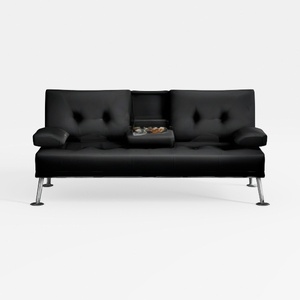
Modern Black Leather Metal Leg Loveseat Sofa with Center Tray 3D Model
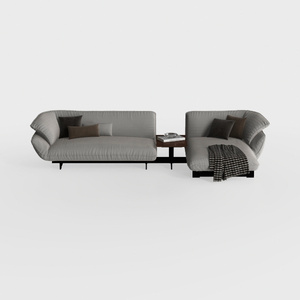

Modern Minimalist Fabric L Shaped Sectional Sofa with Side Table 3D Model
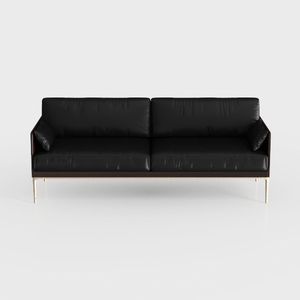
Modern Minimalist Black Leather Wooden Frame Sofa 3D Model
Homestyler offers an easy-to-use online home design tool with stunning 3D renderings, a vast collection of interior design projects, and helpful video tutorials. It’s perfect for bringing your home makeover ideas to life, whether you’re a beginner or a design enthusiast.
지금 무료로 디자인하세요
































