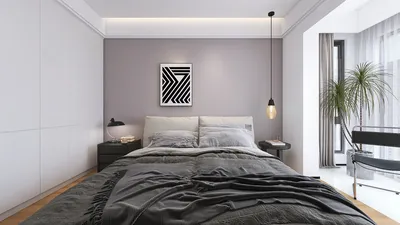


Crafting a comprehensive interior design rendered plan is crucial for visualizing your spaces effectively while ensuring optimum functionality. Whether you are designing a compact apartment or an expansive home, a rendered plan clarifies the design process significantly. In this article, we will discuss the steps to create a high-impact interior design rendered plan that enhances your space utilization, incorporating the advantages of using Homestyler.
Grasping the Essentials of Rendered Plans
Before embarking on the creation of your rendered plan, it’s vital to comprehend what it entails. A rendered plan serves as a visual depiction of your interior design concepts, illustrating the layout, colors, materials, and furnishings in a three-dimensional format. This visualization enables both designers and clients to appreciate how the space will come together before any physical alterations are made.
Step 1: Measure Your Space Accurately
Begin by accurately measuring the dimensions of your space. Utilize a tape measure to record the height, width, and depth of the room, taking into account doors, windows, and any unique architectural elements. This ensures that your rendered plan is to scale, providing a realistic view of your area.
Step 2: Select the Right Design Software
Choose a user-friendly design tool that facilitates easy rendering. One recommended option is Homestyler, which offers intuitive features specifically designed for creating detailed and precise rendered plans.
Step 3: Develop a Floor Plan
Utilizing your chosen software, input the gathered measurements to craft a fundamental 2D floor plan. Ensure that walls, windows, and doors are accurately positioned. This foundational step is crucial for your rendered plan's development.
Step 4: Incorporate Furnishings and Decor
Once your floor plan is in place, start adding furnishings and decor elements. Consider opting for multifunctional furniture to optimize space efficiency. Be mindful of the room's flow and how each piece enhances the overall design.
Step 5: Experiment with Colors and Textures
Play around with various colors and textures to determine the ideal palette for your area. Utilize the rendering capabilities within your software, such as Homestyler, to visualize how different hues appear in your room under natural and artificial lighting conditions.
Step 6: Polish Your Rendered Plan
After making necessary adjustments and confirming that all elements are in harmony, finalize your rendered plan. Ensure it meets both functionality and aesthetic standards, applying any revisions before showcasing it to clients or stakeholders.
In Conclusion
Developing an interior design rendered plan requires meticulous planning and a spark of creativity. By adhering to these steps, you will visualize your design ideas effectively, ensuring your small spaces are not only visually appealing but also serve their purpose well.
Frequently Asked Questions
Q: What software is optimal for creating rendered plans? A: Widely favored options include Homestyler for its user-friendly interface alongside other robust features.
Q: How can I make the most of a small space in my design? A: Concentrate on utilizing multifunctional furniture, open layouts, and clever storage solutions to enhance functionality.
Welcome to Use the Top Home Design Software
立即免费设计
































