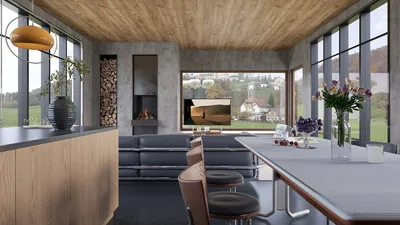


In the current digital landscape, selecting the ideal CAD tool has become essential not only for professional designers but also for students, hobbyists, and collaborative project teams. If you’ve ever looked for terms like "Google CAD solutions," "free CAD options for Chromebook," or "CAD tools that integrate with Google Drive," you're definitely not alone.
With over a decade of experience as a professional interior designer, I’ve explored nearly every prominent design software available today—ranging from powerful CAD programs to innovative browser-based 3D modeling tools. Throughout my career, I have found that the most effective tools aren't necessarily the most feature-rich; rather, they are the ones that seamlessly integrate into your established workflow.
For those whose daily tasks revolve around using Google Chrome, Google Drive, and Gmail, the following four tools are certainly worth considering.
Choosing the Right CAD Tool
Before getting into specific software recommendations, it's crucial to ask yourself:
The tools I am about to recommend are all browser-based, completely free to use, support Google logins, and have demonstrated reliability in practical design scenarios.
1. SketchUp Free (Web-Based)
Ideal for: Intermediate and professional users focused on spatial organization, furniture arrangement, and 3D modeling.
Originally crafted by Google and currently managed by Trimble, SketchUp is a favorite among space planners and architectural professionals. The free web version operates entirely within your browser and integrates seamlessly with Google Drive, enhancing usability.
Key Benefits:
Practical Applications:
I typically employ it in the initial phases of space layouts, especially for kitchens and open-plan environments. Its user-friendly interface and speedy modeling capabilities make it exceptional for showcasing conceptual designs.
save pin
2. TinkerCAD
Ideal for: Beginners, educators, and clients wishing to experiment with layout concepts.
TinkerCAD is Autodesk’s approachable, browser-based 3D modeling tool. While often utilized in educational settings, it is surprisingly effective for managing small-scale design projects and engaging clients.
Key Benefits:
Practical Applications:
In a recent project, I had a client use TinkerCAD to rearrange furniture in their child's room. Within 20 minutes, they had created a clear layout, vastly reducing communication time.
save pin
3. Onshape (Free Plan)
Ideal for: Collaborative projects, structural design, and engineering drawings.
Developed by the creators behind SolidWorks, Onshape is a cloud-based CAD platform designed for real-time collaboration. It shines in projects that require multiple stakeholders—engineers, contractors, and designers—to access live documents simultaneously.
Key Benefits:
Practical Applications:
For a custom TV wall project, I collaborated with a carpenter, project manager, and client all at once. By using Onshape, we edited the same document in real time, which cut our project turnaround time by more than half.
4. Homestyler
Ideal for: Interior designers requiring quick 2D/3D layouts, high-quality visualizations, and client-friendly presentations.
Homestyler is an all-encompassing browser-based design platform popular among interior designers. It provides rapid layout features, extensive 3D furniture libraries, and a powerful rendering engine that can produce imagery and walkthroughs in minutes.
Key Benefits:
Practical Applications:
I frequently utilize Homestyler for developing apartment designs and selecting soft furnishings. On one occasion, I was able to create and render a 90 square meter apartment in just one day, complete with visual walkthroughs and client notes.
Feature Comparison Overview
My Suggested Workflow
I recommend establishing a three-stage workflow utilizing these tools:
This streamlined method minimizes feedback loops and ensures that your tools facilitate the project, rather than dictate it.
Final Thoughts
There is no definitive "best CAD tool"—only the one that aligns perfectly with your workflow.
If you prioritize:
…then this set of tools is likely to transform your working experience. Each platform provides unique features, and collectively, they create an effective, efficient, and modern design workflow for anyone engaged in the Google ecosystem.

Coaster Home Furnishings - Camacho - Upholstered C
Minimalist Marble Top Solid Oak Round Two Tier Coffee Table 3D Model
Modern Minimalist Walnut Fluted Door TV Cabinet 3D Model
Discover your creative side with Homestyler, an exceptional online home design platform! Utilize its user-friendly design tool and stunning 3D rendering features to visualize your ideas. Explore inspiring design projects and informative video tutorials, making your home transformation both easy and enjoyable.
Design Now for FREE
































