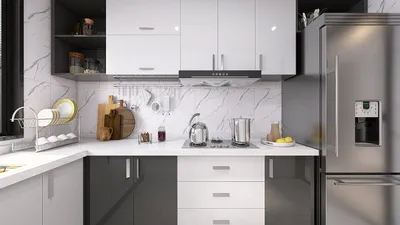


SketchUp Free serves as an excellent tool for what it is designed to do—lightweight, browser-based 3D modeling that is relatively easy to learn compared to other 3D software. For architecture students, beginner designers, or anyone needing to create basic 3D geometric models, SketchUp Free provides unmatched accessibility.
However, many users grow frustrated with SketchUp Free, especially those primarily focused on designing and visualizing residential interiors. The limitations are not minor or peripheral; they affect the very features most needed for such tasks.
Limitations of SketchUp Free
SketchUp Free does not offer photorealistic rendering capabilities at all. The best visual you can achieve is a 3D model with basic materials that resemble a video game screenshot from around 2005. Achieving realistic renders requires costly plugins like V-Ray or Enscape, often priced higher than SketchUp Pro itself.
There is no organized furniture catalog. Although SketchUp offers the 3D Warehouse with millions of models, locating high-quality items can be time-consuming and disappointing due to heavy file sizes, missing materials, or inaccurate dimensions.
Export options are highly limited in the free version. SketchUp Free does not support exporting to standard formats like DWG, DXF, or other 3D file types—critical when sharing work with architects, contractors, or other software. Exporting requires upgrading to the paid SketchUp Pro.
Artificial intelligence and automation features are absent. SketchUp Free is purely manual modeling, with no suggestions for layout, proportional furniture placement, or workflow automation—every element must be created and positioned manually.
Who Should Still Consider SketchUp Free?
SketchUp Free remains relevant for geometric and structural modeling that does not demand photo-realistic rendering, such as conceptual architecture models for proportion evaluation, basic concept presentations, or learning foundational 3D modeling skills before advancing to specialized tools.
Architecture students building SketchUp expertise as a technical foundation will find significant value in the free version. However, homeowners, interior designers, or contractors who require visuals that effectively communicate and serve as tangible references have much better alternatives available.
Introducing Homestyler: Bridging the Gaps Left by SketchUp Free
Homestyler is not just another SketchUp version but a distinct platform specifically optimized for interior design from start to finish. While SketchUp is a general modeling tool for various purposes, Homestyler focuses entirely on assisting users in designing and visualizing home interiors efficiently and effectively.
Homestyler includes built-in 4K photorealistic rendering without needing plugins or additional software. Its curated library offers over 600,000 3D furniture models readily available within the platform, eliminating tedious external searches. AI-driven automatic layout suggestions further simplify optimal space planning. All these features come free with basic packages accessible via browser or desktop applications for Windows and macOS.
Comparing SketchUp Free and Homestyler
When to Use SketchUp Free vs. When to Switch to Homestyler
Choose SketchUp Free when requiring flexible geometric modeling for architectural concepts, full control to build 3D models from scratch, or when learning 3D modeling as a technical skill.
Switch to Homestyler when your goal is to design interior spaces, present visualizations to clients or contractors, explore extensive furniture catalogs, or view final design results in photorealistic renders without paying for expensive rendering plugins.
Getting Started with Homestyler for SketchUp Users
Transitioning from SketchUp to Homestyler is simpler than expected. If you already have SketchUp models or floor plans, Homestyler supports importing various file formats so you don’t have to start from scratch. The Homestyler interface is far more intuitive for interior design tasks—as opposed to creating raw geometry, you work with ready-made components such as walls, doors, windows, and drag-and-drop furniture placement.
Access Homestyler via browser or download the desktop app for Windows and macOS. Create a new project, enter room dimensions, and begin exploring the comprehensive furniture catalog. Within hours, you can produce 4K renders that SketchUp Free alone cannot achieve without costly add-ons.
Conclusion
While SketchUp Free is a solid general 3D modeling tool, it is not the best choice for designing and visualizing home interiors. Homestyler offers a far more complete, efficient experience and produces significantly higher-quality outputs—all within a free package accessible via browser or desktop apps on Windows and macOS.
Try Homestyler today and see the difference compared to SketchUp Free.
FAQ
1. Is SketchUp Free really free forever?
SketchUp Free is a browser-based free version with very limited features—no export options, no rendering, and no access to Pro capabilities. For full features, SketchUp Pro requires a paid subscription around USD 299 per year.
2. Can SketchUp Free produce photorealistic renders?
No, SketchUp Free only offers basic 3D visuals without photorealistic rendering. Achieving quality renders requires paid plugins like V-Ray or Enscape. Homestyler includes built-in 4K photorealistic rendering at no extra cost.
3. Can SketchUp users easily adapt to Homestyler?
Absolutely. Homestyler offers a more user-friendly interface designed for interior design, with pre-built components that let SketchUp users become productive much faster.
4. Are there truly free, more comprehensive alternatives to SketchUp Free?
Yes, Homestyler provides a free plan with extensive features suited for interior design—including 4K photorealistic renders, an extensive 600,000+ furniture 3D model catalog, and AI-driven layouts—available via browser and desktop apps.
5. Can models created in SketchUp be imported into Homestyler?
Homestyler supports importing floor plans from various formats. For detailed specifications, refer to Homestyler’s official website documentation.
6. In what scenarios is SketchUp Free better than Homestyler?
SketchUp Free excels at free-form geometric modeling, complex conceptual architectural modeling, and as a general 3D modeling learning tool. Homestyler outperforms it for interior design, furniture visualization, and photorealistic renderings.
7. Is Homestyler available on smartphones like SketchUp?
Homestyler is accessible via browser on laptops or desktops and through desktop applications for Windows and macOS. For full design features and 4K rendering, using a laptop or desktop is recommended.
8. How long does it take to learn Homestyler compared to SketchUp?
Homestyler is much quicker to master for interior design—most new users can create satisfying designs within 1 to 2 hours. SketchUp requires weeks to become productive even for simple interior design tasks.
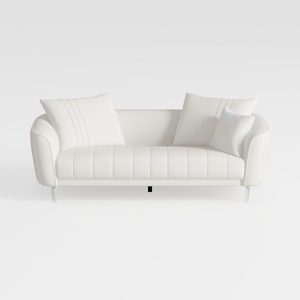
Minimalist White Leather Tufted Sofa With Throw Pillows 3D Model
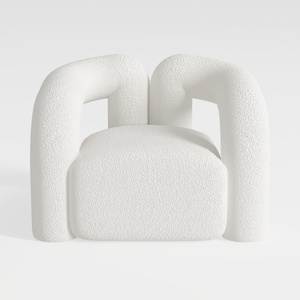
Minimalist Boucle Fabric Armchair Modern Unique Design 3D Model

Modern Marble Top Fluted White Solid Wood Round Coffee Table 3D Model
Homestyler offers an easy-to-use online home design tool featuring stunning 3D renderings, a vast collection of design projects, and helpful DIY video tutorials—making it simple and fun to create your dream space.
지금 무료로 디자인하세요
































