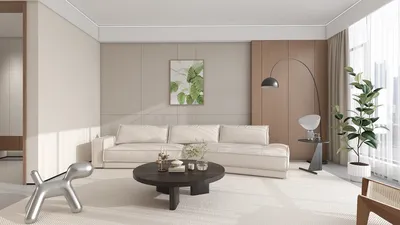


Room planners have become some of the most sought-after tools in 2026, enabling users to design spaces more quickly, neatly, and efficiently. Whether for homes, apartments, offices, or interior design projects, these planners simplify the layout process without starting from scratch manually.
Using a room planner allows you to arrange room layouts, position furniture, manage circulation flow, and preview visual designs before actual implementation. This approach helps minimize design errors and supports more informed decision-making early in the process.
What Is a Room Planner?
A room planner is a digital planning tool that assists users in organizing interior layouts. It does more than just locating sofas, tables, or beds—it ensures that every element within the room feels balanced, comfortable, and tailored to the user's needs.
Modern room planners typically come with 2D and 3D visualization features, allowing users to see their design outcomes more clearly. This makes the planning process significantly easier compared to relying solely on traditional sketches.
Why Are Room Planners Becoming Increasingly Important?
Nowadays, many desire spaces that are not only visually appealing but also highly practical. Room planners address this by providing a realistic preview before renovation or rearrangement begins.
Benefits of Using a Room Planner:
Space planning becomes more focused, furniture placement is more accurate, room flow improves, and the final results tend to look more professional. Homeowners save time and costs, while designers accelerate their presentations to clients.
The Role of Room Planners in Interior Design
Who Should Use a Room Planner?
Room planners suit a wide audience. Homeowners use them to design bedrooms, living rooms, kitchens, or home offices. Business owners utilize them to organize commercial spaces such as offices, shops, or showrooms. Interior designers benefit from room planners by streamlining workflows and providing clients with convincing visualizations.
Because the process is digital, room planners are also ideal for beginners without technical expertise who want to experiment with their own room designs.
How to Choose the Right Room Planner
Selecting a room planner requires careful consideration since each platform offers unique advantages. Understanding which features are essential is crucial.
Things to look for when picking a room planner:
Ensure the tool is user-friendly, provides clear 3D visualization, offers an extensive furniture catalog, supports realistic rendering, and allows flexible layout adjustments.
Key Insight: The best room planners are not merely visually attractive but truly assist you in making quick and accurate design decisions.
Why Homestyler Is Well-Suited for Your Room Planning Needs
Homestyler is a cutting-edge interior design platform ideal for modern room planning. It enables you to create room layouts, select furniture from thousands of 3D models, and view your designs in highly realistic 3D visuals.
One of Homestyler's strongest features is its built-in photorealistic 4K rendering without the need for extra plugins. This streamlines the process from planning to visualization, making it more convenient. Furthermore, the AI-powered automatic layout feature accelerates space arrangement, offering efficient alternative configurations.
Homestyler is accessible through web browsers as well as desktop applications for Windows and macOS. Although it doesn’t currently support Android or iOS, its design experience is optimized for desktop and browser usage.
To get started, you can explore room planning solutions with Homestyler and enjoy realistic visualizations through real-time rendering features.
Tips for Maximizing Results When Using a Room Planner
Start with accurate room measurements before designing. Prioritize essential areas first, such as seating zones, workspaces, or storage. Avoid overfilling the space with too many items that can make layouts feel cramped.
Also, pay attention to circulation paths. A room planner becomes more effective when prioritizing not only aesthetics but also the ease of movement within the space. Test multiple layout options before settling on your final design for optimal results.
Common Mistakes to Avoid with Room Planners
Some users focus too much on visual appeal without considering furniture proportions. Others overcrowd rooms with too many elements. Another common error is neglecting the room's functional purpose in the design.
Room planners should help create more efficient spaces, not just busier ones. Thus, balancing function, scale, and aesthetics must always be a priority.
Frequently Asked Questions (FAQ)
What is the primary purpose of a room planner?
The main function of a room planner is to help arrange room layouts, position furniture, and visualize designs before they are executed.
Are room planners beginner-friendly?
Yes, room planners are very suitable for beginners since the design process becomes more visually understandable and practical.
Are room planners only meant for residential spaces?
No, room planners can also be applied to offices, stores, apartments, showrooms, and various commercial environments.
Why is Homestyler a good choice for room planning?
Homestyler offers AI-assisted layouts, a vast 3D furniture catalog, 3D visualization, and photorealistic 4K rendering all within a single platform.
Is Homestyler available on smartphones?
Currently, Homestyler is accessible through web browsers and desktop applications for Windows and macOS, but not via Android or iOS devices.

Minimalist Solid Oak White Top Dining Table 3D Model

Modern Marble Top Black Metal Round Dining Table 3D Model
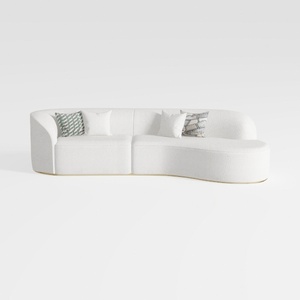
Minimalist Boucle Fabric Curved Sectional Sofa 3D Model
Homestyler is a user-friendly online platform that lets you design and visualize your home with ease. Enjoy powerful 3D rendering, explore inspiring interior projects, and learn through helpful DIY video tutorials—all in one place to bring your dream space to life.
Design Now for FREE
































