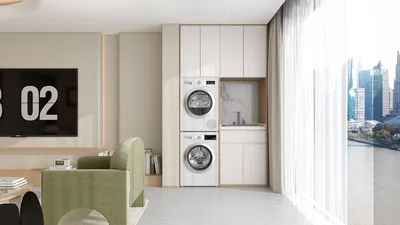


In the context of residential architecture and renovation, "LV Room" means Low Voltage Room. This specialized area is where all structured cabling and vital equipment like routers, patch panels, AV receivers, network switches, security system hubs, and smart home controllers are installed, acting as the central hub for power-constrained systems. In both multi-unit properties and large single-family homes, the LV Room brings these devices together to enhance reliability, safety, and easier maintenance while reducing visible clutter in living areas, especially when using tools like Homestyler for effective layout planning.
Creating an efficient LV Room goes beyond just managing cables and devices; it also revolves around enhancing performance and ensuring the comfort of occupants. The heat generated from network and AV equipment could affect overall comfort and equipment lifespan, while fan noise may transfer into adjacent spaces. Best practices from office settings can be seamlessly applied to home designs; for instance, the WELL Building Standard emphasizes the importance of good acoustics and lighting control for improved performance and wellness. It also highlights ideal air and thermal comfort conditions that should be achieved in equipment rooms, detailed in WELL v2 guidance available at wellcertified.com. Similarly, the Illuminating Engineering Society (IES) prescribes lighting levels between 300–500 lux for maintenance tasks, which helps prevent errors during wiring work and mitigates eye strain while troubleshooting.
What Does Low Voltage Cover in a Home
Low voltage systems in residential design typically encompass a variety of technologies, including data (Ethernet), coaxial cables, fiber optics, doorbells, intercom systems, security sensors, cameras, thermostats, window shades, smart lighting controls, speakers, and AV distribution units. Most of these components operate at 12–24V DC or utilize power-over-Ethernet (PoE). By consolidating these various systems into a single service point, upgrades become more manageable while minimizing cable runs in finished areas. From a safety angle, isolating low-voltage systems from high-voltage electrical panels not only reduces electromagnetic interference but also limits the fire load around essential distribution equipment.
Location and Spatial Configuration
I prefer to position the LV Room on a cool, interior wall—steering clear of direct sunlight and moisture-prone spots like unconditioned garages. In smaller homes, a structured media enclosure measuring 24–36 inches in width is often sufficient; for technology-rich residences, a small closet of about 3–6 square feet should be targeted, ensuring there’s enough clearance for fully opening rack doors and accessing rear connections if necessary. Using a room design tool like Homestyler can greatly assist in visualizing the layout, airflow routes, and service clearances during the planning process.
Thermal Management and Ventilation
Even equipment stacks of modest size create heat. A typical setup with a professional-grade router, switch, NAS, and AV receiver can generate an additional 200–500 watts. My target for a comfortable environment is a set temperature between 72–78°F (22–26°C), employing active exhaust or a dedicated supply/return system when heat levels increase. It's crucial to keep intake and exhaust systems separate to avoid short-cycling. If the LV Room uses the main HVAC, incorporating a perforated door or transfer grille will help. Maintaining thermal stability not only extends the lifespan of your equipment but also minimizes random reboots during peak summer heat.
Noise Control and Acoustics
Fans, hard disk drives (HDDs), and cooling devices for AV equipment can produce noise levels ranging from 35 to 50 dBA within the LV Room. To reduce disruptive noise transfer, I recommend adding door seals, specifying solid-core doors, and possibly lining the interior walls with mineral wool insulation. It's advisable not to position bedrooms directly next to high-load LV Rooms; if this is unavoidable, employing double-stud or resilient channel assemblies will help maintain a quiet sleeping environment. The WELL philosophy, which targets lower background noise levels to promote health, is equally relevant in home settings.
Lighting, Visibility, and Maintenance Efficiency
When it comes to service tasks, bright and consistent lighting is essential. I specify 4000K LEDs providing 300–500 lux at the height of the rack face in alignment with IES recommendations for utility areas. Additionally, I suggest adding a flexible-arm secondary task light for detailed tasks like punch-downs and fiber terminations. Ensuring that every cable is labeled and leaving service loops will enhance organization. Incorporating a shallow work shelf, positioned at 36–38 inches high, facilitates comfort and improves ergonomics during longer tasks.
Rack and Cable Organization
Deciding between wall-mounted swing racks, which are ideal for tight spaces, and 19-inch floor racks, which offer greater depth and scalability, is crucial. Always maintain separation between power and data cables, ensuring they cross at a 90-degree angle to minimize interference. Utilize both horizontal and vertical cable management solutions, and prefer Velcro straps instead of zip ties to prevent cable compression damage. Plan for at least 25–30% spare rack space and an extra 30–50% patch panel capacity for future expansions like PoE lighting or additional cameras.
Power Resilience and Electrical Needs
Even within low-voltage systems, having reliable power is essential. I'm a proponent of installing dedicated circuits for the LV Room and considering a small UPS for the core equipment stack, which includes the modem, router, switch, and controller. This guarantees that your network and key automation systems remain functional during brief power outages. For larger homes, a rack-mounted UPS with pure sine wave outputs is beneficial for preserving the longevity of your equipment. It's also important to keep power outlets accessible; I favor installing a dedicated, surge-protected power strip inside the rack for neatness and safety.
Network Performance Optimization and Future-Proofing
Run Cat6 or Cat6A cabling to vital locations such as workstations, access points (APs), TVs, and cameras. Cat6A can support 10GbE over extended distances and can handle PoE heat efficiently in dense arrangements. Aim to provide a minimum of two home-run cables to each room, with more being necessary at media walls and office areas. For future-proofing against multi-gig service, consider incorporating fiber connectivity to a media panel. To ensure wireless stability, centralizing access points is key; avoid placing them inside dense LV Rooms and plan for ceiling drops in primary zones.
Safety, Compliance, and Wiring Separation
It is crucial to maintain clear distinctions between low-voltage and line-voltage wiring pathways in accordance with local codes and manufacturer guidelines. Utilize plenum-rated cabling in shared duct situations. Implementing fire stopping at penetrations is non-negotiable. Avoid over-filling conduits; following appropriate fill ratios ensures manageable pull tension and facilitates future pulls.
Understanding User Behavior and Access Control
The LV Room often becomes a frequently visited space during upgrades and troubleshooting. Hence, it's important to make it lockable yet easily accessible for both homeowners and integrators. Mount patch panels at an accessible height (around 60–66 inches) for convenient labeling. Including a stool or fold-down bench can contribute to comfort during extended service periods. Providing clear wayfinding and labeling reduces cognitive burdens and mistakes.
Material Choices and Environmental Sustainability
Opt for low-VOC paints and finishes to sustain air quality within a confined LV Room. Metal racks are preferred for their durability and recyclability. Utilizing LED lighting lowers energy consumption and heat generation. Incorporating passive cooling strategies like vent grilles and leveraging the stack effect minimizes reliance on fans, while using power-managed switches can help decrease idle power usage.
When the LV Room Is Part of Another Space
In smaller apartments, the LV Room may not be a separate area but rather a recessed cabinet or hallway closet. The same foundational principles still apply: ensure sufficient ventilation, appropriate lighting, effective cable management, and clear labeling. Even utilizing a compact swing rack can make a 12-inch-deep enclosure functional for service requirements.
Harmonizing with Overall Floor Plans
Approach the LV Room as a critical component of your home's infrastructure. When designing comprehensive home plans, coordinate your LV routes early on to prevent structural conflicts and reduce the visibility of devices. To effectively examine adjacencies and service clearances during the planning phase, utilizing an interior layout planner like Homestyler can be incredibly beneficial.
Frequently Asked Questions
An LV Room, or Low Voltage Room, centralizes structured cabling, networking, AV distribution, and smart home control devices in one location.
While not strictly necessary, having a dedicated LV Room substantially enhances system reliability, simplifies upgrades, and keeps living areas free from visible wires and devices.
Typically, a compact closet measuring 3–6 square feet suffices when organized efficiently with a wall-mounted rack. Tech-centric homes may benefit from a small dedicated room with adequate service clearances at both the front and back.
It’s recommended to provide 300–500 lux at the rack face for maintenance tasks, ideally at a neutral color temperature of 4000K, in line with IES utility-task guidance for effective and safe work.
Plan for adequate ventilation or dedicated HVAC systems. Separate the intake and exhaust, avoid direct sunlight, and maintain temperatures between 72–78°F (22–26°C). Monitoring these conditions protects your equipment's functionality.
No, they should remain distinct to comply with code, minimize interference, and facilitate easier maintenance. If they must intersect, ensure they cross at a 90-degree angle.
At a minimum, install Cat6 cabling to every room, Cat6A for high-performance or PoE-dense runs, coaxial cables to media points as needed, and home runs dedicated for cameras, access points, and door stations. For future-proofing, consider fiber connections to the distribution point.
It's best to avoid placing access points directly inside the LV Room. Dense walls and equipment can hinder signal strength. Instead, place APs centrally in open spaces and run PoE from the LV Room to ensure optimal performance.
Equipment fans can create noise that transfers to other areas. Using solid-core doors, door seals, and acoustic insulation helps mitigate sound transfer, particularly near sleeping quarters or workspaces.
Utilizing a small UPS for the modem, router, and switch ensures connectivity during transient outages. For larger equipment stacks, a rack-mounted UPS with pure sine output safeguards sensitive gear from power fluctuations.
Most low-voltage equipment is designed to fit into standard 19-inch racks. For constrained spaces, consider wall-mounted swing racks, whereas floor racks allow for greater expandability. Always leave 25–30% of rack units available for future needs.
Select low-VOC paints, durable metal racks, and LED lighting to enhance air quality, longevity, and energy efficiency within the compact LV Room.



Homestyler is your go-to platform for home design! With its user-friendly online design tool, stunning 3D renderings, and a wealth of DIY video tutorials, you can effortlessly create and visualize your dream space. Transform your ideas into reality today!
Zaprojektuj teraz za darmo
































