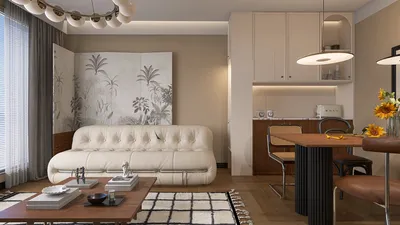


I view LCD panel walls as the central visual element of a living room—an essential feature that should honor sightlines, seating ergonomics, light control, and movement flow. When executed properly, a panel transforms into both a technological marvel and an architectural piece—streamlined, seamless, and flexible. Recent studies in workspaces and homes repeatedly correlate seating distances and angles of view with user comfort and focus. Research conducted by Herman Miller emphasizes the importance of varying postures and maintaining neutral viewing angles to alleviate musculoskeletal discomfort; applying this to residential spaces, I recommend positioning screens between 0–15° above eye level and arranging main seating at an ideal distance that measures approximately 1.5–2.5 times the diagonal screen size for 4K displays.
Managing glare is just as crucial as achieving a pleasing aesthetic. The Illuminating Engineering Society advises on achieving luminance equilibrium while minimizing direct exposure to bright light sources; thus, I aim for ambient lighting levels of around 150–300 lux during TV viewing, employing a mix of dimmable lights and steering clear of placing the panel directly opposite large windows. WELL v2 also promotes circadian-friendly lighting practices—utilizing warm dimming around 2700–3000K for evening viewing helps maintain visual comfort and reduces disruptions to melatonin production. In spaces with ample natural light, I strategically position the LCD wall near windows and utilize low-reflectance finishes surrounding the screen to minimize distracting reflections.
Core Principles for Efficient LCD Wall Designs
An updated panel wall should exude simplicity and precision. I base my designs on three key ratios: the proportion of the screen to the panel (ensuring the display resides within a visual frame that allows for an 8–12 cm breathing space on either side), the balance of storage and display (limiting closed cabinetry to no more than 40% of the overall width to maintain a light visual presence), and the necessary clearance for movement (ensuring 900–1000 mm pathways remain clear in front of units). This approach cultivates a serene, navigable space while providing ample storage for media equipment.
Layout Techniques for Various Room Dimensions
In smaller drawing rooms (10–14 m²), I opt for a floating panel design with integrated cable management as my primary choice. Concealed channels and a shallow niche (90–120 mm) ensure surfaces remain flush. A compact bench beneath it (300–350 mm deep) accommodates devices while allowing sufficient foot space. For rooms that are mid-sized (15–25 m²), I favor an asymmetrical design with one vertical storage pier offset from the screen to preserve open areas. Larger spaces benefit from a transparent zoned approach: the TV wall should align with seating areas for conversation, while adjacent reading nooks or display niches add depth.
When determining seating arrangements, a useful technique for visualizing the relationship between sofa and panel is to use a room layout tool. This method streamlines the process of assessing sightlines, movement paths, and the depths of cabinetry prior to finalizing construction.
Ergonomics: Sightlines, Mounting Height, and Viewing Distance
I position the center of the screen about 100–110 cm from the finished floor for standard sofa heights, making adjustments of ±5 cm depending on the actual seat elevation. For larger displays, I resist the urge to mount them high; prolonged upward viewing can strain the neck. The ideal viewing distance is calibrated by resolution: for 4K, aiming for 1.5–2.5 times the screen diagonal ensures clarity without exaggerating compression artifacts; for 1080p, a range of 2–3 times is more accommodating. Side seating should ideally fall within a 30–40° angle off-axis to preserve color fidelity and contrast uniformity.
Lighting Environment and Glare Mitigation
I employ a trio of lighting layers: ambient (indirect cove lights or dimmable ceiling fixtures), task (reading lights set to 3000K), and accent (wall lighting highlighting textured surfaces). I avoid directing downlights straight at the screen; instead, I prefer to reflect light off the ceiling or opposite walls to maintain an even brightness. Utilizing matte or ultra-matte finishes around the TV minimizes reflections. In rooms with large windows, I recommend sheer drapes paired with blackout side panels to ensure the luminance ratio between the screen and surroundings remains comfortable.
Material Selection: Sleek, Sustainable, and Acoustic
Selected materials must mitigate reflections and absorb mid to high range frequencies. I prefer ultra-matte lacquers, Fenix NTM, micro-textured laminates, or oiled woods to limit shine. Placing acoustic felt or PET behind perforated panels can diminish reverberation without increasing bulk. Fire-rated MDF protects cable spaces, and ventilated shelves keep equipment safe. For warm-toned homes, smoked oak and brushed bronze complement well, while cool designs benefit from ash veneers and anodized aluminum for a fresh look.
Compositional Strategies: Asymmetry and Flow
An asymmetrical setup often feels more harmonious than a perfectly aligned screen, particularly in elongated spaces. I integrate vertical rhythms—such as slats, pilasters, or shelving units—to offset mass, anchoring the LCD in that grid. Maintain continuous horizontal lines so the panel appears as a unified element, employing a 2:1 or 3:2 ratio to dictate shelf spacing. Small gaps (3–5 mm) around the panel and cabinet doors enhance precision and depth, elevating the craftsmanship.
Discrete Storage Solutions
Closed storage should be discreetly integrated. I often use push-latch doors, media recesses, and a concealed soundbar area beneath the screen to declutter the overall appearance. Floating benches create a shadow line, giving the wall a lighter impression. Routed cable trenches with removable access panels simplify future upgrades. A dedicated drawer for charging with built-in cable pathways can further minimize countertop clutter.
Integration of Technology
Account for ventilation by allowing 20–30 mm space behind devices, and incorporating perforations above and below to enable passive airflow. For power supply, keep clean power and data pathways separate, along with surge protection in place. Install shallow conduits for accommodating future devices and a service loop behind the panel for easy exchanges. In cases where soundbars or discrete LCR setups are used, ensure tweeters are positioned at ear height relative to the primary seating and isolate speakers from cabinetry to prevent vibrations.
Color Impact and Atmosphere
Color plays a vital role in establishing the ambiance for gatherings or movie nights. Insights from Verywell Mind indicate that blue tones foster tranquility and concentration, while warmer shades encourage social interaction. In my designs, I often utilize muted blues and greige backdrops to keep focus on the visuals, complemented by a cozy accent shelf or fabric to enhance hospitality. I avoid vivid colors near the screen to prevent contrast distortion.
Acoustic Considerations
Flat, hard surfaces can create echo. Incorporating slight asymmetry and soft textures can help: use a felt-lined backboard, decorative book spines, wood textures, and thick rugs to absorb sound. Position subwoofers away from corners to mitigate booming noises, and for lively rooms, a few broadband absorbers discreetly placed behind artwork can manage mid-range reflections without displaying acoustic treatments overtly.
2024–2025 Design Trends
I've identified three emerging themes: ultra-slim floating panels with shadow reveals, a blend of natural veneers alongside micro-textured solids, and soft-integrated lighting that subtly frames the screen. Storage solutions are becoming more integrated into the architecture, while cable management is transitioning from an afterthought to a systematic design feature. There's also an uptick in the demand for discreet gaming docks built into media benches, and homeowners increasingly inquire about acoustic PET that mimics stylish fabric rather than appearing like technical foam.
Budgeting and Quality of Build
Attention to detail matters significantly: clean edges, aligned finishes, and secure mounting are essential. If financial constraints exist, prioritize investing in structural integrity (like a straight wall and sturdy cleats) and cable management first; cosmetic upgrades can follow later. A straightforward, matte-finished design with good layout principles will always surpass a flashy, unwieldy design that suffers from glare and instability.
Planning and Visual Representation
Before construction begins, I create a model of the room to confirm viewing angles and conduct sunlight assessments. Adjusting the seating arc, determining panel placements, and assessing cabinet depths with an interior layout tool helps avoid expensive mistakes during installation. This process clarifies sightlines, movement patterns, and ventilation requirements around devices.
Citing Authoritative Guidelines
For optimal viewing and lighting practices, I pay close attention to recommendations from WELL v2 and the Illuminating Engineering Society. These guidelines reinforce the significance of adjustable, layered lighting and effective glare management around screens.
Frequently Asked Questions
Position the center of the screen approximately 100–110 cm from the floor for standard sofa heights. Make minor adjustments of a few centimeters based on actual seat height to ensure the top of the screen is visible with a slight upward gaze angle.
A distance of around 1.5–2.5 times the diagonal of the screen is ideal. For a 65-inch display, this translates to a distance of approximately 2.5–4.1 meters. This maintains sharpness without revealing pixelation.
Implement layers of dimmable lighting with indirect ambient sources, and utilize warmer color temperatures in the evening (2700–3000K) alongside matte finishes around the screen. Avoid placing the TV directly across from expansive windows and direct lighting at the display.
Optimal choices include ultra-matte laminates, Fenix NTM, oiled veneers, and acoustic PET behind slatted designs. These materials effectively control reflections, conceal smudges, and enhance sound quality.
Absolutely. Install discreet cable channels behind the panel, include removable access points, and utilize a floating bench with concealed cable pathways. Additionally, plan a service loop to facilitate seamless upgrades of devices.
Keep tweeters positioned at ear level relative to the main seating area, separate speakers from cabinetry to avoid unwanted noise, and ensure good airflow around audiovisual equipment. A refined soundbar slot positioned below the screen maintains clean sightlines.
Select muted neutral colors with cool tones for focus, use warmer accents to evoke hospitality. Avoid vibrant hues near the display to prevent contrast alterations. Blues are generally calming, whereas warmer shades promote a social environment.
For smaller areas, aim for a floating panel, shallow equipment niches (90–120 mm), and compact bench depths (300–350 mm). Maintain clear pathways of about 900–1000 mm and trial layouts with a room design visualization tool prior to installation.
Target an ambient luminance of about 150–300 lux, utilizing dimmable fixtures and indirect light to manage glare. Opt for warmer color temperatures in the evening to minimize disruptions to circadian rhythms during late viewing.
Focus first on structural integrity and cable management—achieving straight framing, durable cleats, and organized conduits. Combine these with matte finishes and precise detailing for an elegant design, even on a limited budget.

Minimalist Solid Oak Open Storage Bookshelf 3D Model

Minimalist Solid Wood And White Accent Cabinet With Drawers 3D Model

Minimalist Solid Wood TV Stand Cabinet with Slatted Doors 3D Model
Homestyler is your go-to online platform for all things home design! With its user-friendly design tool, stunning 3D renderings, and a wealth of DIY video tutorials, you can effortlessly transform your ideas into reality. Start creating your dream space today!
立即免费设计
































