


Direct Answer
To enhance the rendering speed of a cement ventilator 3D model, it's essential to minimize surplus polygons, utilize instancing for duplicated elements, streamline materials, and export with optimized mesh and texture configurations. These strategies reduce the scene's complexity while keeping visual fidelity intact, significantly boosting rendering efficiency in architectural visualization contexts.
Quick Takeaways
Introduction
In practical visualization projects, an unoptimized cement ventilator 3D model can drastically slow down the entire scene. I encountered this issue firsthand years ago when rendering a courtyard housing design filled with decorative vent blocks. Although the pattern was visually appealing, performance suffered considerably once multiple walls featured the same intricate model.
Through extensive experience in architectural rendering, I found that vent blocks are among the most commonly over-detailed components in 3D asset libraries. Designers tend to model every minor groove and edge, although most of that detail gets lost at standard viewing distances.
Currently, my process emphasizes a balance between accurate visual representation and rendering performance. When preparing ventilator block assets—particularly for expansive facades—I follow optimization principles akin to those applied in large-scale architectural projects employing professional 3D planning workflows. This approach yields much faster render times without compromising the blocks' architectural essence.
This article will detail the precise techniques I use to streamline vent block models, enabling faster renders while maintaining lightweight, adaptable assets suitable for large architectural scenes, and how tools like Homestyler can assist in efficiently visualizing these optimized designs.
Why Optimization Matters for Architectural 3D Assets
Key Insight: Performance issues in architectural scenes often arise not from a single heavy model, but from repetitive use of complex assets multiplying polygon load.
Vent blocks seldom appear only once; they are arranged in grids often numbering in the hundreds across a wall. For example, if one cement ventilator has 20,000 polygons, a wall with 150 units becomes a model comprising millions of polygons overall.
From my experience, such accumulation is a common cause of slow rendering.
Typical impact of heavy assets in visualization scenes:
Artists involved with large-scale environments—especially those aiming for photorealistic architectural renders—must consider each repeated object as a performance multiplier.
A practical rule: assets appearing over 20 times per scene require optimization before final rendering to maintain performance.
Typical Geometry Complexity of Cement Ventilator Models
Key Insight: Many vent block models are excessively detailed because they prioritize manufacturing-level accuracy over visualization efficiency.
Most commonly available models feature unnecessary bevels, hidden internal faces, and rounded segments that add little to visual quality in rendered images.
Common sources of excessive geometry include:
In several audits, vent block models contained upwards of 40,000 polygons, whereas reducing them to roughly 3,000 polygons made virtually no visible difference in final renders.
Architectural visualization focuses on perceived detail rather than manufacturing exactness, enabling significant polygon reduction potential.
Reducing Polygon Count Without Losing Detail
Key Insight: Thoughtful simplification methods preserve a vent block's visual identity while dramatically cutting polygon numbers.
I prefer using a systematic approach to polygon reduction instead of relying solely on automatic decimation tools.
The stepwise reduction process often decreases polygon counts by 70–85% without altering the block’s silhouette.
An effective technique involves baking fine surface details, like grooves or concrete textures, into normal maps instead of modeling them geometrically.
Using Instancing and Modular Placement
Key Insight: Instancing identical ventilator blocks enables the rendering engine to treat hundreds of copies as a single in-memory object.
This method radically boosts performance in architectural modeling workflows.
Rather than duplicating the mesh geometry multiple times, instancing references a single shared mesh dataset.
For example, a wall with 200 ventilator blocks can be handled like one asset when instancing is employed effectively.
In large-scale architectural environments, especially when coordinating layouts similar to those designed via tools like Homestyler, instancing is crucial for maintaining smooth rendering performance.
Texture and Material Optimization Techniques
Key Insight: Material complexity can bottleneck renders equally as much as polygon density.
While many focus on optimizing geometry, overly complex shaders and excessively large textures often impair performance.
Effective material optimization includes:
Cement ventilator blocks usually share consistent materials across a given structure, making texture atlasing an extremely effective optimization.
Export Settings for Rendering Engines
Key Insight: Improper export configurations can reintroduce complexity that negates earlier optimization efforts.
Before importing optimized models into rendering software like V-Ray, Unreal Engine, or real-time visualization tools, it's critical to configure export settings carefully.
Recommended export settings are:
Many performance issues derive from hidden mesh errors introduced during export; cleaning geometry prior to export is vital to avoid them.
Answer Box
Optimizing a cement ventilator 3D model involves cutting excess polygons, employing instanced placements for repeat blocks, simplifying materials, and exporting clean meshes. These combined approaches substantially speed up rendering in architectural visualization scenes.
Final Summary
FAQ
What is the ideal polygon count for a cement ventilator 3D model?
Typically, 1,500 to 4,000 polygons per block suffice for maintaining good visual fidelity in architectural renders.
How can I optimize cement ventilator 3D geometry?
Remove hidden faces, simplify curves, collapse redundant edge loops, and carry out controlled decimation to preserve silhouette while reducing polygon numbers.
Does polygon reduction affect visual quality during rendering?
If the outline and edges are preserved, viewers seldom perceive differences in architectural scenes.
Should vent block models use high-resolution textures?
Only when the camera is very close. Otherwise, textures ranging from 1K to 2K usually provide adequate detail.
Why do repeated models degrade rendering performance?
Duplicates increase polygon and memory load. Using instancing solves this by referencing a single mesh asset multiple times.
Can a low-poly cement ventilator model appear realistic?
Absolutely. With high-quality materials, lighting, and normal maps, low-poly assets can look indistinguishable from high-poly versions in most architectural visualizations.
Which file formats are best for exporting optimized models?
FBX and glTF are popular formats that preserve geometry and material data reliably.
How can render speed be improved when using vent block models?
Lower polygon counts, utilize instancing for repeated elements, optimize textures, and ensure export settings are clean before importing into rendering engines.
References
Autodesk University. Best Practices for Optimizing 3D Geometry in Architectural Visualization.
Chaos Group Documentation. V-Ray Scene Optimization Guidelines.
Unreal Engine Documentation. Static Mesh Optimization Techniques.


Monarch Specialties I 7629 Computer Desk, Home Off
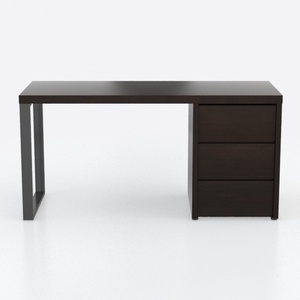
Minimalist Dark Solid Wood Office Desk With Storage Drawers 3D Model

LITTLE TREE 74-Inch Executive L-Shaped Desk with S
Homestyler offers an easy-to-use online design tool with stunning 3D renderings, inspiring interior projects, and helpful DIY video tutorials—perfect for anyone looking to create and visualize beautiful home designs effortlessly.
지금 무료로 디자인하세요
































