

Direct Answer
Optimizing a dresser for storing a TV, media gadgets, and managing cables requires three essential elements: an efficient drawer configuration, concealed cable pathways, and adequate ventilation for electronic devices. When executed properly, a standard dresser can serve almost like a dedicated media console while keeping accessories neatly arranged and clutter out of sight.
The essential approach is to view the dresser as a storage solution rather than just a furniture piece. This involves allocating drawers specifically for devices, remotes, and cables while carefully managing airflow and surface appearance.
Quick Takeaways
Introduction
Over the last ten years designing living room arrangements, I've observed a trend: many homeowners now use dressers as TV stands. This choice provides more storage than typical media consoles and can create a more commanding presence in a room. However, without thoughtful planning, dresser setups for media can quickly get disorganized—cables tangled, devices overheating, and drawers cluttered with miscellaneous adapters.
The encouraging part is that optimizing a dresser for TV use mostly depends on smart organization instead of costly alterations. In several apartment projects I've managed, a simple reorganization of storage areas and cable pathways transformed a basic six-drawer dresser into a comprehensive entertainment hub.
If you're designing your living room layout from the beginning, employing a visual room planner like Homestyler to arrange TV furniture can help you finalize an effective setup before purchasing or moving items.
This guide details practical modifications designers apply to make dressers operate like professional media consoles without compromising on style.
save pin
Selecting the Ideal Drawer Configuration for Media Storage
Key Insight: The most significant upgrade comes from dedicating each drawer to a specific function rather than mixing electronics, cables, and remotes together.
Typically, dressers have deeper drawers than standard media consoles. This provides spacious storage but can create challenges if devices get hidden or blocked. In my experience, drawers are best separated into three functional zones.
This method helps avoid the frequent "junk drawer" issue that gradually overtakes TV areas.
Interior designers also emphasize ease of access; items used daily should reside in upper drawers, while accessories seldom used can be stored lower down.
According to advice from the Consumer Technology Association, well-organized media storage reduces wear on cables and extends device life by preventing constant bending or compression of wires.
Innovative Cable Management Solutions for Dressers
Key Insight: Effective cable management usually requires only a minor adjustment—adding cable routing holes at the rear of the dresser.
The primary reason dressers appear cluttered when used as media centers is that they weren't originally designed to handle cables. Thankfully, the solution is simple.
Practical cable management techniques include:
A common error is routing cables out through the front of drawers. While it may seem convenient, it leads to a messy look and eventual cable damage.
save pin
Utilizing Drawer Organizers for Remotes and Small Accessories
Key Insight: A budget-friendly organizer, often costing around $10, can resolve storage chaos effectively.
TV areas quickly accumulate many small items such as remotes, HDMI adapters, batteries, streaming sticks, headphones, and controllers. Without organization, drawers fill with clutter rapidly.
Professional organizers recommend using compartment trays to properly separate these accessories.
Effective drawer organization includes:
This approach parallels practices used in professional media cabinets and editing studios, where each item has a designated place.
If you're testing various furniture arrangements, previewing your storage solutions with a 3D floor planning tool like Homestyler can help visualize media wall layouts and furniture spacing.
Ventilation Advice for Electronic Devices Stored in Drawers
Key Insight: Electronics inside enclosed drawers require adequate airflow to prevent overheating.
This often overlooked issue is vital when placing streaming boxes, routers, or gaming consoles inside a dresser. Since dressers are generally enclosed, heat buildup becomes a risk.
Simple ventilation strategies include:
Gaming devices such as the PlayStation 5 and Xbox Series X especially need strong airflow. In various redesign efforts, problems with overheating stopped immediately after introducing rear ventilation holes.
save pin
Styling the Top of the Dresser Without Creating Clutter
Key Insight: The most appealing media setups maintain a minimal number of items on the dresser surface.
People often decorate a dresser-turned-TV stand like a bedroom dresser by placing too many small decor pieces, which competes visually with the television.
An aesthetically balanced dresser media console usually features:
Designers often refer to this as the "rule of three" for arranging items on media surfaces.
Another useful tip is to utilize AI-assisted interior visualization tools like Homestyler to preview TV wall designs in advance, ensuring the dresser and screen complement each other rather than feeling improvised.
Transforming a Basic Dresser into a Functional Media Center
Key Insight: The gap between a dresser and a professional media console typically involves just a handful of structural modifications.
After optimizing numerous living room designs, I’ve learned that converting a dresser into a true entertainment center requires about five key upgrades.
With these improvements, a dresser often surpasses many retail TV stands by offering deeper storage and more concealed organization.
Answer Box
The most effective method for optimizing dresser TV storage is to distinctly separate device storage, accessories, and cable management into assigned zones. Incorporate rear cable holes, drawer organizers, and ventilation spaces to convert a basic dresser into a streamlined, functional media console.
save pin
Final Summary
FAQ
Can a dresser safely support a TV?
Yes. Most solid-wood dressers can hold modern flat-screen TVs, which rarely exceed 50 pounds.
How can cables be concealed when using a dresser as a TV stand?
Drilling small cable holes in the back panel and routing wires behind the dresser helps hide cables. Using cable sleeves and clips keeps cords bundled and out of sight.
What dresser size is optimal as a TV stand?
A dresser that extends at least 6–10 inches beyond the TV on each side offers better stability and visual balance.
Is it possible to store media devices inside dresser drawers?
Yes, but ventilation holes or slight gaps are necessary to avoid overheating issues.
How should TV accessories be organized in dresser drawers?
Use compartmentalized organizers to separate remotes, adapters, batteries, and cables for easy access and order.
What is the ideal setup for a dresser media console?
A good arrangement places accessories in top drawers, devices in the middle, and routes cables through rear openings for a tidy appearance.
Is it necessary to modify a dresser to optimize it as a TV stand?
Usually, small modifications such as adding cable holes and organizers deliver the greatest benefits.
Are dresser entertainment centers better than traditional TV stands?
Often yes. Dressers provide more concealed storage and can look more substantial in expansive living rooms.
References
Consumer Technology Association – Guidelines for Home Entertainment Setups
National Association of Home Builders – Recommendations for Living Room Layouts
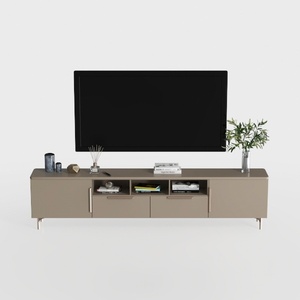
Modern Minimalist Solid Wood TV Stand Cabinet with Storage 3D Model

Natural Live Edge Solid Walnut Coffee Table Top 3D Model

Minimalist Modern Gray Wall Mounted Bathroom Shelves 3D Model
Homestyler offers an easy-to-use online home design tool with stunning 3D renderings, inspiring design projects, and helpful DIY video tutorials—perfect for bringing your interior design ideas to life effortlessly.
Desain sekarang Gratis
































