Creating an engaging home theater within a limited space focuses more on thoughtful design than sheer size. I emphasize crucial elements like sightlines, acoustic management, and dynamic lighting to craft an immersive environment without unnecessary clutter. In smaller areas, the positioning of the seating and the distance from the screen are essential. Research from Steelcase indicates that maintaining proper viewing distances significantly enhances comfort and reduces eye strain, ultimately improving the viewer's experience. The WELL v2 lighting guidelines highlight the importance of balanced lighting for visual clarity and comfort, which is vital when transitioning between the darkened cinema setting and the well-lit areas of the room.
The proportions of the room play a significant role in the layout. Following the recommended practices by IES, minimizing glare and managing luminance ratios is critical for maintaining contrast and detail on screen, particularly in low-light conditions. Insights from Verywell Mind suggest that darker colors can minimize visual distractions, which is perfect for theater areas. I combine these principles with practical strategies like matte surfaces, indirect lighting, and soft task lighting to ensure comfort during movement or reading. I often reference the WELL v2 guidelines for effective lighting that focuses on contrast and glare reduction.
Enhancing Sightlines and Screen Positioning
In compact settings, I establish the layout around the primary viewing axis. The ideal distance from the screen is approximately 1.2–1.6 times the screen's diagonal for 4K displays and 1.6–2.0 times for 1080p to maintain immersion without perceiving pixelation. It's important to position the center of the screen at eye level for the front row, generally 36–42 inches from the floor, influenced by the height of the seating. Avoid mounting in corners to prevent distorted perspectives. For narrow rooms, a slight curve in a single row of seats enhances sightlines. Utilizing an interior layout planner can aid in visualizing these factors effectively.
Adjust Seating for Optimal Comfort and Layout
Small theaters are best with 2 to 4 seats that provide ample space between them and a minimal reclining angle. Aim for around 24–26 inches for lounge chairs; if theater-style recliners are chosen, ensure sufficient reclining space behind (usually 8–14 inches). The aisle should remain at 24–30 inches for easy movement. Using risers makes sense only if the ceiling height exceeds 7 feet above the rear row; otherwise, a single row with expertly designed tilt and lumbar support enhances comfort. Research by Herman Miller indicates that proper posture and back support significantly reduce fatigue during extended viewing sessions.
Lighting Strategy: Layers, Color Temperature, and Glare Management
Small theater spaces require adjustable lighting layers: ambient (for instance, cove or wall-wash), task (such as reading lights), and low, indirect path lighting. Color temperatures should ideally range from 2700–3000K for ambient and 3000–3500K for task lighting to retain warmth without compromising color quality. Using high-CRI light sources helps maintain skin tones and detail in versatile usage scenarios. It's vital to shield light fixtures to prevent direct visibility from seating. According to IES recommendations, contrast ratios must be balanced to ensure bright light does not distract from the screen. I prefer low-lumen dimming for scenes before and during intermission, then set to low levels for viewing, with subtle floor-level lighting guides that don't distract from the main focus.
Effective Soundproofing and Acoustic Treatment
Managing bass is crucial in small rooms. Begin with airtight construction—ensuring doors, outlets, and HVAC penetrations are sealed to prevent sound leakage. A solid-core door with gaskets significantly reduces sound transmission. For optimizing room acoustics, blend absorption at primary reflection points with limited diffusion behind seating to prevent a ‘dead’ sound environment. A practical target is to treat roughly 20–30% of wall surfaces in smaller areas. Bass traps in corners can help smooth out low-frequency sound response. Soft wall panels or lightweight mineral wool placed behind fabric are effective without taking much space. Avoid heavy gloss finishes which could create unwanted echoes, and instead, use varied materials to disrupt parallel reflections.
Choosing the Right Screen Type and Finish for Smaller Spaces
In rooms that receive daylight, using ambient light rejecting (ALR) screens can be beneficial; however, in fully controlled light settings, they are less essential. In narrow spaces, opt for matte or low-gain screens (0.8–1.1) to prevent hot spotting and ensure uniform image quality across all viewing positions. If opting for a sizable OLED or LED display, introducing modest bias lighting behind the screen can help alleviate perceived contrast and reduce eye strain. Keeping wall finishes in dark matte—charcoal, deep navy, or chocolate—helps absorb any stray light.
Efficient AV Layout and Cable Management
Position the equipment rack away from the main seating area to minimize fan noise and stray light distractions. Ensure adequate ventilation for the cabinetry—allowing 2–4 inches of free space around components and incorporating quiet fans if they generate heat. Outline cable paths ahead of time: either through conduit or raceways along the baseboards, with specific power circuits designated for the projector or display and audio equipment. Keep subwoofers adjustable—moving one by a foot can noticeably affect bass response due to room acoustics. Consider using rubber isolation feet beneath subwoofers and racks to dampen vibrations.
Understanding Color Psychology and Material Selection
Choosing deeper, muted color schemes reduces visual distraction and fosters concentration. Verywell Mind’s findings support this notion—cool, dark hues can lower stress, while vibrant reds heighten energy, making them less suitable for theater environments. I prefer matte paints, soothing upholstery, and textured carpets to absorb both light and sound. Utilizing carpets built with dense underlays minimizes footfall noise, enhancing overall room tone. Avoid using glossy finishes or metallic materials near the screen. For sustainability, go for low-VOC products and resilient fabrics to decrease replacement frequencies.
Strategic Layout Solutions for Small Rooms
In cramped environments, I lean towards symmetrical designs: a centered screen, aligned seating, and mirrored acoustic treatments to maintain balanced reflections. If necessary to offset an entrance, use darker tones closer to the door to visually push back traffic paths. Opt for shallow storage solutions—about 10–14 inches for media—to keep aisles clear. Concealed drawers outperform open shelves in minimizing visual disorder. A love seat paired with a chaise may provide greater adaptability than bulky recliners in extremely small rooms. To explore different arrangements efficiently, utilize an interior layout planner to clarify circulation patterns and speaker arrangements.
Optimizing Speaker Positions and Calibration
For a 5.1 setup in smaller rooms, position front speakers at ear height, angled between 22–30 degrees from the center, and place surround speakers slightly above ear level at 90–110 degrees. Avoid placing subwoofers in the center of the room to prevent sound anomalies. For Atmos systems, ceiling speakers should be positioned directly above or marginally forward of the front seating; ensure ceiling height is adequate before committing to designs. Utilize room correction tools but remember that initial placement is crucial. Treat early reflection points prior to final adjustments with EQ.
Controlling Light and Creating Blackout Solutions
Implement layered window treatments including blackout roller shades with side channels to prevent light leakage, along with secondary drapes for acoustic control. Dim or mask any LED indicators from equipment. Installing door sweeps and light baffles around frames can effectively maintain darkness within the room.
Details for Enhanced Comfort During Viewing
Incorporate a narrow console between seats for storing remotes and snacks. Include small, flexible reading lamps with dimmable options. Providing a soft throw blanket adds thermal comfort, especially since small rooms may cool in uneven patterns with air conditioning. Ensure HVAC returns are placed away from primary seating to minimize noise interference. A silent, low-speed fan can help regulate temperature without introducing additional sound.
Establishing Budget Priorities
When designing compact theaters, I prioritize acoustic management, seating ergonomic features, and adjustable lighting, followed by selections for displays or projection equipment. Well-tuned environments enhance longevity for devices and make even modest screens feel expansive. A medium-gain screen coupled with the proper viewing distance can outperform larger, inadequately placed systems.
Frequently Asked Questions
For optimal viewing distances, aim for approximately 1.2–1.6 times the screen diagonal for 4K and 1.6–2.0 times for 1080p. This helps maintain clarity and minimizes pixel visibility, adhering to visual comfort principles cited by Steelcase research.
Aim for seating for two to four individuals, with each seat being 24–26 inches wide, and maintain a 24–30-inch aisle. A single seating row generally enhances both sightlines and comfort.
Utilize dark, muted tones such as charcoal, deep navy, or espresso, complemented with matte finishes to absorb ambient light. This strategy aligns with insights from Verywell Mind, illustrating how darker colors diminish stimulation.
Absolutely. Prioritize treatment at first reflection points with corner bass management. Aim for around 20–30% coverage of wall surfaces to balance absorption while maintaining natural acoustics.
Implement dimmable ambient (like cove or wash lighting), task lights, and subtle path illumination. Keep ambient color temperatures within 2700–3000K and slightly higher for task lighting. This approach aligns with the WELL v2 lighting standards for comfort.
Only in instances where controlling ambient light is a challenge. In darker environments, matte or low-gain screens tend to provide a more consistent experience and improved performance off-axis.
Position the equipment rack in a ventilated cabinet with sufficient clearance, incorporating quiet fans if necessary. Utilize solid-core doors and gaskets to mitigate sound leakage. Ensure indicator lighting is either dimmed or concealed.
Utilize a room design visualization tool for optimal seating, aisle, and speaker positioning, adjusting based on sightlines and entry locations. A preliminary scan can highlight potential conflicts in circulation patterns before construction.
Homestyler's roots trace back to Autodesk, the global leader in design and engineering software. That heritage lives on in every feature we build. Today, with a community of more than 20+ million registered users (platform data, 2026) worldwide, Homestyler continues to make professional-quality interior design accessible to everyone — from first-time decorators to seasoned architects.

Mid-Century Walnut TV Stand With Fluted Glass Doors Drawers 3D Model
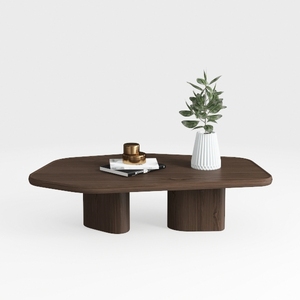
Minimalist Walnut Solid Wood Irregular Coffee Table 3D Model
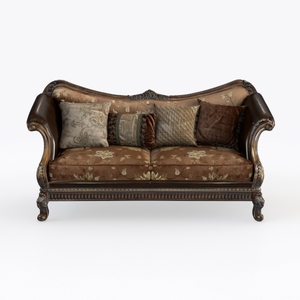
Vintage Luxury Leather Fabric Upholstered Loveseat Sofa 3D Model
Homestyler is your go-to online home design platform, perfect for turning your vision into reality. With its user-friendly design tool, stunning 3D renderings, diverse design projects, and helpful DIY video tutorials, you can effortlessly create and visualize your dream space. Start designing today!
Design Now for FREE






![[14]](https://hs-designs.homestyler.com/production/design/images/2026-09-12/aa817543-bb43-4f3a-9583-2b2473af620f/1789226165872/10757139.jpg?x-oss-process=image/resize,w_502,m_mfit/format,webp)