


Unity stands as a formidable game engine that empowers creators to craft dynamic animations for 3D models, showcasing intricate details and interactive elements. To integrate your Unity animations with a 3D model, the initial steps involve importing your model along with the animation assets, establishing an Animator Controller, and linking your animation clips to this controller. Below is a detailed, step-by-step guide to get you started:
As a designer, I consistently advise utilizing a 3D render home scene for previewing your 3D assets within context. Prior to assigning keyframes or triggers, this practice allows me to visualize how my models and animations engage with various lighting effects and spatial arrangements. This methodology aids in identifying any potential issues early in the process, ensuring that your animation feels integrated and cohesive within the overall design framework.
Tips 1:
Evaluate your animations in diverse lighting conditions and from different camera perspectives. Occasionally, an animation may appear flawless within the editor but seems misaligned within the actual scene layout. Utilizing preview scenes or dedicated render tools like Homestyler can significantly reduce the time needed for adjustments later on.
FAQ
Q: What file types does Unity support for 3D models and animations?
A: Unity is compatible with several formats including FBX, OBJ, DAE, and 3DS for 3D models, with FBX being the most widely used format for importing both models and animations.
Q: How can I retarget animations from one 3D model to another in Unity?
A: To retarget humanoid animations across compatible rigs, utilize Unity’s Humanoid rig type along with its Avatar system.
Q: Is it possible to create animations directly within Unity?
A: Absolutely, Unity’s Animation window enables you to animate transforms, materials, and various properties straight from the editor interface.
Q: How do I initiate animations from scripts?
A: In your script, access the Animator component and apply functions like SetBool or SetTrigger to manipulate animation states.
Q: What might be the reason my animation is not playing in Unity?
A: Some typical reasons include unassigned Animator Controllers, incorrect rig types, or parameter mismatches within the Animator window.

OKD 48" Modern Farmhouse Coffee Table, Wooden
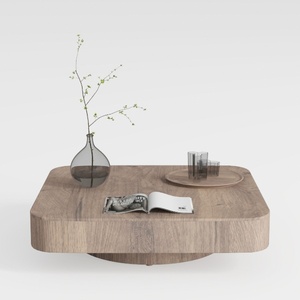
Minimalist Solid Oak Square Floating Coffee Table 3D Model

Modern Marble Solid Wood TV Wall Unit With Bookshelves 3D Model
Discover your dream home design with Homestyler! This user-friendly platform offers an intuitive online design tool, stunning 3D renderings, diverse design projects, and informative video tutorials. Bring your creative vision to life effortlessly, whether you're a novice or a seasoned DIYer!
今すぐ无料でデザイン
































