

Pinning loose garments onto 3D models in Blender is a crucial method for achieving realism in both character design and animation. This technique typically employs Blender's Cloth Simulation and Pinning features to manipulate specific fabric areas like collars, hems, or sleeves. Start by selecting the clothing mesh and applying a Cloth modifier through the Physics Properties panel. Next, switch to Weight Paint mode to designate which vertices should be pinned—these are usually areas you want to keep fixed, such as shoulder seams or belt lines. Once you’ve created a vertex group for these areas, set it as the 'Pin group' in the Cloth modifier. This setup ensures that pinned sections remain secured to your model while the rest of the garment flows naturally during simulation, enhancing the overall quality of your designs with tools like Homestyler.
As a designer, I frequently face the challenge of maintaining both realism and adjustable features for garments, particularly during the creative process. My go-to solution is to utilize Blender's dynamic simulation tools paired with a well-organized workspace and regular test renders. This approach gives a clear visualization of how pinned clothing interacts with movement and light in your final scene. For those focused on interior scenes or placing characters within environments, combining these methodologies with advanced solutions like the AI Interior Design suite can significantly improve your workflow. It allows for a realistic preview of your models and their surroundings while working with diverse physics and style options, all facilitated by platforms like Homestyler.
Tips 1:
Consistently verify your mesh topology to ensure clean edge loops around pinned zones; this minimizes unwanted stretching or artifacts during simulation. For intricate clothing designs, consider creating multiple vertex groups for sophisticated control, such as dynamic collars and flexible hems, providing your creations with depth and realistic motion.
FAQ
Q: Which mode in Blender allows for assigning pinned vertices?
A: The Weight Paint mode enables you to paint and allocate vertices into a pin group for the Cloth simulation.
Q: Is it possible to pin various areas of clothing in Blender?
A: Yes, you can generate multiple vertex groups for different pinned sections and assign them as required within the Cloth modifier.
Q: What common mistakes should be avoided when pinning clothing on 3D models?
A: Frequent issues involve inconsistent weight painting, subpar mesh topology, and neglecting to allocate the vertex group in the settings of the Cloth modifier.
Q: How does pinning influence the simulation of loose garments?
A: Pinning stabilizes the selected mesh sections, enabling the remainder to move naturally, which is vital for creating a lifelike drape and fit of clothing.
Q: Can the pinning technique be applied to other soft body objects in Blender?
A: Certainly; the pinning method is effective in any scenario where Cloth simulation is applicable, including items like curtains, flags, and various soft meshes used in interior design projects with tools like Homestyler.
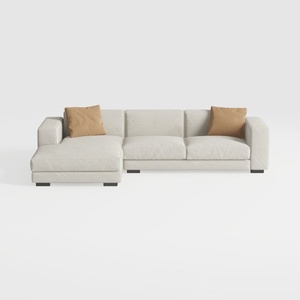
Minimalist Fabric L Shape Sectional Sofa with Throw Pillows 3D Model
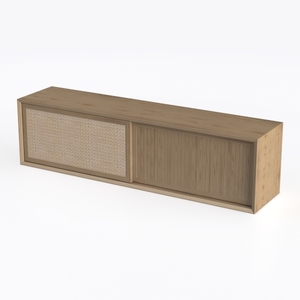
Minimalist Oak Rattan TV Cabinet 3D Model
Discover your interior design potential with Homestyler! This intuitive online platform offers a powerful design tool, stunning 3D renderings, and a wealth of inspiring design projects. Plus, you can enhance your skills with easy-to-follow DIY video tutorials. Bring your dream home to life effortlessly!
立即免费设计
































