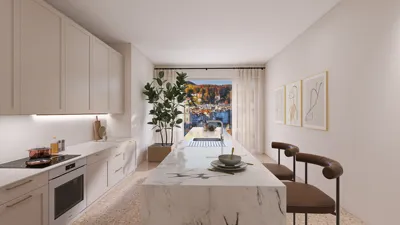


One point perspective is a vital technique that can significantly improve your interior architectural renderings, especially when utilizing VRay for enhanced visuals. By concentrating on a unique vanishing point, you create depth and a lifelike view that instantly attracts your audience's attention. Regardless of whether you are an experienced designer or a newcomer, mastering this technique can transform your work from commonplace to remarkable, making it a perfect fit for tools like Homestyler.
Understanding One Point Perspective
One point perspective provides a straightforward way to perceive space and depth in a two-dimensional representation. This method involves arranging objects in alignment with a single vanishing point on the horizon line, crafting the illusion that they diminish into the background. It is particularly impactful in interior environments, where the viewer's gaze is intuitively drawn down hallways or toward a room's main feature.
Setting Up Your VRay Scene
To successfully implement one point perspective in your architectural visualizations, it's crucial to set your VRay scene correctly. Follow these steps for guidance:
Position the camera at eye level, directing it straight toward the vanishing point. This perspective is essential for establishing depth in your rendering.
Utilize VRay's camera features to modify the depth of field and focal length. Adjusting these settings can create a more powerful impact in your perspective visualization.
Enhancing Your Render with Materials and Lighting
The choice of materials and lighting in your VRay scene is crucial for amplifying the one point perspective effect. Here’s how to fine-tune them:
Incorporate high-quality textures and materials to enhance realism in your visualizations. Observe how lighting interacts with these materials to produce a credible environment.
Lighting has the power to alter the atmosphere and perception of your space dramatically. Combine natural light sources, such as windows, with artificial lighting to boost depth and shadow dynamics in your rendering.
Post-Processing Techniques
Once you finish rendering, post-processing can greatly elevate your final output. Consider using software like Photoshop for color adjustments, contrast enhancement, and sharpening. This stage can invigorate your one point perspective, making it more striking and engaging.
Tips for Success
Here are some additional strategies to help you perfect one point perspective in your VRay renderings:
Conclusion
Achieving mastery of one point perspective in interior architectural VRay visualizations can enhance your work significantly. By grasping concepts such as camera positioning, material usage, and lighting techniques, you can produce extraordinary visuals that embody the spirit of your designs. Remember, continuous practice is key, so keep exploring and refining your abilities, perhaps using software like Homestyler to aid your design journey!
FAQ
Q: What is the ideal camera angle for one point perspective? A: The most effective angle is eye-level, directed squarely at the vanishing point to foster depth.
Q: How can I achieve realistic materials in VRay? A: Employ high-quality textures and fine-tune the lighting to observe its interaction with your materials.
Q: Which software is suitable for post-processing my VRay renders? A: Photoshop stands out as an excellent choice for enhancing colors, contrast, and sharpness in your visuals.
welcome to Use No.1 Home Design Software
Progetta ora GRATIS
































