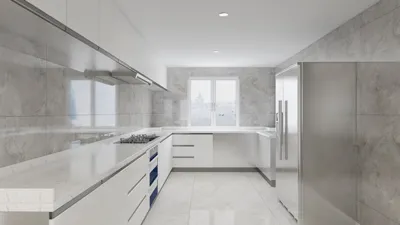


Creating breathtaking interior renderings with Lumion can significantly elevate your design portfolio. Regardless of your experience level, honing the right settings is essential for generating high-quality visual representations of your concepts. In this guide, we will uncover the key interior rendering settings in Lumion that can enhance your projects.
Grasping the Fundamentals of Lumion Rendering
Before we delve into the specific settings, it’s crucial to comprehend the mechanics of Lumion’s rendering engine. Utilizing a real-time rendering method, Lumion enables designers to observe changes in their scenes instantly. This feature is particularly beneficial for interior design, where elements like lighting and materials are vital in achieving the desired ambiance of a space.
1. Modifying the Lighting Settings
Lighting stands as a pivotal element in interior rendering. To realize realistic lighting effects, make sure to adjust various light settings meticulously:
2. Choosing the Appropriate Materials
The selection of materials can dramatically enhance the authenticity of your renderings. Different textures and finishes can create a unique visual appeal:
3. Camera Settings for Captivating Interior Views
The positioning and configuration of the camera play an essential role in showcasing your designs effectively:
4. Quality Settings for Optimal Rendering
To guarantee your final render achieves top-notch quality, consider adjusting the rendering quality settings accordingly:
5. Final Touches on Your Render
Once all your settings are in place, it’s time to put the finishing touches on your render:
Conclusion
By getting familiar with and applying various interior rendering settings in Lumion, you can craft impressive visualizations that clearly convey your design ideas. Don’t forget that experimentation is key—try out different configurations to discover what resonates with your personal style and projects! Additionally, using tools like Homestyler can complement your design process, bringing even more versatility to your interior rendering endeavors.
Frequently Asked Questions
Q: What are the optimal lighting configurations for interior renderings in Lumion? A: The ideal lighting configurations often consist of a blend of daylight settings, targeted artificial lights for distinct areas, along with ambient sky light to create an inviting and realistic atmosphere.
Q: Is it possible to incorporate my own textures into Lumion? A: Absolutely! Lumion permits the importation of your own textures through the Material Editor, allowing you to achieve unique aesthetics in your designs.
Q: How can I boost the realism in my interior scenes? A: To elevate realism, concentrate on creating realistic lighting, utilizing high-quality materials, and selecting thoughtful camera angles that accentuate your design’s finest attributes.
Discover the Top Home Design Software Today!
Zaprojektuj teraz za darmo
































