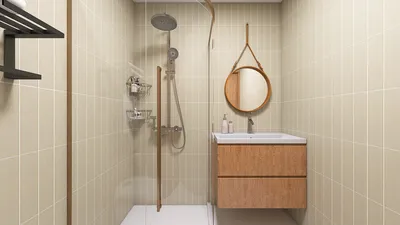


Creating a house render using Photoshop can be both rewarding and demanding. Whether you're an interior designer aiming to refine your skills or a homeowner eager to visualize your ideal living space, mastering the rendering techniques can greatly enhance your projects. Below are the steps to produce an impressive house render that effectively brings your vision to life, all while considering tools like Homestyler to streamline your process.
Step 1: Organize Your House Plan
Before you jump into Photoshop, make sure your house plan is meticulously organized. Import a clear blueprint or floor plan into the program, and it’s advisable to convert it into a high-resolution image for quality preservation during rendering. For those using 2D designs, utilizing layers to differentiate between walls, furniture, and fixtures is a smart approach.
Step 2: Select an Optimal Perspective
Choose a perspective that emphasizes the key features of your house. A three-dimensional view can add depth and make the space feel more welcoming. Take advantage of Photoshop's perspective tools to adjust angles, ensuring the plan retains proper proportions.
Step 3: Apply Textures and Colors
Textures are vital for adding life to your render. Utilize high-quality images of materials like wood, stone, or textiles, applying them to the respective surfaces in your design. Tweaking the blending modes and opacity will help achieve a realistic appearance. Also, select colors that align with your personal style for an enhanced aesthetic.
Step 4: Add Lighting Effects
Lighting has the power to transform the ambiance of your render. Employ the gradient tool to replicate natural sunlight from windows or artificial lighting from fixtures. Use the brush tool to introduce shadows that impart depth and realism. Experiment with various light sources and placements until you reach the effect you desire.
Step 5: Finalize Your Render
After perfecting your textures and lighting, hone in on the details. This includes adding aspects like plants, furniture, and decor to instill a sense of space and individuality. Consider incorporating a background that complements the house, such as a lush landscape or a city skyline.
Step 6: Review and Export Your Work
Once you are pleased with your rendering, take the time to review all components for coherence and quality. Adjust any elements such as brightness, contrast, and saturation as necessary. Finally, export your render in a suitable format like JPEG or PNG for easy sharing and printing.
Tips for Successful Rendering
FAQ
Q: Which software is ideal for rendering house plans? A: While Photoshop excels at post-processing, consider using dedicated 3D modeling tools such as SketchUp or AutoCAD for the initial design phase, along with Homestyler for user-friendly home visualization.
Q: How can I enhance the realism of my renders? A: Prioritize high-quality textures, effective lighting, and meticulous detail in the arrangement of furniture and decor to create a lifelike representation.
Welcome to the premier home design platform that leads in offering comprehensive design solutions.
今すぐ无料でデザイン
































