


Designing 3D models for Unreal Engine 5 involves a comprehensive set of steps crucial for developers, architects, and designers who are aiming for engaging environments. The process generally encompasses concept creation, 3D modeling, UV unwrapping, texturing, exporting in compatible formats, and ultimately integrating into Unreal Engine. Many creators depend on powerful software solutions like Blender, Autodesk Maya, or 3ds Max for object modeling, where they also apply PBR materials and textures. It is essential to ensure compatibility for real-time applications—polygon count, optimization, and accurate scaling play significant roles in balancing visual quality with performance.
Begin by gathering clear reference images or concept art to outline essential shapes and details. Utilize efficient practices such as symmetry and modular design when crafting your geometry. Pay close attention to UV unwrapping to minimize stretching or seams, and bake normals and ambient occlusion maps to enhance realism. Textures should ideally be created in 2K or 4K resolution, tailored to your needs. Export your assets in formats like .FBX or .OBJ, and set up collision meshes if necessary. Finally, import your model into Unreal, assign materials, and check lighting interactions in real-time to confirm everything functions as intended.
As a designer, I continuously consider how these models will fulfill both aesthetic and functional roles within the digital space. The arrangement, scale, details, and material selections significantly influence the ambiance of an area—similar to designing an actual interior. To create truly realistic and interactive virtual environments, utilizing sophisticated tools—such as the innovative Homestyler platform—can expedite the visualization journey, ensuring a smooth transition from design concepts to their implementations in Unreal Engine.
Tips 1:
Always refer to Unreal Engine's official documentation for the latest information on mesh optimization, naming standards, and texture compression practices. Frequently preview your assets in the Unreal viewport to identify any artifacts or scaling discrepancies before finalizing your work.
FAQ
Q: Which software is optimal for creating 3D models for Unreal Engine 5?
A: Blender and Autodesk Maya are favored for their extensive toolsets and seamless compatibility with Unreal Engine's import specifications.
Q: What file formats does Unreal Engine 5 accept for 3D models?
A: Unreal Engine typically supports FBX, OBJ, and occasionally glTF formats for 3D asset imports.
Q: How intricate should my models be for real-time rendering?
A: The polygon count of your model should strike a balance; it needs enough detail for visual appeal but also be optimized to ensure performance, particularly in complex scenes.
Q: Is it necessary to create collision meshes for my 3D assets?
A: Yes, it is important for interactable or physical objects. Custom collision meshes enhance accuracy and boost performance in Unreal Engine.
Q: Can I use procedural materials or textures from other software in Unreal Engine?
A: Absolutely, but you should bake materials into textures during the export process. Some procedural materials may require adjustments or conversions to function properly in Unreal Engine 5.


Minimalist Black Stone Coffee Table Unique Irregular Shape 3D Model
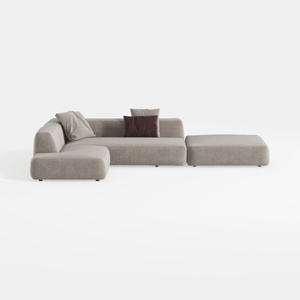
Minimalist Fabric L Shaped Sectional Sofa with Ottoman 3D Model

Modern Marble Top Solid Wood Console Table With Decorative Accents 3D Model
Homestyler is your go-to online platform for transforming your home design dreams into reality. With its user-friendly design tool, stunning 3D renderings, inspiring design projects, and helpful video tutorials, creating your ideal space has never been easier. Start designing today!
Projete agora para LIVRE
































