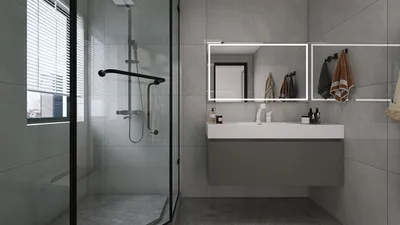


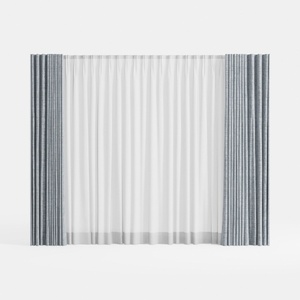
Incorporating 3D modeled curtains can add an authentic touch to your interior design projects. Whether you're working on a virtual home or rendering furniture layouts, customized curtains significantly enhance their visual appeal. Here’s a beginner's guide to effectively modeling curtains.
Understanding the Basics of 3D Modeled Curtains
The first step to crafting realistic 3D modeled curtains is to familiarize yourself with their structure. Typically, curtains consist of adjustable horizontal or vertical slats designed to regulate light. Before diving into software, it's vital to recognize different curtain types—like roller shades, venetian blinds, or vertical panels. Choosing the right modeling techniques that align with your design style is also critical.
Your curtain design should harmonize with the room's aesthetics while providing functionality. What type of curtain do you envision modeling? When sketching, consider straightforward designs such as mini blinds, traditional drapes, or even more intricate patterns.
Start Modeling with 3D Software
Once you have a concept in mind, launch your preferred 3D modeling software. Popular options include Blender, SketchUp, or Autodesk Maya. Initiate a new project and set parameters based on the dimensions of your windows. Achieving real-world proportions will enhance the effectiveness of your modeling.
Begin with simple geometric shapes, like rectangles to represent the slats of your curtains. Utilize extrusion techniques to create thickness. Pay attention to details; minor adjustments can make your model stand out. Have you considered how lighting interacts with the curtains throughout different times of the day?
Applying Textures and Colors
Once the basic shapes are modeled, it’s time to integrate colors and textures. Opt for materials that replicate real-life options—wood, fabric, or metal. Most modeling software allows you to import textures or create your own, significantly boosting realism.
Don't forget to consider how various materials will affect light! Think about rendering scenes with the curtains both open and closed to see how natural light influences the interior.
Final Adjustments and Rendering
After completing your model and textures, focus on making final tweaks. Pay close attention to the sliding mechanisms and how the curtains tilt. These details can enhance the practicality of your 3D visualizations.
Finally, set the camera angles and lighting within the scene. Proper rendering will help you observe how well the curtains integrate with the surrounding environment. Which angle makes your curtains the most visually appealing?
Tip: Keep Practicing!
3D modeling, like any artistic discipline, requires patience and practice. The more you interact with your modeling software, the more your skills will improve. Experiment with different curtain styles and functional designs.
FAQ
Q: Which 3D modeling software is best for beginners? A: Blender and SketchUp are excellent choices for beginners, offering user-friendly interfaces and plenty of learning resources.
Q: How long does it take to learn 3D modeling? A: The learning duration varies, but generally, consistent practice for a few hours each week can significantly enhance your skills.
Q: How can I ensure my model displays smoothly across different devices? A: Make sure to use appropriate file formats and optimize the polygon count of your model to ensure smooth performance on various devices.


Homestyler is your go-to online home design platform, offering an easy-to-use design tool and stunning 3D renderings. With a wealth of inspiring design projects and DIY video tutorials, transforming your ideas into reality has never been simpler or more enjoyable.
Progetta ora GRATIS
































