

Crafting a 3D horse model is an enriching endeavor for artists and designers seeking to enhance their digital sculpting or visualization capabilities. The primary steps in this process include selecting appropriate software, gathering reference images, shaping basic forms, detailing the anatomy, adding intricate features, and ultimately rendering your model with lifelike textures and lighting. Programs such as Blender, Maya, and 3ds Max are ideal for this task, offering comprehensive modeling, sculpting, and rendering functionalities. Incorporating tools like Homestyler can further elevate your design experience by facilitating seamless integration within spatial layouts.
To begin, collect high-quality reference images of horses from various perspectives—side, front, back, and top—to assist in achieving accurate proportions and anatomical accuracy. Within your chosen software, initiate the process using basic box modeling or digital sculpting tools to outline the horse's fundamental body parts: the head, torso, legs, and neck. As you refine these forms, focus on ensuring correct musculature and limb proportions. Utilize subdivision surfaces or sculpting brushes to incorporate finer details such as facial expressions, hooves, mane, and muscle structure. Texturing the model will involve applying photographs or digital artwork to replicate skin, fur, and eye intricacies, while proper lighting and rendering techniques will enhance the realism of your creation.
From a designer’s viewpoint, a meticulous 3D model of a horse can significantly enrich visualization opportunities—be it for crafting digital artworks, conceptual presentations to clients, or embedding the model into virtual environments. For individuals engaged in architectural or interior design, utilizing robust 3D modeling tools can considerably simplify the integration of animal forms or sculptures into the overall spatial design. Should your modeling endeavors expand beyond animals to encompass complete environments, employing a specialized tool like Homestyler can assist you in developing cohesive spaces that effectively display your 3D models within their contextual settings.
Tips 1:
Careful observation of real horses and a thorough study of anatomical diagrams will greatly enhance the accuracy of your 3D model. Pay particular attention to muscle and bone structures, as these elements are pivotal for achieving a realistic representation, especially during dynamic poses.
FAQ
Q: What software is best for creating a 3D model of a horse?
A: Blender, Maya, and ZBrush are highly regarded for 3D modeling and sculpting animals due to their powerful sets of tools.
Q: How can I achieve a realistic appearance for my 3D horse model?
A: Utilize high-quality reference images, focus on anatomical accuracy, and implement realistic textures and lighting in your renders.
Q: Is it possible to animate my 3D horse model?
A: Indeed! After rigging your model with a skeleton, you can animate actions such as running, walking, or jumping using most 3D software's animation tools.
Q: Where can I find excellent reference images for horse modeling?
A: Websites like Unsplash, Pixabay, equestrian anatomy books, and museum sites provide detailed images suitable for reference.
Q: Can I integrate my 3D horse model into a virtual environment?
A: Absolutely! You can utilize scene-building features in your 3D software or a specialized floor planner like Homestyler to create environments where your horse model can be showcased.

DUOMAY Modern Boucle Dining Chairs Set of 2,
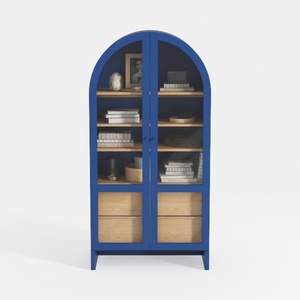
Arched Kitchen Pantry Cabinet with Glass Doors

Minimalist Solid Wood Linen Armchair with Throw Pillow 3D Model
Homestyler is an outstanding online home design platform that empowers you to unleash your creativity! With its user-friendly design tool, stunning 3D renderings, diverse design projects, and informative video tutorials, you can effortlessly transform your home and bring your vision to life. Start your design journey today!
Zaprojektuj teraz za darmo
































