


Crafting lifelike 3D hair presents a unique blend of challenges and rewards within the realm of digital design, whether it pertains to character modeling, product visualization, or architectural presentations. Achieving realistic hair demands both an artistic perspective and proficient technical abilities, encompassing knowledge of hair dynamics and volume alongside adeptness with the digital platforms that render these strands. Common methodologies consist of polygon modeling for a stylized effect, employing hair particles for enhanced realism, or using alpha-textured planes that strike a balance between visual fidelity and system performance. Initiate the process by collecting references—not merely hairstyles but also insights on how light interacts with hair and its behavior on diverse head shapes. Within your preferred 3D software, start by outlining a rough shape before refining it into clusters or layers, culminating in detailing individual strands through particle systems, sculpting brushes, or specialized hair modeling tools like Homestyler.
Guideline 1:
As an interior designer, I’ve discovered that applying the same meticulous attention to flow, light, and volume used in arranging textiles and furniture can significantly enhance your 3D hair modeling skills. Just as a harmonious composition or well-contoured space influences the ambiance of a room, this analogy translates to how hair contours around a character’s face or interacts with apparel. To optimize your workflow, utilizing a high-quality 3D render tool, such as Homestyler, becomes invaluable. This software helps visualize how your 3D hair will respond to varying lighting conditions and intricate scenes, ensuring it integrates seamlessly within the overall design, much like a carefully selected piece of furniture complements a living area.
Common Questions
Q: What’s the optimal approach for 3D hair modeling: polygonal, particles, or textured planes?
A: Each technique has distinct advantages. Polygonal modeling is ideal for stylized or low-poly projects, particle systems (hair simulations) deliver realism, albeit at a higher resource cost, while alpha-textured planes strike a middle ground regarding detail and efficiency.
Q: Which software is recommended for creating 3D hair?
A: Software such as Blender, Maya, and 3ds Max provide robust systems for hair modeling. Blender particularly stands out due to its free accessibility and flexible particle hair features.
Q: How can I achieve a natural appearance for hair in my 3D renders?
A: Utilize reference images, focus on aspects such as strand thickness, natural clumping, and directional flow. Additionally, adjust your lighting and material shaders to achieve realistic glossiness and translucent effects.
Q: Is it acceptable to use premade hair assets in my 3D models?
A: Certainly! Many artists opt to utilize or modify premade assets to enhance efficiency. However, for bespoke projects or commercial purposes, developing or significantly altering your own hair models can be a rewarding investment.
Q: How crucial are shader settings and materials in 3D hair design?
A: They are vital—shaders dictate the hair's interaction with light, managing transparency, shine, and color variance, essential for achieving either realistic or stylized effects in your renders.


Modern Pink Velvet Curved 3 Seater Sofa with Decorative Throw Pillows 3D Model

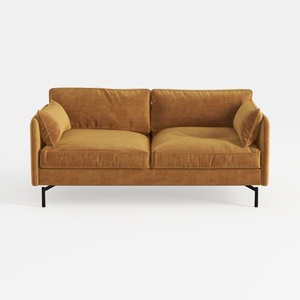
Modern Velvet Upholstered 2 Seater Sofa With Black Metal Legs 3D Model
Homestyler is your go-to online home design platform! With its user-friendly design tool, stunning 3D renderings, diverse design projects, and helpful DIY video tutorials, you'll effortlessly create your dream space. Perfect for both beginners and seasoned designers looking to explore their creativity!
Concevez maintenant gratuitement
































