


Curving a 3D model can greatly enhance its design and aesthetic appeal. Whether you're just starting out or are an experienced designer, mastering the art of curving shapes can take your project to the next level. Let’s explore how to achieve this!
Grasping the Foundations of 3D Curving:
Before you dive into curving, it’s crucial to be familiar with the tools offered by 3D modeling software. Popular programs like Blender, Autodesk Maya, and SketchUp provide specific functions designed for creating curves. Understand these tools and how they operate to get started effectively.
Moreover, it's important to know the distinction between spline curves and polygon curves. Spline curves are generally smoother, suitable for organic shapes, while polygon curves consist of straight lines connecting points. Selecting the right type will depend on your design's requirements.
Steps to Curve a 3D Model:
1. **Choose Your Model:** Begin by selecting the segment of your 3D model that you want to curve, which could be an edge or a face, depending on your design specifications.
2. **Access the Curving Tool:** Find the curving tool in your software. This is often located under the modification or sculpting options. For example, in Blender, the 'Deform' modifier can be utilized to apply curvature to your model.
3. **Modify the Curvature:** After applying the tool, adjust the parameters to reach your desired curvature. Focus on the radius and angles to ensure smooth transitions.
4. **Polish and Finalize:** Once you've curved the model, examine it for any irregularities. Refine the curves by making adjustments to the vertices or by applying additional modifiers.
Tips for Effective Curving:
- Always keep a backup of your original model; duplicating it before applying curves can safeguard your work in case adjustments are required.
- Begin by practicing different curving tools on simpler shapes to hone your skills before tackling more complex models.
- Consider using the 'Subdivision Surface' modifier to eliminate jagged edges resulting from curving, achieving a more refined finish.
FAQ
Q: Which software is ideal for 3D curving? A: Blender, Autodesk Maya, and SketchUp are favored options due to their robust modeling capabilities and intuitive interfaces.
Q: How can I avoid glitches during the curving process? A: Ensure that the model’s geometry is clean and devoid of overlapping vertices or faces, which can lead to complications when curving.
Q: Is it possible to revert changes after curving? A: Certainly! Most 3D modeling applications include an undo feature. It’s also wise to edit a copy of your model to maintain the original's integrity.
Q: Can complex shapes be created using curving techniques? A: Yes! By combining various curving methods and tools, you can design intricate shapes and forms. Experimentation is essential!
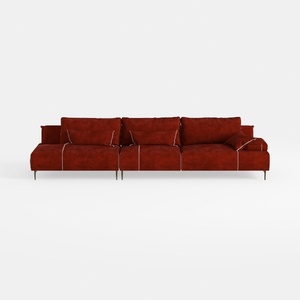

Modern Burgundy Velvet L Shaped Sectional Sofa 3D Model

Minimalist Fabric Curved Sofa With Throw Pillow 3D Model

Minimalist Fabric Curved Sectional Sofa 3D Model
Homestyler is an outstanding online home design platform that empowers you to create stunning spaces effortlessly. Enjoy its user-friendly design tool, impressive 3D renderings, a wealth of inspiring design projects, and helpful DIY video tutorials. Transform your home design dreams into reality with ease!
Progetta ora GRATIS
































