

Animating 3D models using 3ds Max is an essential capability for anyone eager to bring vitality to their digital artworks, whether intended for video games, films, or architectural visualizations. This software provides an extensive array of animation functionalities that enable you to adjust objects, characters, and cameras effectively within your scenes. Let’s outline the fundamental steps to kickstart your animation journey:
As a designer, I believe that effective animation not only boosts visual appeal but also improves the comprehension of spatial relationships in a scene, which is particularly vital for interior visualizations. Leveraging platforms like Homestyler can significantly optimize your workflow by permitting you to test lighting setups, camera trajectories, and animated interactions prior to final rendering. This enables a dynamic evaluation of your design decisions, ensuring that the ultimate presentation is not just visually captivating but also functionally robust.
Tips 1:
Always make incremental backups of your project before implementing major alterations to your animation timeline. This approach safeguards your progress and permits you to explore freely without the risk of losing important work.
FAQ
Q: Is it possible to animate textures or material attributes in 3ds Max?
A: Absolutely, you can keyframe nearly any attribute, including materials, lights, and cameras, facilitating the creation of dynamic visual effects.
Q: What differentiates forward kinematics (FK) from inverse kinematics (IK) in character animation?
A: FK involves animating joints starting from the parent down the hierarchy, whereas IK enables you to control the end effector, automatically adjusting the positions of intermediate joints.
Q: How can I export my 3ds Max animations for use in other software or gaming engines?
A: You can export your animations in various formats such as FBX or OBJ, often with options to bake animations for compatibility with engines like Unity or Unreal.
Q: Are there auto-animation features in 3ds Max for basic tasks?
A: Yes, utilities like Auto Key and Set Key allow you to create standard animations effortlessly. For more complex or repeating actions, explore controllers like Noise or Wave.
Q: Why does my animation playback appear choppy in the viewport?
A: The smoothness of real-time playback is influenced by your hardware and the complexity of the scene. Consider using the Preview feature or rendering a frame sequence for a smoother visual experience.

Fluted Storage Cabinet, 31.5“ Wooden Sideboards

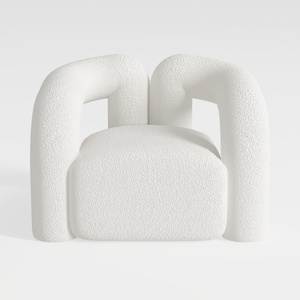
Minimalist Boucle Fabric Armchair Modern Unique Design 3D Model
Homestyler is your go-to platform for easy and inspiring home design. With its user-friendly online design tool, stunning 3D renderings, and a wealth of design projects and DIY video tutorials, you can effortlessly create your dream space—no experience needed!
Zaprojektuj teraz za darmo
































