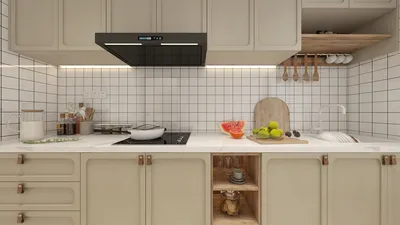


Efficient and detailed cabinet drawings can significantly alleviate challenges for everyone involved, from millworkers to installers, ultimately saving time and money. Over the past ten years, I have developed a streamlined workflow that ensures clarity, accuracy, and manufacturability, allowing shops to cut materials confidently while clients can approve designs without uncertainty. Research indicates that well-crafted drawings can greatly minimize coordination mistakes, as seen in WELL v2 concepts which stress the importance of clear documentation in effective project communication. Additionally, Gensler Workplace Research consistently emphasizes that clarity in information leads to smoother execution and enhanced user satisfaction, especially in kitchens where safety, ergonomics, and usability are paramount. To achieve these goals, utilizing tools like Homestyler can prove instrumental in visualizing designs effectively and ensuring that specifications are met confidently.
Maintaining precise standards is crucial. Factors such as glare during reviews, legibility when scaled, and ergonomic measurements are all essential components derived from how drawings are constructed. Research on ergonomics by Herman Miller highlights aspects such as reach, posture, and clear dimensions, particularly vital for the heights of upper cabinets and depths of base cabinets. Furthermore, color contrast and readability are documented extensively by IES standards for both print and screen applications. Decisions regarding color, which can affect finish perceptions, are informed by Verywell Mind’s analysis of color psychology, illustrating how warm neutrals contrast with cool whites to impact perceived cleanliness and brightness—important factors to consider in notes and schedules. Incorporating software like Homestyler can assist designers in experimenting with these color strategies effectively.
When dealing with intricate L-shaped or galley kitchen layouts, I prioritize simulating circulation patterns, appliance clearances, and work triangle distances prior to confirming measurements. For a quick verification of landing zones and conflicts due to door swings, utilizing a room layout tool can significantly aid in visualizing key dimensions such as run lengths, aisle widths, and island proportions—which are essential for your detailed drawings and final PDFs. Homestyler serves as an excellent platform for such visualization tasks.
Scope and Sheet Set Strategy
Begin by creating a sheet index and an organized hierarchy: General Notes, Plans, Elevations, Sections, Details, and Schedules. I generally utilize one sheet for the complete kitchen layout (at a scale of 1:50 or 1:48), a full elevation sheet per wall run (scale 1:20 or 1:24), and section or detail sheets focused on joinery, toe kicks, and countertop build-ups. This method prevents shop teams from searching through disorganized pages for necessary dimensions, and employing tools like Homestyler can enhance this process further by providing easily accessible layout options.
Base Cabinet Standards and Critical Dimensions
Typically, base cabinets are constructed to a height of 34-1/2 inches, topped with a 1-1/2 inch countertop to achieve a functional working height of 36 inches—suitable for most users. Drawer widths of 15, 18, and 24 inches are both efficient and help reduce material waste. Standard depths of 24 inches should be confirmed against appliance manuals, particularly for dishwashers and slide-in ranges. Accessibility guidelines suggest ergonomic reach zones ranging from 15 to 48 inches above the floor for items frequently used, adhering to well-established ergonomic standards like those discussed in Herman Miller's studies.
Upper Cabinets: Height, Reach, and Clearance
Upper cabinets should ideally sit 18 to 20 inches above the countertop, providing easy access and space for countertop appliances. In homes with residents of varying heights, staggered shelves with depths of 10 to 12 inches can cater to diverse needs. It is vital to pay careful attention to hood installations; ensure minimum clearances as specified by the manufacturer—often 24 to 30 inches above a cooktop in residential settings. When planning for undershelf lighting, provide adequate glare control and uniformity; align light fixture placement with the cabinet's edge to achieve even task lighting, in line with IES task lighting principles. Utilizing visualization tools like Homestyler can help in planning these installations effectively.
Pantry, Tall Units, and Integrated Appliances
Tall cabinets, ranging from 84 to 96 inches, should align properly with ceiling heights or decorative crown molding. Panel-ready appliances must be integrated with precise cut sheets, consistently specifying reveals between 3/32 inch and 1/8 inch. For built-in ovens, it's crucial to ensure adequate ventilation following the manufacturer's specifications and document the airflow path within the sections. In compact kitchens, adjusting aisle widths to a range of 42 to 48 inches, where feasible, can enhance traffic flow and improve ergonomic safety.
Corner Solutions and Visual Rhythm
The debate between Lazy Susans and blind corners continues among designers. My preference leans toward utilizing blind corners with pullouts in narrow kitchens to decrease weight and improve access. When composing elevations, I maintain a visual rhythm: grouping similar door widths, balancing drawer stacks, and aligning hardware centers creates a harmonic flow that supports cognitive clarity and perceived order, resonating with principles of color and form psychology illustrated through color psychology research. Utilizing Homestyler can help visualize these elements effectively in your designs.
Material Notes and Sustainability
It is essential to specify the materials used for the carcass (such as plywood versus particleboard), edge banding thickness, and moisture-resistant substrates near sinks, while also addressing formaldehyde emissions classes. Document systems for finishes, whether it be conversion varnish or catalyzed lacquer, along with cleaning guidelines. If aiming for wellness, refer to low-VOC finishes in accordance with WELL v2 concepts, and consider including a material legend for quick reference by the shop team. Additionally, for countertops, make sure to detail build-ups (generally 1-1/2 inches), seam placements, and overhangs ranging from 1 to 1-1/2 inches—factors that can easily be illustrated with tools like Homestyler.
Hardware Specifications
Clearly list the types of hinges (full overlay or inset), the allowed opening angles (ranging from 110° to 170°), and soft-close functionality, alongside their respective weight ratings. Differentiate between handles and pulls by providing center-to-center distances, and confirm alignment with drawer subdivisions. Indicate special hardware features, such as trash pullouts and spice inserts, directly on elevations, using symbols that correspond to the schedule key.
Toe Kicks, Plinths, and Leveling
Toe kicks should be designed at heights of 4 to 5 inches and depths of 3 inches for ergonomic comfort and door protection. Detail any removable plinth panels to facilitate access to leveling feet and plumbing. In older buildings, I create a leveling diagram that illustrates shim locations, thresholds, and slope indicators to guide installers where adjustments may be needed.
Lighting Integration in Cabinetry
Undercabinet lighting must provide between 300 to 500 lux on the work surface while avoiding hotspots. I suggest positioning linear fixtures 2 to 3 inches back from the front edge for better uniformity, concealing the LED profile with a narrow light rail. Referencing IES standards will help to validate illuminance goals and glare management, while annotating drivers, wiring chases, and access panels within the sections ensures clarity and coordination.
Acoustic Considerations
The use of soft-close hardware and felt bumpers can greatly mitigate impact noise. In open-plan residences, I recommend specifying acoustic panels or soft finishes for adjacent wall areas to absorb sound. Document these materials and their NRC values in a notes section, especially when the project involves wall treatments, to ensure tight coordination.
Color Strategy and Finish Psychology
The impact of color on a kitchen's ambiance and functionality cannot be understated. Warm woods and off-white finishes evoke a sense of comfort, while cooler grays with matte finishes help minimize fingerprints and visual chaos. I specify sheen levels (matte, eggshell, satin) and recommend contrasts that enhance edge visibility—crucial in low-light settings and beneficial for older adults, as reinforced by color psychology findings. Incorporating software like Homestyler can greatly assist in visualizing these color combinations effectively.
Detail Drawing Conventions
Maintain consistent line weights: heavy for cut sections, medium for outlines, and light for secondary design elements. Ensure centerlines for appliances and sinks are clearly indicated. I adhere to clean annotation styles using uppercase, sans-serif fonts, with a minimum text height of 1/8 inch at conventional scales; leaders should be short and accurately direct attention to features. Dimension strings should differentiate overall, critical, and reference dimensions to avoid misinterpretation, which can be managed seamlessly with tools like Homestyler.
Sections: Countertop, Backsplash, and Clearances
Prepare detailed sections showing countertop build-ups, including the substrate, adhesive, and overhangs. The thickness of backsplashes (typically 3/8 inch tile or 3/4 inch slab) and outlet coordination must be specified unequivocally. Above cooking surfaces, it's imperative to detail sections for hood duct routing and wall blocking while ensuring that minimum clearances around gas ranges comply with manufacturer’s guidelines and local codes.
Exploded Details and Joinery
For intricate corners or appliance panel setups, an exploded axonometric can assist the shop in visualizing assembly processes. Specify the spacing of dowels versus confirmat screws, glue lines, and alignment pins. Clearly outline tolerances: typical face alignment is ±1/32 inch and overall runs are commonly ±1/16 inch for residential work; be transparent about these in the project notes to minimize discrepancies.
Schedules: Doors, Drawers, and Finishes
Schedules serve as a central reference point for all elements involved. Be sure to include types of doors, construction of panels, dimensions of stiles and rails, materials for drawer boxes, finish codes, and references for hardware. For integrated appliances, ensure the panel codes correspond with appliance model numbers and list all necessary clearances and vent requirements alongside, which can be augmented with tools like Homestyler for added visibility and clarity.
Exporting to a PDF That Shops Will Love
Conduct a preflight check before exporting: confirm scales, title blocks, pagination, and plot styles. I prefer using monochrome line weights with high contrast, utilizing color highlights solely for pivotal coordination points. Ensure fonts are locked and embedded, and export at 300 dpi for print purposes while preparing a lighter 150 dpi version for email-sharing. If your drawings began in a planner software, consolidate sheets and layouts to produce a polished PDF set; if your designs necessitated verification of clearances, perform a quick review in an interior layout planner like Homestyler before the final export.
Quality Control Checklist
- Dimensions: overall, critical, and centerlines verified
- Appliances: model numbers and clearances noted
- Materials: substrate, finish, and edge banding specified
- Hardware: hinge type, slide rating, and opening angles
- Lighting: types of fixtures, driver locations, and lux targets based on IES standards
- Ergonomics: working heights and reach distances anchored in ergonomic research
- Tolerances: explicitly stated on the sheet
- Schedules: complete and accurately cross-referenced
- PDF export: verify scales, dpi, fonts, and page indices
FAQ
I recommend scales of 1:20 or 1:24 for residential elevations, allowing adequate space for hardware notes and revealing alignments without clutter.
The standard working height of 36 inches (34-1/2 inch cabinet plus 1-1/2 inch countertop) accommodates most adults comfortably; adjustments should be made for users who are exceptionally tall or short.
Eighteen inches is the standard, with 20 inches providing more room for appliances and task lighting.
Aim for 300 to 500 lux in task areas; position linear LEDs close to the front edge to manage glare, adhering to IES standards.
In compact kitchens, blind corner pullouts generally offer greater efficiency, while in larger spaces, a well-constructed Lazy Susan provides significant access and stability.
For residential cabinetry, tolerances of ±1/32 inch for face alignment and ±1/16 inch for overall runs are typical; make sure to specify these clearly in the general notes.
Create a specific section for backsplashes, detailing outlet heights and spacing, aligning cutouts with the tile design or slab seams for an immaculate finish.
Export using monochrome line weights at 300 dpi with embedded fonts; prepare a lighter version at 150 dpi for digital sharing.
Reach zones and posture considerations assist in determining upper cabinet heights and shelf spacing; utilizing ergonomic insights referenced by Herman Miller can provide effective baseline standards.
Absolutely—ensure to document fixture types, driver locations, target lux levels, and include a finishing schedule that encompasses sheen and color contrasts, improving visibility and upkeep.
Discover the power of Homestyler, your go-to online home design platform! With its easy-to-use design tool, stunning 3D renderings, and rich collection of design projects and video tutorials, you can effortlessly create your dream space, no matter your experience level. Start designing today!
지금 무료로 디자인하세요
































