

Direct Answer
Homestyler is an excellent interior design solution if you want rapid 3D visualization, straightforward floor planning, and photorealistic renders without mastering complex software. It is particularly beneficial for homeowners, real estate professionals, and designers who prioritize efficiency and visual impact over intricate CAD-level details.
Quick Takeaways
Introduction
A frequent question among homeowners and novice designers is whether Homestyler is suitable for interior design tasks or if a more advanced program should be chosen.
Having spent over ten years in residential design environments and assisting teams in adopting new visualization software, I've realized that the optimal design tool often relies more on compatibility with one's workflow than on sheer functionality. Many users select tools that are either too complicated or insufficient for their needs.
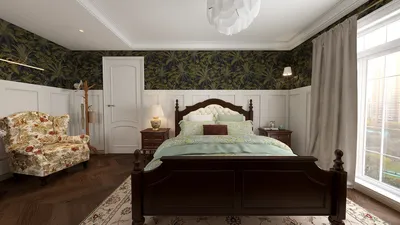
Homestyler occupies a unique niche. It enables fast layout generation, offers an extensive furniture library, and boasts impressive rendering speeds. This blend can save users significant time, bypassing extensive modeling efforts. For those curious about how professionals swiftly develop visual concepts, a walkthrough demonstrating how room ideas transform into photorealistic designs highlights this process effectively.
Nonetheless, like any software, Homestyler may not be ideal for every project. Some expect detailed architectural accuracy, while others aim for quick mood boards. Recognizing where Homestyler excels and where it falls short is crucial for an informed choice.
Let's examine scenarios where Homestyler performs well, where it might not, and how to gauge if it aligns with your project requirements.
What Type of Users Benefit Most from Homestyler
Key Insight: Homestyler is best suited for users valuing speed, visual presentation, and simple spatial arrangement over technical modeling precision.
In practice, three primary user categories derive the most benefit from this platform.
1. Homeowners planning remodels
Individuals redecorating kitchens, living areas, or apartments often need quick visual solutions. Instead of sketching or imagining setups, they can construct rooms and experiment with designs within minutes.
2. Interior designers showcasing concepts
Freelance designers commonly use rapid visualization tools to illustrate initial ideas before committing to detailed CAD work.
3. Real estate professionals and staging teams
Agents often require visual staging to enhance listings or promotional materials.
According to the National Association of Realtors, staged properties sell more swiftly and often at better prices. Efficient 3D visualization tools enable agencies to produce appealing images without engaging dedicated rendering firms.
The underlying theme is that these users emphasize communication through visuals instead of technical drafts.
Project Types Best Suited for Homestyler
Key Insight: Homestyler excels in residential floor plans and single-room redesign initiatives.
Over years of testing numerous residential planning applications, successful projects with Homestyler share traits like minimal structural alterations, focus on furniture layout, and the need for realistic renders.
Examples include:
Designers often incorporate simple layout tools during concept development stages. If you need to explore room configurations prior to detailed planning, examples showing furniture arrangement and spatial flow demonstrate how swiftly room layouts come together.
However, larger commercial developments, significant structural modifications, and code-compliant architectural projects typically require more advanced technical modeling.
When You Might Need More Advanced Software
Key Insight: Projects demanding construction documentation or complex structural designs usually necessitate specialized CAD or BIM applications.
This is a common misunderstanding among novices: rendering tools are not substitutes for detailed design documentation software.
Advanced software may be necessary if your project involves:
In our design studio, a combined workflow is typical. Initial concepts get quick visualization, while precise construction documents are developed in CAD software later.
Such hybrid approaches are becoming widely adopted in the industry.
Evaluating Features That Matter for Your Workflow
Key Insight: Selecting the right design software depends more on how efficiently it supports decision-making than on feature lists alone.
When assessing design applications, I generally advise focusing on five practical features.
Homestyler shines particularly in rendering speed and asset availability. Many users can generate near-photorealistic images swiftly. If visualization quality is paramount for client presentations or marketing, workflows exhibiting how designers produce top-tier 3D interior visuals showcase Homestyler’s strengths.
An often overlooked aspect is the learning curve. Tools like SketchUp or Revit may take weeks to master, whereas visual design planners such as Homestyler can often be learned in a single afternoon.
Answer Box
Homestyler is ideal for rapid interior layout design combined with photorealistic visualization. It best serves homeowners, concept-driven interior designers, and real estate staging professionals rather than those requiring comprehensive architectural documentation.
Budget Considerations and Free Plan Limits
Key Insight: While the free tier is great for experimenting, serious design projects often call for paid subscriptions.
Cost tends to be a major factor for those starting with interior design software.
Free tiers typically provide:
However, premium rendering quality, expanded libraries, or commercial usage often need upgraded plans.
The hidden expense many overlook is time. Tools saving hours of modeling and rendering can pay off rapidly through subscription value.
Decision Checklist Before Choosing a Design Tool
Key Insight: Choose interior design software that aligns with your project complexity, timeline, and visualization expectations.
Before selecting any platform, consider these practical questions.
If your requirements lean toward quick visuals, basic layouts, and residential projects, Homestyler is typically a suitable choice.
Final Summary
FAQ
Is Homestyler suitable for beginners in interior design?
Absolutely. Its user-friendly interface allows novices to create layouts and realistic renders without complex modeling knowledge.
Who benefits most from Homestyler?
Homeowners, interior designers, furniture sellers, and real estate agents gain significant advantages from Homestyler’s visualization tools.
Is Homestyler appropriate for professional interior designers?
Yes, particularly for concept presentations and client demos. Many professionals integrate it with CAD software for detailed technical plans.
Can Homestyler produce realistic interior renderings?
Definitely. One of its core strengths is generating photorealistic interior images rapidly.
Is Homestyler a good choice for home design projects?
For residential interiors and visual planning, many find Homestyler valuable due to its ease and speed.
Can Homestyler design entire homes?
Yes, though it is best suited for layout and visualization rather than detailed architectural blueprints.
How quickly can one learn Homestyler?
Most users grasp the basics in just a few hours and can produce their first rendered room within a day.
How to pick the right interior design software?
Evaluate your project’s scale, need for detailed documentation, rendering demands, learning time, and collaboration features.
References
National Association of Realtors. 2023 Profile of Home Staging.
Meta TDK
Meta Title: Is Homestyler the Ideal Interior Design Software for Your Project?
Meta Description: Learn whether Homestyler suits your interior design workflow and visualization needs through this comprehensive guide.
Meta Keywords: is Homestyler good for interior design, who should use Homestyler design software, choosing the right interior design software, when to use Homestyler for home design
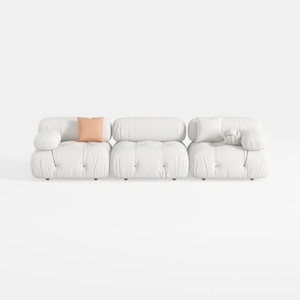
Minimalist White Fabric Modular Sofa 3 Seater 3D Model
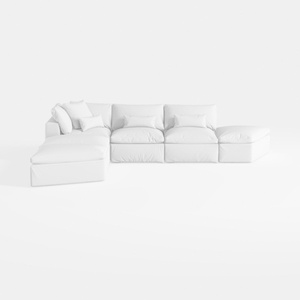

Minimalist White Fabric L Shaped Sectional Sofa 3D Model
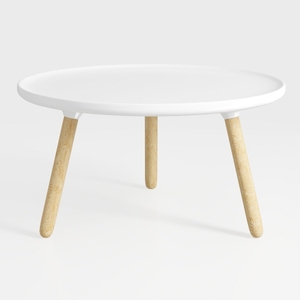
Minimalist White Solid Wood Round Coffee Table 3D Model
Homestyler offers an easy-to-use online home design tool with stunning 3D renderings, inspiring design projects, and helpful DIY video tutorials. It’s ideal for anyone looking to create and visualize beautiful interior spaces effortlessly.
Design Now for FREE
































